Watchguard Firebox M400/M500
-
@jriofrio happy flashing,this means first step was bios backup,now flash new and wishing good luck and good power lines :)
-
@korenchkin ....Here, here :]
-
question: i did manage to run the tinym400 linux and i wasn't able to make a copy of backup.rom.
ONCE I FLASHed THE BIOS, i run the command to make a backup2.rom of the flash bios.i shut the m400 box and took the ssd where i installed the tinym400 and connected it to mu linux PC, but i can't see the /opt/rom drive in order to get the copies of the rom backups.
i tried to do it through the terminal with the mkdir, mount, and all that stuff.
I was able to get into the ssd but still can get access to the opt/rom directory.linux mint disk is of not use, i see the folders but not the opt/rom directory.
is there a way i can get to those files? -
@jriofrio if it works,you dont need the bios,it is better the new one,but if you really want it,it should be in home or root(not exactly sure now with the sudo,so either /home/'username' (look at your picture,i think there was the name of user maybe),or it could be /root (if sudo works on it) ...i mean the ~ character =home
-
Yup only the home directory is saved. But, yes, don't worry about it you don't need that file if it's booting fine now.
-
@stephenw10 ....Hello everyone, hope all of you had a nice Thanksgiving in the company of all your love ones....
Anyhow, the m400 is running as intended, just waiting for the CPU upgrade arrives and perhaps some memory too. Also waiting for an ssd to be upgrade it.Once all is in place i will connect it to the network.... it has been a bumpy road but i arrive finally. Thanks to all of you the travel has been a lot easier and interesting...
Again thank you for your advice, guidance and patient, i do really appreciated very, very much....best regards to all and happy holidays to come.
-
Hello.... me again. I though I was home safe....
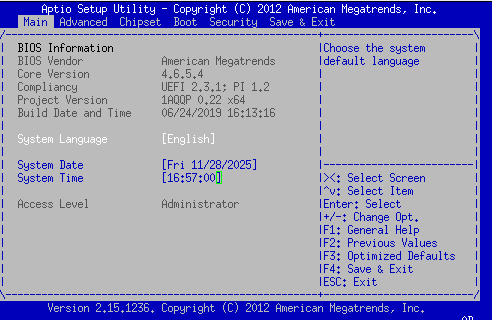
I though the BIOS version was 6.xxx but it shows 4.6.5.4 .This is afther the flash of the BIOS.
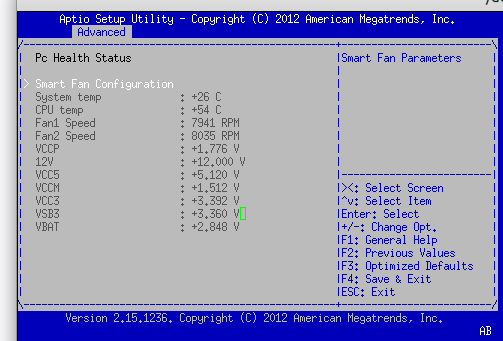
How you can see the CPU temp is a little to high, is it possible that i canchage something in the BIOS, if so... where? couldn't find anywhere to change fan speed.
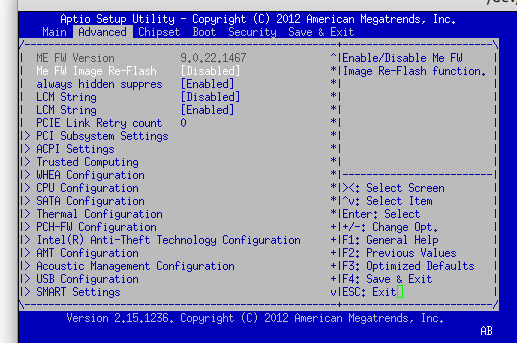
there are a few more option at the bottom but couldn't get it.... is there a location i should look harder? I went through it a few times, couldn't find anything related to change the speed of the fans...I apologize making more questions, i though it was all good....
Hope there is something i can do about this temp issue.
thanks to all -
That's the correct BIOS version. The
v6is just that it was Zanthos' 6th mod version. See post.Is that the original CPU? Is the case closed?
It will always run hot in the BIOS setup because it has no CPU idle process at that point. It runs at full power continually.
-
@stephenw10 ...
Well, well... i can see my lack of experience in the netter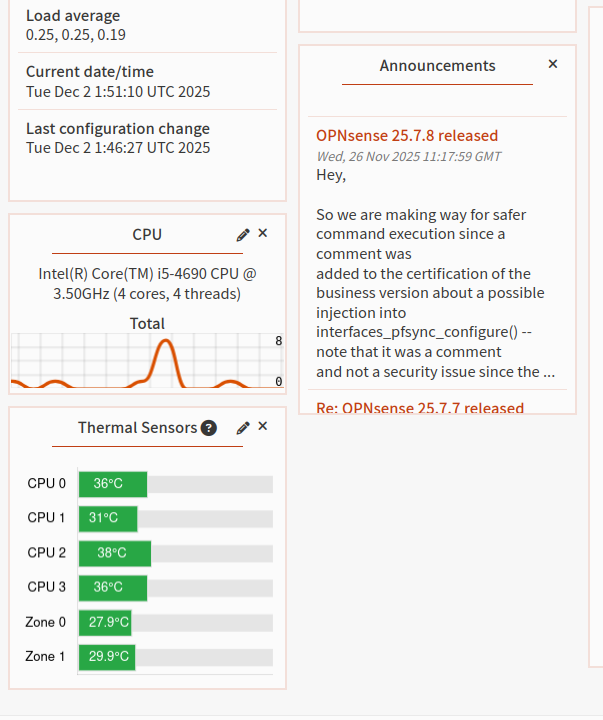 .
.you are correct Sir... just another nooby mistake.
To answer your question about the cpu, I ordered few weeks ago the i5-4590 mention in the forum and it worked ok after the bios update. the one that i got was defected so the vendor replace it with this i5-4690. i got just today and though it was pulling too much power and the cooling in place wasn't enough. luckily you made me see the light. :)Still a couple more changes in the next weeks... hopefully all goes well.
thanks again... -
Make sure it reboots as expected. A lot of CPUs will fail to warm reboot for some reason.
-
@stephenw10 that i think i solved :) (couple months ago),however,it was on my machine only,so no second check...it was bios from here from the minilinux distribution,that i modified with newer intel 'me' (9.5 vs 9.1 if i remember correctly) to support haswell refresh
