Networking two subnets together
-
Hello,
This is my current setup:Modem > Openwrt(wrt1200ac) > Pfsense > Computers
Openwrt creates a 192.168.2.1 subnet, and pfsense is assigned 192.168.2.100 on its wan interface.
Pfsense then creates a 192.168.1.1 subnet and all the computers plug here.
The setup was made because during power outages you can still connect to the openwrt router. It uses a lot less power than pfsense, so only the openwrt router is connected to the UPS.
This results in computers connected to the Openwrt router via wireless unable to connect to pfsense, which makes sense. Pfsense will see those computers on WAN and block them.
I tried to plug pfsense's lan port and openwrt's lan port into the same switch along with the computers. I unchecked authorize DHCP on openwrt's LAN. Computers are still assigned 192.168.1.x ips so that's good.
So I tried to manually set a computer to 192.168.2.105 and it can ping to the internet sometimes but constantly drops packets. It also cannot connect to the 192.168.1.x computers on pfsense either.
Is there a solution to make it so the computers on the different subnets can talk to eachother?
Would buying a TP-Link 5 port managed switch be able to do this?Thanks
-
WTF???
You have both sides of pfSense connected to the same network??? That will confuse it.
The only way computers on the 2 subnets can communicate is through the router. All devices use their address and the subnet mask to determine the local network. Then it compares the packet destination address, to see if it's on the local network. If not, it sends the packet to the router (pfSense) for forwarding towards the destination.
-
WTF???
You have both sides of pfSense connected to the same network??? That will confuse it.
The only way computers on the 2 subnets can communicate is through the router. All devices use their address and the subnet mask to determine the local network. Then it compares the packet destination address, to see if it's on the local network. If not, it sends the packet to the router (pfSense) for forwarding towards the destination.
Yeah, I had a LAN port from the Openwrt router connected to a switch, and a lan port from pfsense connected to the switch, all the pcs were plugged into the same unmanaged switch. I was more so curious to see what would happen than actually expect anything to work.
Which router would I configure so that the subnets can communicate to each other? I'm trying to learn as I go here, so I appreciate all advice.
-
At the moment, devices on the pfSense LAN use pfSense as the default route. Devices on the OpenWRT router use it for default route. As such, they don't know how to reach devices on the pfSense LAN. Since they don't know, they send traffic intended for the pfSense LAN out through the OpenWRT default route to the Internet, where they cannot reach the destination. You have to configure devices on the OpenWRT LAN to send the appropriate traffic to the pfSense LAN. This requires an additional route for that network, in addition to the default route. This creates a problem. With DHCP, the default route is normally provided to the clients, but I don't know that it can do the same for additional routes. This means you'd have to use manual configuration. Even if you configured OpenWRT to route to pfSense, any device trying to use it would get an ICMP redirect. Also, if pfSense is running NAT, you'd have no way to specify which device you want to reach.
-
WTF???
You have both sides of pfSense connected to the same network??? That will confuse it.
The only way computers on the 2 subnets can communicate is through the router. All devices use their address and the subnet mask to determine the local network. Then it compares the packet destination address, to see if it's on the local network. If not, it sends the packet to the router (pfSense) for forwarding towards the destination.
Just add static routes on all the PC's by hand! Its easy! haha no i'm just kidding. I worked for a company that did something similar because there router was too slow or some made up BS. I finally talked them into getting a SG-4860 because every time the servers rebooted they lost the static routes (not scripted at startup) and it would kill most of our tools.
-
Yes, I know adding static routes is easy. I've done it too. However, if he wants devices to just work, they won't. Also, how long will the routes last? They'll have to be set after every boot. In Linux it's trivial to add a script to run after DHCP connects, but what about Windows or mobile devices?
-
Huh??? So your not running your pfsense on ups because it uses too much power? What are you running pfsense on exactly? How long are these power outages?
Why not just get a better ups? Or another one for your pfsense.. My network will stay up for about 20 minutes before stuff shuts down on loss of power.. These are more poe AP, my switches and pfsense.. I have 3 UPS… 1 for my main pc and cable modem, pfsense, switch. Another one for my esxi host and 2 poe AP. And then 1 in my AV cab that runs another poe AP and that switch in the AV cab, etc.
What hardware are you working, what UPS.. What run time are you looking for, etc.
-
Huh??? So your not running your pfsense on ups because it uses too much power? What are you running pfsense on exactly? How long are these power outages?
Why not just get a better ups? Or another one for your pfsense.. My network will stay up for about 20 minutes before stuff shuts down on loss of power.. These are more poe AP, my switches and pfsense.. I have 3 UPS… 1 for my main pc and cable modem, pfsense, switch. Another one for my esxi host and 2 poe AP. And then 1 in my AV cab that runs another poe AP and that switch in the AV cab, etc.
What hardware are you working, what UPS.. What run time are you looking for, etc.
It's not just the UPS runtime, but I had a power outage a few months ago that was around 6 hours.
There's one feature in particular in Openwrt that I like a lot. It's Cake + Piece of cake traffic shaping. It's noticeably better than fq_codel in my experience,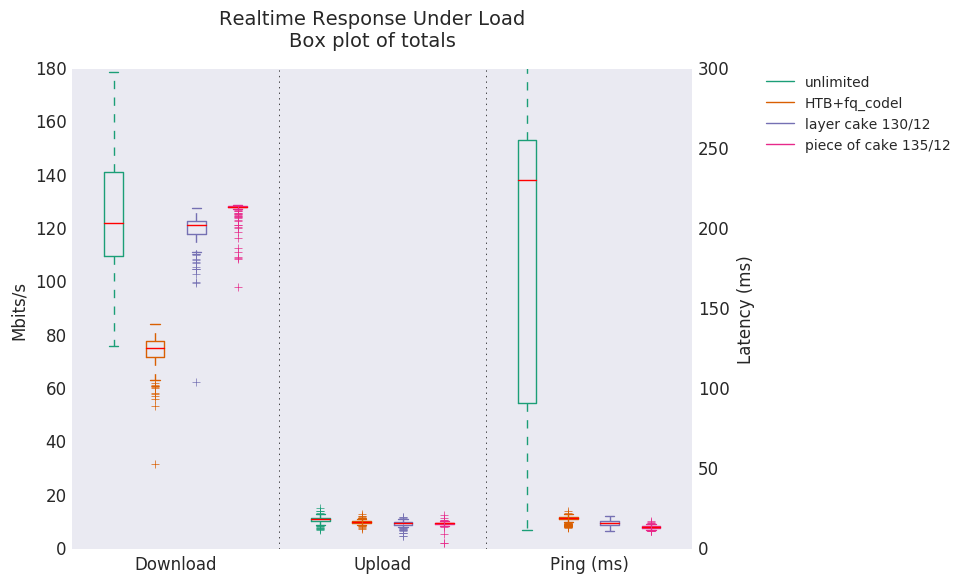
I get no throughput loss and I get a constant low ping even when maxing my connection. I do not see this coming to pfsense anytime soon. -
That's messed up dude.
If you need stuff to stay up longer you have no choice but to buy a bigger UPS, or use a more power efficient pFsense box, people building pFsense box for one reason or other think pFsense requires major CPU, it does not. An I3-based pFsense will shove full-gigabit stuff and using less than 20 watts, but you have to buy one of those dedicated box and not a generic AT/ITX which tend to use more electricity. Myself I have a paltry PROTECTLI(MiniSys) Atom E3845 shoving 60 mbit (already overkill but I want AES-ready) at 10-20% CPU usage, consuming 10 watts.
In your current set up, the pFsense cannot be configured as a firewall, it must be configured as a pure router (don't ask me how as I only know about FW). If configured as a FW, your wireless users are on the WAN, unprotected side of your network. OK it's protected by the wrt1200ac NAT, but why bother having industrial strength pFsense FW if you are not going to use it as your main FW (directly facing the ISP)? Moreover, as is, you are double-NATing, forcing unneeded complication of 2 subnets. For example, to commonly Port-Forward, you would have to do it twice, once on the first NAT, then again on the second NAT, and that's just one common issue on top of my head.
In a dedicated FW world, the correct, generic way is to look like this:
PlainModem –--> FW ----> ANY WIFI (bridge mode, not creating another subnet) and ethernet Switches.
Your plan to add a switch to fix this is not gonna work.
-
That's messed up dude.
If you need stuff to stay up longer you have no choice but to buy a bigger UPS, or use a more power efficient pFsense box, people building pFsense box for one reason or other think pFsense requires major CPU, it does not. An I3-based pFsense will shove full-gigabit stuff and using less than 20 watts, but you have to buy one of those dedicated box and not a generic AT/ITX which tend to use more electricity. Myself I have a paltry PROTECTLI(MiniSys) Atom E3845 shoving 60 mbit (already overkill but I want AES-ready) at 10-20% CPU usage, consuming 10 watts.
In your current set up, the pFsense cannot be configured as a firewall, it must be configured as a pure router (don't ask me how as I only know about FW). If configured as a FW, your wireless users are on the WAN, unprotected side of your network. OK it's protected by the wrt1200ac NAT, but why bother having industrial strength pFsense FW if you are not going to use it as your main FW (directly facing the ISP)? Moreover, as is, you are double-NATing, forcing unneeded complication of 2 subnets. For example, to commonly Port-Forward, you would have to do it twice, once on the first NAT, then again on the second NAT, and that's just one common issue on top of my head.
In a dedicated FW world, the correct, generic way is to look like this:
PlainModem –--> FW ----> ANY WIFI (bridge mode, not creating another subnet) and ethernet Switches.
Your plan to add a switch to fix this is not gonna work.
I would ideally like to have one router, but I do like those features I mentioned above about Openwrt. I currently just have pfsense dmz'd inside of Openwrt to avoid having two put in two firewall rules.
I tried playing with static routes but I still can't access 192.168.1.1

-
Honestly it looks like you should be asking how to set a static route on an OpenWRT forum.
Setting a target and a gateway to the same address is pretty much never right (if you can directly access the gateway, you don't need the route) but I have never used OpenWRT.