Allow traffic between VLANs
-
Hello all,
I'm running pfSense 2.4.3-RELEASE-p1(amd64) under ESXi 6.5 with VLAN tagging working. However, I'm unable to ping a server from one VLAN to another. I receive appropriate IPs on my clients for which ever VLAN its connected to. My Widows Firewall is disabled. I can't even ping the web GUI of my UPS. My setup is as follows:
Default LAN interface -
Name: LAN
IP: 10.10.10.1
Subnet: 255.255.255.0
DHCP: 10.10.10.200-10.10.10.254VLAN3- Added on the same physical NIC as LAN interface
Name: Minions
IP: 10.10.3.1
Subnet: 255.255.255.0
DHCP: 10.10.3.200-10.10.3.254Rules
Default rules from LAN were added to Minions to allow Minion Net traffic to any using the copy function. The only item edited was the interface was changed from Lan to Minions and source was changed from LAN net to Minions Net. Adding these rules allows minion clients to access the internet, but I still cant ping or access servers from either VLAN to the other. I would expect the default Allow To Any rules to give me complete access. Once I accomplish this, I plan to start restricting the rules for security...Can anyone spot something I did wrong or overlooked? Do I need default routes or DNS forwarder rules? I'm pinging addresses and not names, so I wouldn't think DNS to be an issue.
-
Can your devices on vlan 3 ping the IP of LAN? 10.10.10.1?
Can your devices on lan ping IP of vlan 3? 10.10.3.1?
If your saying you have any any rules on lan and vlan3 then you should be able to do this...
As to pinging your UPS - does your ups have a gateway set.. More often then not the problem here is device trying to ping on other network has no gateway, or different gateway than pfsense or has firewall blocking. Or user created a tcp rule and doesn't get why icmp doesn't work.
Another common problem on the rules is user forces traffic out a gateway when it should be *. If your going to do policy routing then you need a rule above your policy rule that allows access to your other networks/vlans
Also - screenshot of your rules goes a long way.. No offense but many a users say they did X and wonder why it doesn't work when they really did Y. So a picture of what is actually done can be worth 10,000 words.
-
Thanks johnpoz!
Not sure why, but I deleted both rules and recreated them from scratch. Now with the default allow rules, I do have access from both VLANs to the other. So I started on phase 2, only allow traffic that I want.
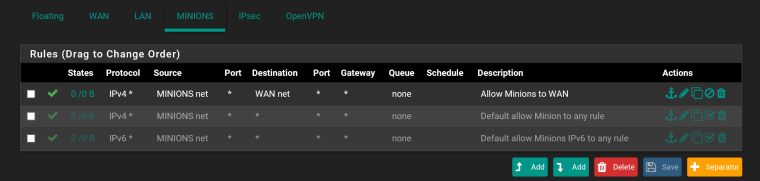
I disabled the default allow rules on Minions and started with a "simple" rule to allow Minions to WAN. I lost all connectivity with the WAN and I can't ping 10.10.3.1 either.
Please see the attached picture. Can you spot what I'm doing wrong?
-
Yeah wan net is not internet its just the net your wan is on ‘any’ is internet
If u want to block access to lan do that above your allow any rule
-
Should that block Minions to LAN rule be under the Minions or LAN interface?
-
This post is deleted! -
Minions.
Interface rules govern what traffic arrives into that interface. So connections from Minions to LAN arrive at the firewall coming into Minions.