SYN packets sometimes dropped between different physical interfaces
-
Hello all,
I have a setup like this:All my web servers are on the LAN of interface ix0. 192.168.2.0/24
When my clients are on the same LAN there are no issues. When my clients are on a separate LAN (ix1, 172.16.0.0/22) and the clients request simple HTML pages, almost all packets go through. Sometimes, there is a SYN packet sent from the client (172.16.4.213 in this case) that never makes it to the server (192.168.2.100) and the connection is severed. I run the following commands in 2 separate terminals connected over SSH on the pFsense box. I am not running pfsense on a virtual server.tcpdump -vv -i ix1 host 192.168.2.100 17:21:59.826919 IP (tos 0x0, ttl 64, id 0, offset 0, flags [DF], proto TCP (6), length 64) macbook385.xxxx.xxxx.60214 > archiedb.xxxx.xxxx.http: Flags [S], cksum 0x319c (correct), seq 726451753, win 65535, options [mss 1460,nop,wscale 5,nop,nop,TS val 315466149 ecr 0,sackOK,eol], length 0 17:22:00.827245 IP (tos 0x0, ttl 64, id 0, offset 0, flags [DF], proto TCP (6), length 64) macbook385.xxxx.xxxx.60214 > archiedb.xxxx.xxxx.http: Flags [S], cksum 0x2db3 (correct), seq 726451753, win 65535, options [mss 1460,nop,wscale 5,nop,nop,TS val 315467150 ecr 0,sackOK,eol], length 0 17:22:01.829874 IP (tos 0x0, ttl 64, id 0, offset 0, flags [DF], proto TCP (6), length 64) macbook385.xxxx.xxxx.60214 > archiedb.xxxx.xxxx.http: Flags [S], cksum 0x29ca (correct), seq 726451753, win 65535, options [mss 1460,nop,wscale 5,nop,nop,TS val 315468151 ecr 0,sackOK,eol], length 0 17:22:02.831052 IP (tos 0x0, ttl 64, id 0, offset 0, flags [DF], proto TCP (6), length 64) macbook385.xxxx.xxxx.60214 > archiedb.xxxx.xxxx.http: Flags [S], cksum 0x25e2 (correct), seq 726451753, win 65535, options [mss 1460,nop,wscale 5,nop,nop,TS val 315469151 ecr 0,sackOK,eol], length 0 This above line keeps repeating until the connection is dropped. tcpdump -vv -i ix0 host 192.168.2.100 NOTHING comes out here unless I refresh the page on the client and then the packet flow continues.Can someone please point me in the right direction? This even happens when accessing through the WAN interface (em0) but not all servers. Only some. Any help is much appreciated.
PS. I have enabled the Bypass firewall rules on the same interface. I have changed the firewall optimization options to "Conservative". I tried the checkbox to clear invalid DF bits, disabled the checksum offloading
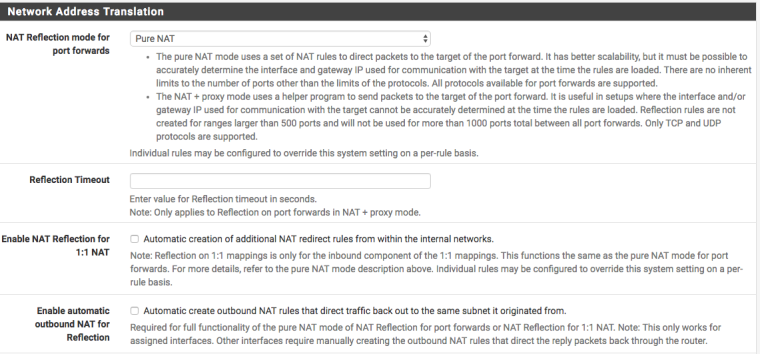
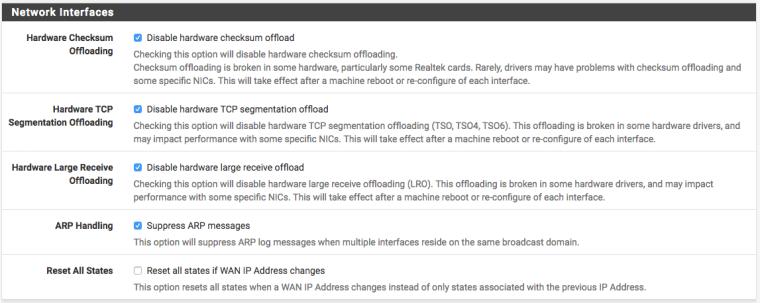
-
Are you using NAT reflection or not?
What address is 192.168.2.100 attempting a connection to?
Maybe use the
-nflag to tcpdump so we are looking at addresses instead of obfuscated hostnames. -
First thank you for the reply.
Here is the output with the-n17:43:12.269396 IP (tos 0x0, ttl 64, id 0, offset 0, flags [DF], proto TCP (6), length 64) 172.16.4.213.60555 > 192.168.2.100.80: Flags [S], cksum 0x0963 (correct), seq 543308826, win 65535, options [mss 1460,nop,wscale 5,nop,nop,TS val 318135642 ecr 0,sackOK,eol], length 0 17:43:13.266923 IP (tos 0x0, ttl 64, id 0, offset 0, flags [DF], proto TCP (6), length 64) 172.16.4.213.60555 > 192.168.2.100.80: Flags [S], cksum 0x057a (correct), seq 543308826, win 65535, options [mss 1460,nop,wscale 5,nop,nop,TS val 318136643 ecr 0,sackOK,eol], length 0 17:43:14.267973 IP (tos 0x0, ttl 64, id 0, offset 0, flags [DF], proto TCP (6), length 64) 172.16.4.213.60555 > 192.168.2.100.80: Flags [S], cksum 0x0191 (correct), seq 543308826, win 65535, options [mss 1460,nop,wscale 5,nop,nop,TS val 318137644 ecr 0,sackOK,eol], length 0 17:43:15.268989 IP (tos 0x0, ttl 64, id 0, offset 0, flags [DF], proto TCP (6), length 64) 172.16.4.213.60555 > 192.168.2.100.80: Flags [S], cksum 0xfda7 (correct), seq 543308826, win 65535, options [mss 1460,nop,wscale 5,nop,nop,TS val 318138645 ecr 0,sackOK,eol], length 0 17:43:16.269208 IP (tos 0x0, ttl 64, id 0, offset 0, flags [DF], proto TCP (6), length 64) 172.16.4.213.60555 > 192.168.2.100.80: Flags [S], cksum 0xf9bf (correct), seq 543308826, win 65535, options [mss 1460,nop,wscale 5,nop,nop,TS val 318139645 ecr 0,sackOK,eol], length 0 17:43:17.272774 IP (tos 0x0, ttl 64, id 0, offset 0, flags [DF], proto TCP (6), length 64) 172.16.4.213.60555 > 192.168.2.100.80: Flags [S], cksum 0xf5d7 (correct), seq 543308826, win 65535, options [mss 1460,nop,wscale 5,nop,nop,TS val 318140645 ecr 0,sackOK,eol], length 0 17:43:19.273677 IP (tos 0x0, ttl 64, id 0, offset 0, flags [DF], proto TCP (6), length 64) 172.16.4.213.60555 > 192.168.2.100.80: Flags [S], cksum 0xee06 (correct), seq 543308826, win 65535, options [mss 1460,nop,wscale 5,nop,nop,TS val 318142646 ecr 0,sackOK,eol], length 0 17:43:23.279494 IP (tos 0x0, ttl 64, id 0, offset 0, flags [DF], proto TCP (6), length 64) 172.16.4.213.60555 > 192.168.2.100.80: Flags [S], cksum 0xde65 (correct), seq 543308826, win 65535, options [mss 1460,nop,wscale 5,nop,nop,TS val 318146647 ecr 0,sackOK,eol], length 0 17:43:31.275524 IP (tos 0x0, ttl 64, id 0, offset 0, flags [DF], proto TCP (6), length 64) 172.16.4.213.60555 > 192.168.2.100.80: Flags [S], cksum 0xbf25 (correct), seq 543308826, win 65535, options [mss 1460,nop,wscale 5,nop,nop,TS val 318154647 ecr 0,sackOK,eol], length 0This tcpdump is running on 2 ssh windows. One on ix0 where 192.168.2.100 is attached and the other on ix1 where 172.16.4.213 is attached. The above is the latter (ix1) showing that the packet is going in to ix1 but never goes out ix0 to be delivered to 192.168.2.100. There is no output on the tcpdump on ix0.
192.168.2.100 is the server. I dont understand your question. The issue that I have is that some packets from the client do not reach the server and that is not consistent either. If I keep refreshing the browser, the packets will go through and the web page will load. But every few requests the packets start dropping again.
For the NAT reflection please see below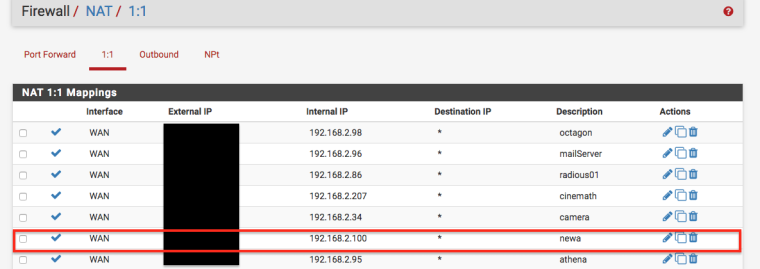
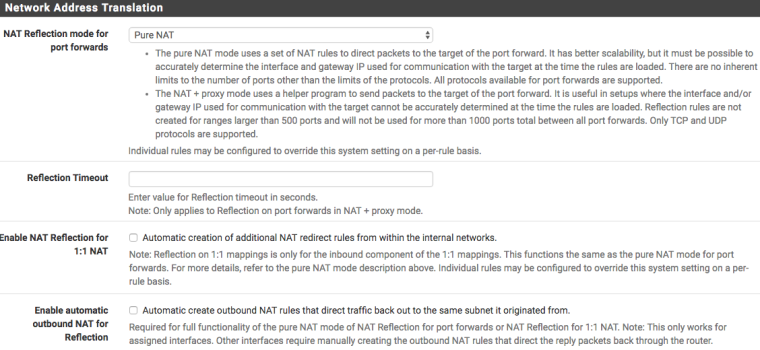
Thanks again
-
Probably need to post your ix1 firewall rules. I assume ix0 and ix1 are both inside interfaces and not WAN.
You also want to be looking for anything pertinent in your firewall logs.
That doesn't really show us anything more than the SYNs hitting the interface.
Connecting directly to 192.168.2.100 will not be using NAT reflection.
Do any of these servers/clients have multiple NICs in them or anything?
-
Funny thing happened. While I was gathering the info to post my previous reply to your very wise questions, I realized that I have 192.168.2.100 as 1:1 NAT. What I also realized is that this specific IP was used by another server many moons ago for other internal stuff. There was a manual NAT rule for port 80 defined from that time and once I saw that I deleted it, then created just a FW rule to allow traffic on port 80 from the wan. Once the rules were reloaded, it seems that no packets are dropping anymore.
Could it be this is the resolution of the PITA issue that I have been having for the past few weeks?
-
Well, it had to be some sort of misconfiguration. There isn't a pfSense checkbox for randomly drop SYN packets to make users pull their hair out.
-
@derelict said in SYN packets sometimes dropped between different physical interfaces:
There isn't a pfSense checkbox for randomly drop SYN packets to make users pull their hair out.
Maybe that could be suggested as a feature.

-
@jknott said in SYN packets sometimes dropped between different physical interfaces:
@derelict said in SYN packets sometimes dropped between different physical interfaces:
There isn't a pfSense checkbox for randomly drop SYN packets to make users pull their hair out.
Maybe that could be suggested as a feature.You could setup a limiter with a defined packet loss rate and only send TCP SYN packets through the limiter with some creating floating rules set not to track state. :-)
Make a mental note of that for next April 1... :-)
-
Yeah, I thought about fun with dummynet when I posted that... :)