Netgate Discussion Forum
    • Categories
    • Recent
    • Tags
    • Popular
    • Users
    • Search
    • Register
    • Login

    Rules don't seem to commit until I reboot

    Scheduled Pinned Locked Moved Firewalling
    4 Posts 4 Posters 739 Views 4 Watching
    Loading More Posts
    • Oldest to Newest
    • Newest to Oldest
    • Most Votes
    Reply
    • Reply as topic
    Log in to reply
    This topic has been deleted. Only users with topic management privileges can see it.
    • G Offline
      gavpop
      last edited by

      I'm creating some firewall rules with NAT'ing.
      This is on a brand new 2.4.3 release of PFSense.
      No matter what I do, rules don't seem to commit until after I've rebooted the firewall.

      I've reset the states.
      I've watched the filter reload - no errors.

      Here is one of my rules...

      NAT - 0_1537867633023_0a4d2e63-a533-43e2-8780-5b2a3a552ccd-image.png

      Firewall - 0_1537867291464_b428db1b-fc5b-4f11-b258-6b1f5a648c5d-image.png

      I'm at a loss.

      SammyWooS GertjanG DerelictD 3 Replies Last reply Reply Quote 0
      • SammyWooS Offline
        SammyWoo @gavpop
        last edited by

        @gavpop Don't know the details but I wouldn't be surprised, sometimes rules have dependencies. Stuff have to reset/restart from a known state.

        1 Reply Last reply Reply Quote 0
        • GertjanG Offline
          Gertjan @gavpop
          last edited by

          @gavpop said in Rules don't seem to commit until I reboot:

          ere is one of my rules...
          NAT -
          Firewall -

          I'm at a loss.

          When creating a NAT rule, something like :
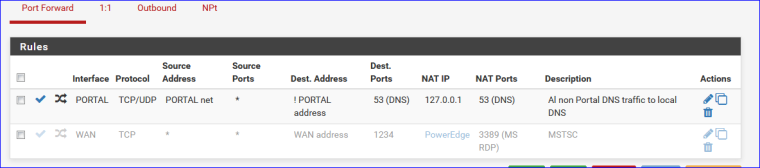
          0_1540192297433_6e806e50-0a7f-433d-a22f-8d6513385072-image.png
          (see the second one - deactivated, but valid)

          the related firewall rule is created automatically.
          This image 0_1540192409038_f4f4e5d5-ad8e-4597-ba66-71502cd84e7e-image.png

          in front of the rule is important !! This means the two are linked-related.

          The auto-created related firewall rule (third one) :
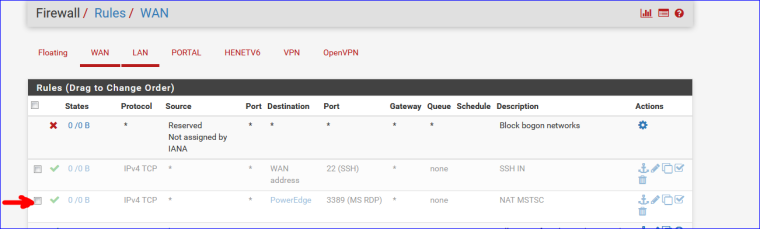
          0_1540192685498_a42b385e-6756-4704-8cf1-71ca297157cb-image.png

          No "help me" PM's please. Use the forum, the community will thank you.
          Edit : and where are the logs ??

          1 Reply Last reply Reply Quote 0
          • DerelictD Offline
            Derelict LAYER 8 Netgate @gavpop
            last edited by

            @gavpop said in Rules don't seem to commit until I reboot:

            I'm creating some firewall rules with NAT'ing.
            This is on a brand new 2.4.3 release of PFSense.
            No matter what I do, rules don't seem to commit until after I've rebooted the firewall.

            I've reset the states.
            I've watched the filter reload - no errors.

            Here is one of my rules...

            NAT - 0_1537867633023_0a4d2e63-a533-43e2-8780-5b2a3a552ccd-image.png

            Firewall - 0_1537867291464_b428db1b-fc5b-4f11-b258-6b1f5a648c5d-image.png

            I'm at a loss.

            If you look at OP's ruleset you will see that he is port forwarding WAN Address port 9987 to 192.0.0.60 port 443. The firewall rule passes destination 192.0.0.60 port 9987. That should be passing the post-NAT address and port, or 192.0.0.60 port 443.

            No idea what rebooting had to do with anything. That would never work.

            Chattanooga, Tennessee, USA
            A comprehensive network diagram is worth 10,000 words and 15 conference calls.
            DO NOT set a source address/port in a port forward or firewall rule unless you KNOW you need it!
            Do Not Chat For Help! NO_WAN_EGRESS(TM)

            1 Reply Last reply Reply Quote 0
            • First post
              Last post
            Copyright 2025 Rubicon Communications LLC (Netgate). All rights reserved.