Not able to get past WAN from OPT1
-
First off, hey guys.
Now, what I have set up is an old laptop that I want to turn into a wifi router, for lack of better solutions.
I've been able to set up my interfaces properly (I assume), but I simply can't get any traffic through except for two things - I can ping 8.8.8.8, which I use as my DNS, from anywhere in the network, and I can resolve any adress that I want. Tracerouting 8.8.8.8 does not get past the router. I believe this is a firewall issue, though I am not 100% sure.
Attached are screenshots of my firewall and NAT rules, and the admin page which might also be relevant.
-
Your firewall rules are all wrong.
I suggest you have a look here:-
https://www.netgate.com/docs/pfsense/firewall/firewall-rule-basics.html
https://www.netgate.com/docs/pfsense/firewall/firewall-rule-troubleshooting.html
Your OPT1 rules basically say anything on the OPT1 network allow access to the OPT1 gateway.
Change it to any.
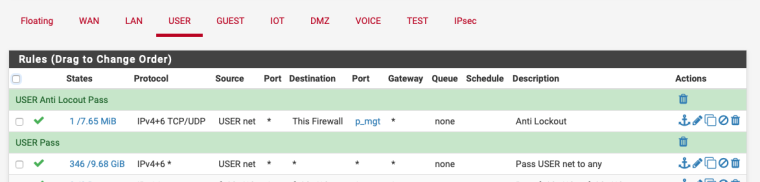
Also any reason your using Hybrid NAT?
-
Your rules are screwed. First off, get rid of ALL of the rules you have on WAN. Unless you have an exposed VPN or NATed server, you should have NOTHING on WAN except for Block private/bogons (which you are missing). Second, your OPT1 rules are wrong. You only need one rule that is exactly the same as the Default allow LAN to any rule on the LAN interface.
-
@NogBadTheBad No exect reason for the hybrid NAT, It's something left over from troubleshooting.
@KOM I will try that. Also, since I don't really have a LAN interface due to the laptop having a single RJ45 port, I can't look up what the rule is easily.Also here is what happens when I try to ping adresses, which might help a little.
-
@jonixas said in Not able to get past WAN from OPT1:
@NogBadTheBad No exect reason for the hybrid NAT, It's something left over from troubleshooting.
@KOM I will try that. Also, since I don't really have a LAN interface due to the laptop having a single RJ45 port, so I can't look up what the rule is easily.Also here is what happens when I try to ping adresses, which might help a little.
Copy my rule but replace USER net with OPT1 net.
Its pointless sending more screenshots till you fix your firewall rules they are borked.
-
@nogbadthebad I've done that, but it made no difference. In fact, I lost all outbound connectivity, meaning no DNS resolving or pinging.
-
What interface is connected to the Internet ?
I've just re-read your 1st post where you state "old laptop that I want to turn into a wifi router"
-
@nogbadthebad That would be WAN, which is able to negotiate an IP and the DNS config via DHCP.
-
@jonixas said in Not able to get past WAN from OPT1:
I want to turn into a wifi rout
I'd be tempted to factory default it and start again leaving as much as default.
-
@nogbadthebad seeing that you guys think the rules and the config are borked, it might be a good idea. What should I do to config it after a reset on a checklist basis?
Quick note - I can't see my wireless interface from the console, so I need to use LAN to get into the webConfig first.
-
It should work fine with a simple pass OPT1 net any rule.
Not sure why its named the interfaces as WAN and OPT1, should be a WAN and LAN.
-
@nogbadthebad I've since reset it and reconfigured it. Things I touched are DHCP, interface assignments, and wireless config. I can't get anything outbound from inside the network, or the device itself. WAN correctly negotiates it's IP and DNS via DHCP.
These are the current firewall rules for WAN and OPT1. NAT is on default.
The reason there's no LAN is a lot of factors, which mainly add up to the the fact that I've 3 ethernet jacks in total, one being on the pfsense device, one being on my laptop, and one is for outbound connectivity that I don't have administrative access to. Because I can't bring up the wireless interface from the console, I have to enable it from the webconfig, which means I need to configure a LAN, which requires a WAN, which means I need a VLAN configured. That leads to configuring the wireless interface on the web interface, switching to wireless, and deleting LAN, switching the wired interface completely to WAN and breaking up the VLAN. This is something that I spent way too much time fiddling with, and if there is a better way, I would gladly accept any advice about it.
-
@jonixas said in Not able to get past WAN from OPT1:
The reason there's no LAN is a lot of factors, which mainly add up to the the fact that I've 3 ethernet jacks in total, one being on the pfsense device, one being on my laptop, and one is for outbound connectivity that I don't have administrative access to. Because I can't bring up the wireless interface from the console, I have to enable it from the webconfig, which means I need to configure a LAN, which requires a WAN, which means I need a VLAN configured. That leads to configuring the wireless interface on the web interface, switching to wireless, and deleting LAN, switching the wired interface completely to WAN and breaking up the VLAN. This is something that I spent way too much time fiddling with, and if there is a better way, I would gladly accept any advice about it.
What IP address do you have on your WAN interface, does it fall in this range:-
10.0.0.0 - 10.255.255.255 (10/8 prefix)
172.16.0.0 - 172.31.255.255 (172.16/12 prefix)
192.168.0.0 - 192.168.255.255 (192.168/16 prefix)Untick "Block private networks and loopback addresses" if you do.
-
@nogbadthebad already unticked, even though the IP is 158.129.x.x


Hello! It looks like you're interested in this conversation, but you don't have an account yet.
Getting fed up of having to scroll through the same posts each visit? When you register for an account, you'll always come back to exactly where you were before, and choose to be notified of new replies (either via email, or push notification). You'll also be able to save bookmarks and upvote posts to show your appreciation to other community members.
With your input, this post could be even better 💗
Register LoginPrivacy Policy · Cookie Policy