Netgate Discussion Forum
    • Categories
    • Recent
    • Tags
    • Popular
    • Users
    • Search
    • Register
    • Login
    Introducing Netgate Nexus: Multi-Instance Management at Your Fingertips.

    CIDR IPs not accessible over the Internet

    Scheduled Pinned Locked Moved Firewalling
    13 Posts 4 Posters 2.3k Views 4 Watching
    Loading More Posts
    • Oldest to Newest
    • Newest to Oldest
    • Most Votes
    Reply
    • Reply as topic
    Log in to reply
    This topic has been deleted. Only users with topic management privileges can see it.
    • R Offline
      revbev
      last edited by

      I was attempting to perform an update on pfSense earlier this morning and for whatever reason the update failed and when it came back up, everything was hosed. So I booted from CD to reinstall and now I'm running into issue with getting my CIDR set up working again.

      I have 3 NICs, one for the WAN, one for the LAN, and the other for my CIDR block.

      From the LAN, I am able to access the Internet just fine. In addition to that, I'm able to access web sites that are available on an IP address that is part of the CIDR block.

      From a device that does not reside on the network however, I'm not able to access the web sites that are on the CIDR network. I tested this by turning WiFi off on my phone and I'm not able to access the sites.

      For a while, I was unable to even ping the CIDR gateway from a server that is part of the CIDR, but I'm able to now.

      I've been pulling my hair out all day and can't think of anything else to try. Can anyone supply any suggestions?

      1 Reply Last reply Reply Quote 0
      • JKnottJ Offline
        JKnott
        last edited by

        What do you mean by "CIDR"? As far as I know, CIDR is just a way of expressing subnets and addresses, instead of the old class A, B & C method.

        PfSense running on Qotom mini PC
        i5 CPU, 4 GB memory, 32 GB SSD & 4 Intel 1 Gb Ethernet ports.
        UniFi AC-Lite access point

        I haven't lost my mind. It's around here...somewhere...

        1 Reply Last reply Reply Quote 0
        • R Offline
          revbev
          last edited by

          I received a CIDR block from my ISP that I can use to assign IPs to my servers behind the pfSense box.

          1 Reply Last reply Reply Quote 0
          • johnpozJ Offline
            johnpoz LAYER 8 Global Moderator
            last edited by

            So you got a public IP block that is routed to you.. Say a /29 and you put this on an OPT interface on pfsense. What rules did you put on the interface? Did you turn off automatic outbound nat for this block.. Or pfsense might try to nat it to the public IP you have on the wan.

            Post up your outbound nat and your firewall rules on your wan and your optX where you put this cidr block

            An intelligent man is sometimes forced to be drunk to spend time with his fools
            If you get confused: Listen to the Music Play
            Please don't Chat/PM me for help, unless mod related
            SG-4860 26.07 | Lab VMs 2.9.0, 26.07

            1 Reply Last reply Reply Quote 0
            • R Offline
              revbev
              last edited by

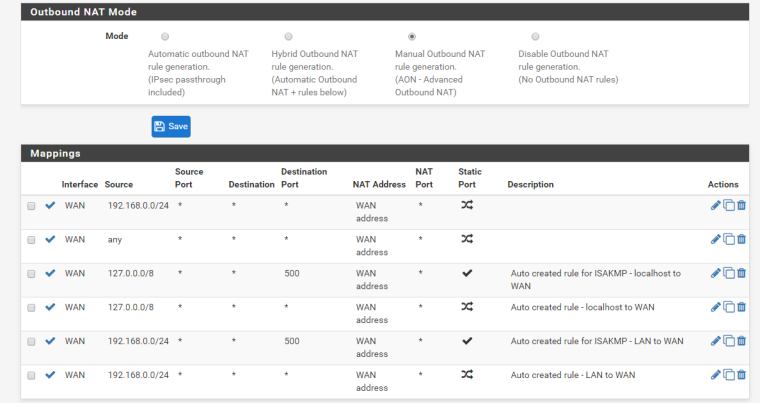
              My NAT rules

              Source Source Port Destination Destination Port NAT Address NAT Port Static Port Description
              WAN 192.168.0.0/24 * * * WAN address *
              WAN any * * * WAN address *
              WAN 127.0.0.0/8 * * 500 WAN address * Auto created rule for ISAKMP - localhost to WAN
              WAN 127.0.0.0/8 * * * WAN address * Auto created rule - localhost to WAN
              WAN 192.168.0.0/24 * * 500 WAN address * Auto created rule for ISAKMP - LAN to WAN
              WAN 192.168.0.0/24 * * * WAN address * Auto created rule - LAN to WAN

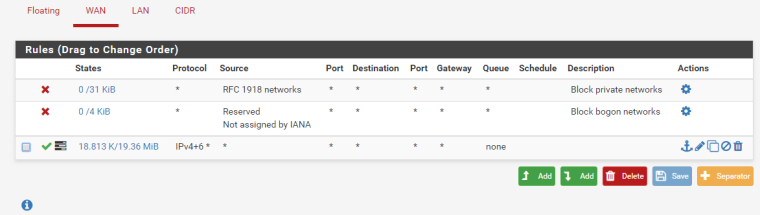
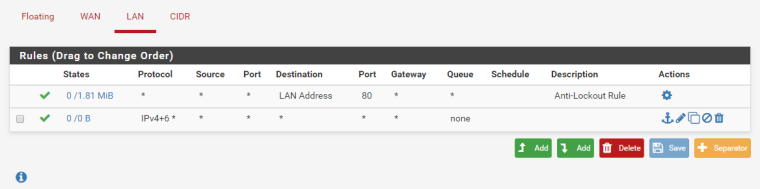
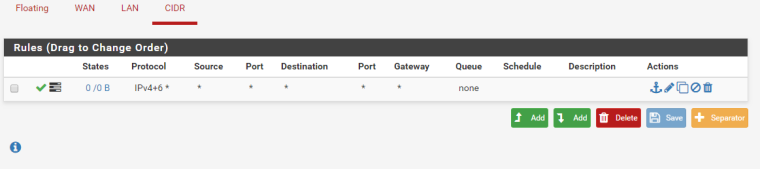
              For my firewall rules, I currently have everything open until I get this worked out.

              Protocol Source Port Destination Port Gateway Queue Schedule
              IPv4+6 * * * * * * none

              I have the same rule for all 3.

              1 Reply Last reply Reply Quote 0
              • johnpozJ Offline
                johnpoz LAYER 8 Global Moderator
                last edited by johnpoz

                How hard is a screenshot vs trying to read your ascii art.. This looks like your trying to NAT anything traffic you see to your wan
                WAN any * * * WAN address *

                Which you would NOT want to do if your have some public 1.2.3.0/29 block

                You have a ANY ANY rule on your wan?

                An intelligent man is sometimes forced to be drunk to spend time with his fools
                If you get confused: Listen to the Music Play
                Please don't Chat/PM me for help, unless mod related
                SG-4860 26.07 | Lab VMs 2.9.0, 26.07

                1 Reply Last reply Reply Quote 0
                • R Offline
                  revbev
                  last edited by

                  0_1540240459211_8d60d22a-6b84-41fe-b1ee-f647175793ff-image.png

                  0_1540240502206_7f41b98a-659a-44dc-9486-4f8d7d41ff7f-image.png

                  0_1540240529987_d21c9e09-dee6-4546-bf8a-23a3af992541-image.png

                  0_1540240550798_6ab8e6da-dd2a-4639-adff-b42ec5ee82f7-image.png

                  1 Reply Last reply Reply Quote 0
                  • johnpozJ Offline
                    johnpoz LAYER 8 Global Moderator
                    last edited by

                    Yup wan rules BROKEN.. You would never put a wan any any rule..
                    Your outbound nat is Broken as well - your saying hey take that 1.2.3.x IP that is my routed cidr and NAT it to what my WAN IP is..

                    An intelligent man is sometimes forced to be drunk to spend time with his fools
                    If you get confused: Listen to the Music Play
                    Please don't Chat/PM me for help, unless mod related
                    SG-4860 26.07 | Lab VMs 2.9.0, 26.07

                    1 Reply Last reply Reply Quote 0
                    • R Offline
                      revbev
                      last edited by

                      Sorry, I'm somewhat new to this. So what would you recommend?

                      1 Reply Last reply Reply Quote 0
                      • johnpozJ Offline
                        johnpoz LAYER 8 Global Moderator
                        last edited by johnpoz

                        Remove that outbound nat that says ANY... Can put in firewall rules on wan that allow what you want to allow inbound to your cidr network.. If that is nothing then there should be no rules on your wan.

                        You sure this is routed to you? What do you have /? What is on your wan - this is a transit network?

                        So for example your wan IP is what 1.2.3.x/? and your routed cidr is what 4.5.6.0/? you sure they routed this to you and not just gave you this netblock..

                        An intelligent man is sometimes forced to be drunk to spend time with his fools
                        If you get confused: Listen to the Music Play
                        Please don't Chat/PM me for help, unless mod related
                        SG-4860 26.07 | Lab VMs 2.9.0, 26.07

                        R 1 Reply Last reply Reply Quote 0
                        • R Offline
                          revbev
                          last edited by

                          Thank you very much for your help.

                          1 Reply Last reply Reply Quote 0
                          • R Offline
                            revbev @johnpoz
                            last edited by

                            @johnpoz

                            Yes, this was working this morning just fine. The problem occurred when my pfSense update failed and I was forced to reinstall. You got me up and running once again with your suggestions, so thank you.

                            Now, I can take steps to lock it down.

                            1 Reply Last reply Reply Quote 0
                            • DerelictD Offline
                              Derelict LAYER 8 Netgate
                              last edited by

                              Never outbound NAT from source any either.

                              Chattanooga, Tennessee, USA
                              A comprehensive network diagram is worth 10,000 words and 15 conference calls.
                              DO NOT set a source address/port in a port forward or firewall rule unless you KNOW you need it!
                              Do Not Chat For Help! NO_WAN_EGRESS(TM)

                              1 Reply Last reply Reply Quote 0
                              • First post
                                Last post
                              Copyright 2026 Rubicon Communications LLC (Netgate). All rights reserved.
                              Privacy Policy · Cookie Policy