Trafic Redirect
-
Hello friends!
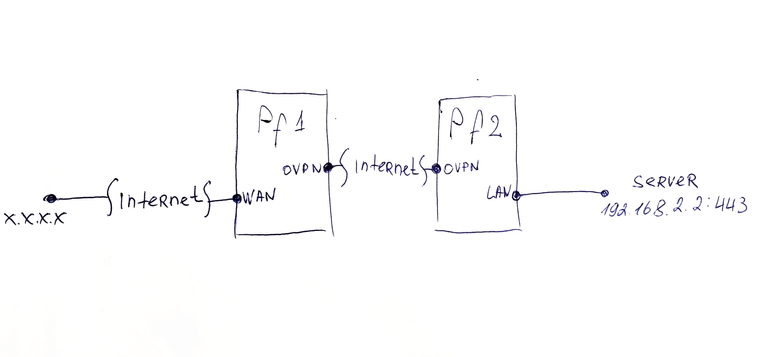
The bottom line is this: there are two servers on Pfsense. They are connected to each other via the Internet using OVPN. Everything works fine, except for one thing - I can not pass the ports. I need to connect to the white IP of one Pf, redirect packets to the IP address in the local subnet of another Pf. Please help me to resolve the issue. no longer know which way to look.
-
On Pf2 assing an interface to the OpenVPN instance.
Interfaces > Assignments. Select the OpenVPN instance, press Add, open the new interface, check "enable", enter a proper description and save that.Then move the firewall rules allowing the access from the other site to the new interface tab.
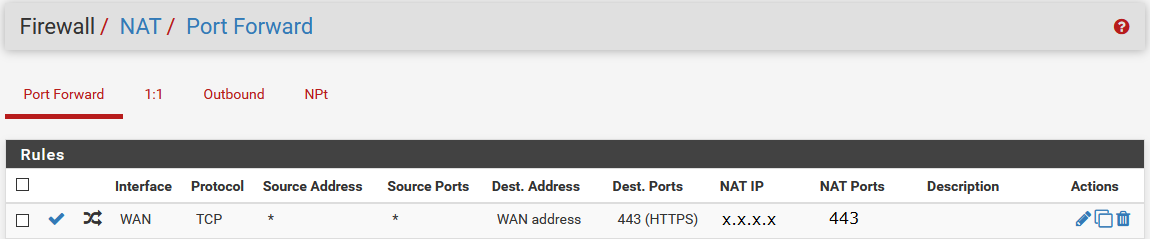
On Pf1 you need a simple port forwarding rule.
-
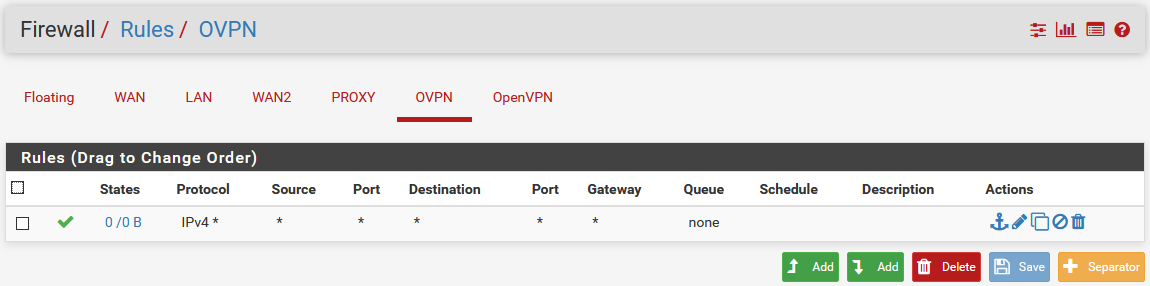
It did not help. Added and activated the interface, added a permissive rule for everything. And made NAT forwarding rule to the subnet address of another Pf. Packets do not reach( 
-
That's straight forward. I had made such forwardings several times.
Ensure that Pf2 is the default gateway for the server and that a firewall rule on the specified OpenVPN interface is allowing the access and that it matches. Also on Pf1 WAN you need a rule allowing the traffic, of course.
@Ilya-V said in Trafic Redirect:
added a permissive rule for everything
You have to ensure that there is no rule on the OpenVPN tab which matches the traffic. OpenVPN is an interface group including all OpenVPN instances you're running and it doesn't work on interface groups! That's why I wrote "move the rule from OpenVPN...".
Hello! It looks like you're interested in this conversation, but you don't have an account yet.
Getting fed up of having to scroll through the same posts each visit? When you register for an account, you'll always come back to exactly where you were before, and choose to be notified of new replies (either via email, or push notification). You'll also be able to save bookmarks and upvote posts to show your appreciation to other community members.
With your input, this post could be even better 💗
Register LoginPrivacy Policy · Cookie Policy