<?xml version="1.0" encoding="UTF-8"?><rss xmlns:dc="http://purl.org/dc/elements/1.1/" xmlns:content="http://purl.org/rss/1.0/modules/content/" xmlns:atom="http://www.w3.org/2005/Atom" version="2.0"><channel><title><![CDATA[Firewall rules &#x2F; problem with blocked traffic &#x2F; no clue what goes wrong]]></title><description><![CDATA[<p dir="auto">Hi guys,</p>
<p dir="auto">I have multiple VLANS in my home.<br />
As I love playing around with that kind of stuff I tried to apply a ruleset to my IOT VLAN</p>
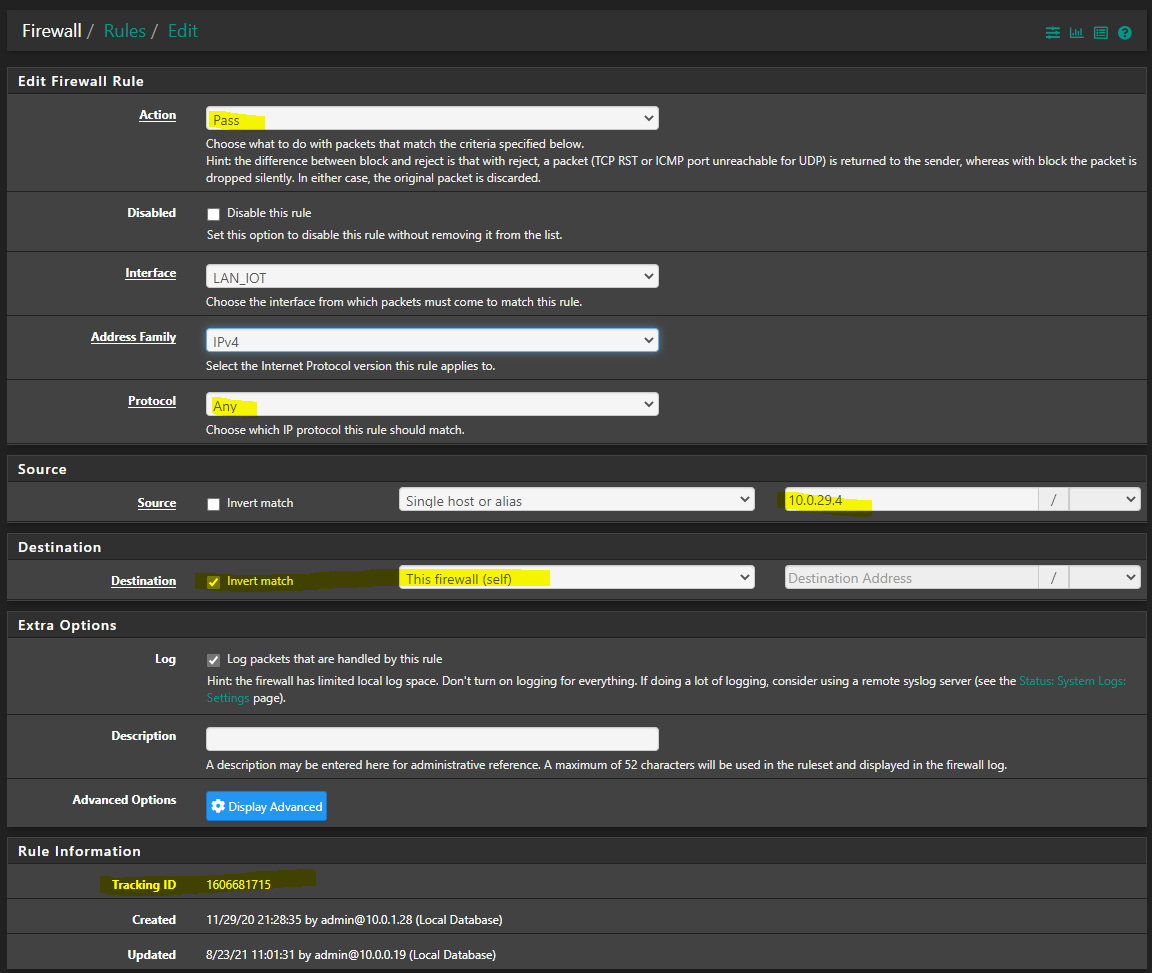
<p dir="auto">In my IOT VLAN there is also my PS5, which has a simple rule:</p>
<p dir="auto"><img src="/assets/uploads/files/1629713570186-96a6f5fe-8a6e-4fe7-ac7e-06f2bb45b70a-image.png" alt="96a6f5fe-8a6e-4fe7-ac7e-06f2bb45b70a-image.png" class=" img-fluid img-markdown" /></p>
<p dir="auto">The PS5 is allowed to do any outbound traffic on any port, exempt accessing the firewall itself. Note The tracking id of the firewall rule</p>
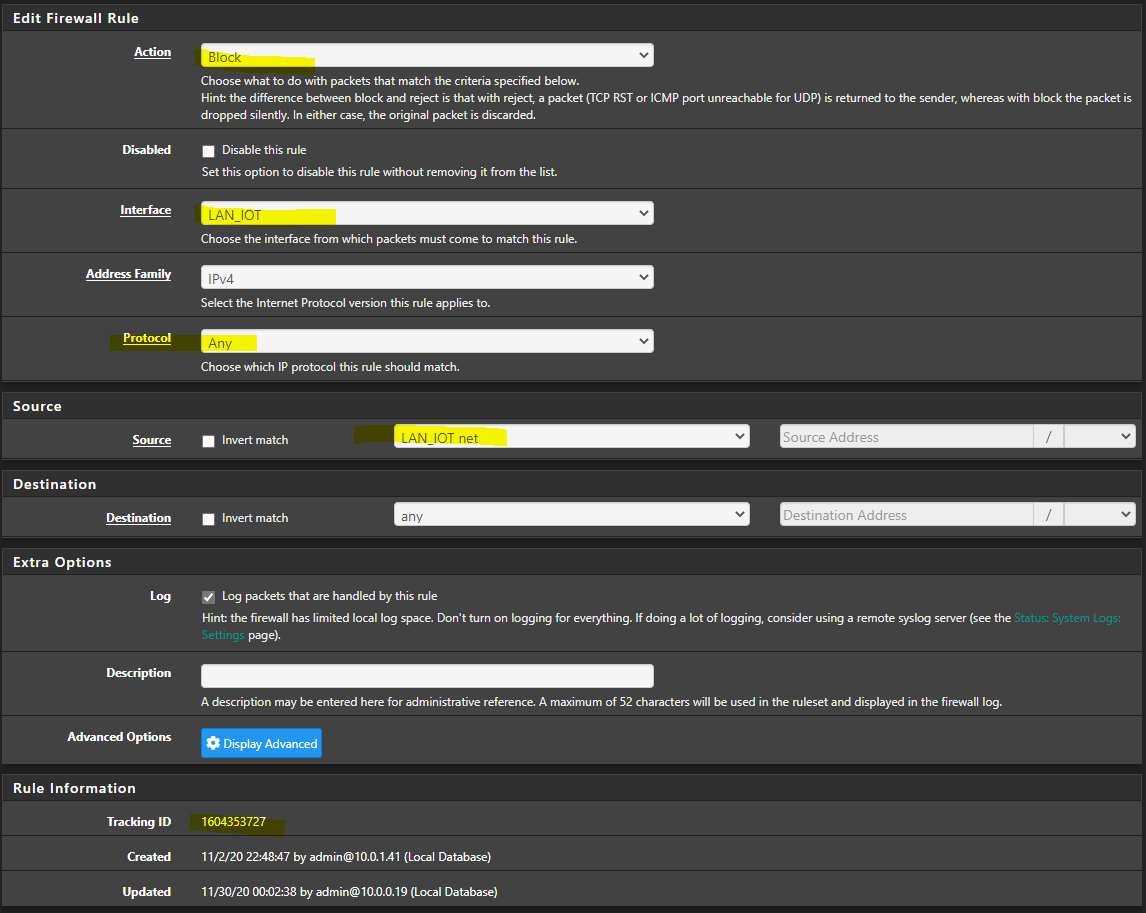
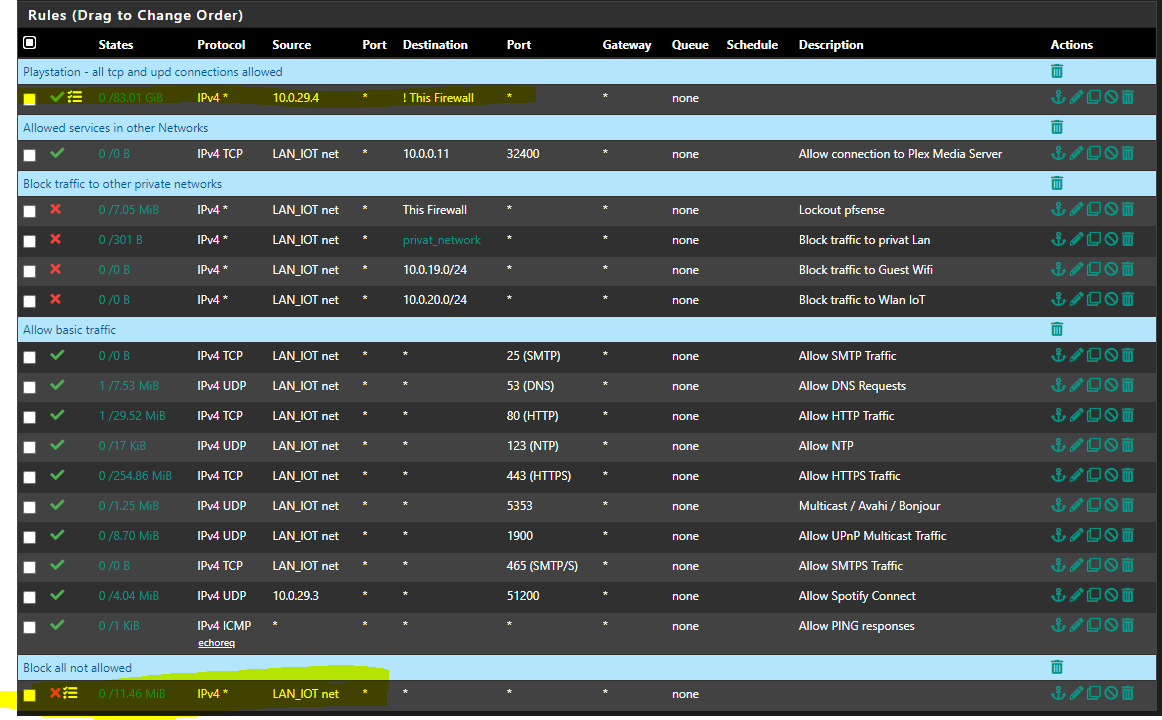
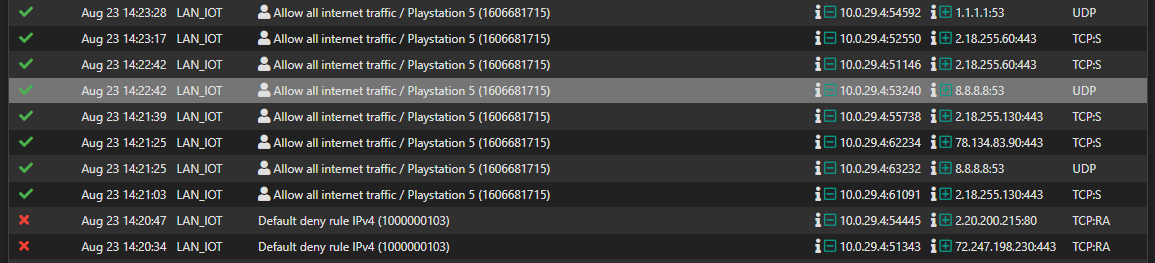
<p dir="auto">LAN_IOT has a specific ruleset to allow only desired outbound traffic. At the bottom i have a rule that blocks all traffic that has not allowed on purpose. Note the Tracking id as well</p>
<p dir="auto"><img src="/assets/uploads/files/1629713651835-3189465c-8900-4787-89f5-c24cc1cd2598-image.png" alt="3189465c-8900-4787-89f5-c24cc1cd2598-image.png" class=" img-fluid img-markdown" /></p>
<p dir="auto">According to my understanding the firewall processes the ruleset from top to bottom. Which means, first rule fits, first applies.</p>
<p dir="auto"><img src="/assets/uploads/files/1629713812082-d9f30aee-594b-417e-b3ba-3bb6dc13c77a-image.png" alt="d9f30aee-594b-417e-b3ba-3bb6dc13c77a-image.png" class=" img-fluid img-markdown" /></p>
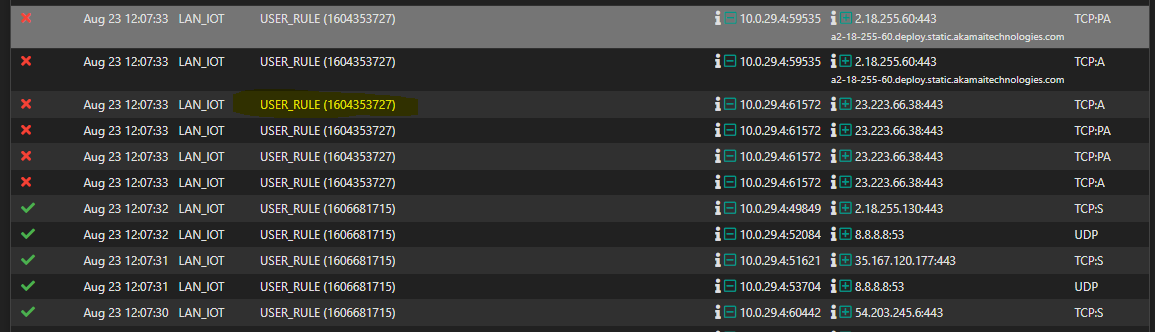
<p dir="auto">I face sudden disconnects from online gaming and voice chats. I checked the firewall logs where I can see that the "general bock" rule applies.<br />
<img src="/assets/uploads/files/1629713990770-20c8120a-ed71-464a-9225-d45ff81c5661-image.png" alt="20c8120a-ed71-464a-9225-d45ff81c5661-image.png" class=" img-fluid img-markdown" /></p>
<p dir="auto">Why does this happen, what is wrong in the configuration?<br />
According to my understanding the first rule that allows anything for the IP of my PS5 should be perfectly fine.</p>
]]></description><link>https://forum.netgate.com/topic/166029/firewall-rules-problem-with-blocked-traffic-no-clue-what-goes-wrong</link><generator>RSS for Node</generator><lastBuildDate>Wed, 13 May 2026 01:09:35 GMT</lastBuildDate><atom:link href="https://forum.netgate.com/topic/166029.rss" rel="self" type="application/rss+xml"/><pubDate>Mon, 23 Aug 2021 10:20:32 GMT</pubDate><ttl>60</ttl><item><title><![CDATA[Reply to Firewall rules &#x2F; problem with blocked traffic &#x2F; no clue what goes wrong on Mon, 23 Aug 2021 12:43:57 GMT]]></title><description><![CDATA[<p dir="auto"><a class="plugin-mentions-user plugin-mentions-a" href="/user/frosch1482">@<bdi>frosch1482</bdi></a> said in <a href="/post/998329">Firewall rules / problem with blocked traffic / no clue what goes wrong</a>:</p>
<blockquote>
<p dir="auto">Isn´t all that multicast traffic on 224 or 225 networks? in this case it shouldn´t be in conflict with the block RFC1918 rule</p>
</blockquote>
<p dir="auto">Yeah while the discovery would be multicast.. Which you seem to be passing with avahi?  But if it finds something on 192.168.1.100 for example via that multicast discovery.. And then wanted to connect to 192.168.1.100 - that would be blocked.</p>
<p dir="auto">So what is the point of the discovery in the first place?</p>
]]></description><link>https://forum.netgate.com/post/998332</link><guid isPermaLink="true">https://forum.netgate.com/post/998332</guid><dc:creator><![CDATA[johnpoz]]></dc:creator><pubDate>Mon, 23 Aug 2021 12:43:57 GMT</pubDate></item><item><title><![CDATA[Reply to Firewall rules &#x2F; problem with blocked traffic &#x2F; no clue what goes wrong on Mon, 23 Aug 2021 12:41:36 GMT]]></title><description><![CDATA[<p dir="auto">you could be right with the 5353, 1900. I have to analyse it deeper these days. If I remember it right, all Spotify stuff is managed via remote server (Spotify is the reason of Avahi). Nothing is done in the local network, exempt "discovery" of the device. But it is a long time ago, I analyzed that stuff in detail.</p>
<p dir="auto">Isn´t all that multicast traffic on 224 or 225 networks? in this case it shouldn´t be in conflict with the block RFC1918 rule</p>
<p dir="auto">Edit:<br />
The new rules did not solve my initial issue<br />
<img src="/assets/uploads/files/1629722484064-66e5114e-bf4e-464b-bf29-e0fbe68f7880-image.png" alt="66e5114e-bf4e-464b-bf29-e0fbe68f7880-image.png" class=" img-fluid img-markdown" /></p>
<p dir="auto">Any other idea?</p>
]]></description><link>https://forum.netgate.com/post/998329</link><guid isPermaLink="true">https://forum.netgate.com/post/998329</guid><dc:creator><![CDATA[Frosch1482]]></dc:creator><pubDate>Mon, 23 Aug 2021 12:41:36 GMT</pubDate></item><item><title><![CDATA[Reply to Firewall rules &#x2F; problem with blocked traffic &#x2F; no clue what goes wrong on Mon, 23 Aug 2021 12:24:16 GMT]]></title><description><![CDATA[<p dir="auto"><a class="plugin-mentions-user plugin-mentions-a" href="/user/frosch1482">@<bdi>frosch1482</bdi></a> that looks better for sure.</p>
<p dir="auto">I don't get the multicast 5353 to 1900 to be honest.. And not sure how those would do anything.. Lets say you passed 5353 to via avahi, and you got back some dns answer from something else on your network so it could then connect to it - but you would then block that connection via your above rule that blocks all access to rfc1918.</p>
<p dir="auto">Do you have UPnP enabled..  What is going to be created via that?  Do you have UPnP locked down?  Also 1900 is used for discovery as well, but even if you pass that with avahi and discovered something SSDP, you wouldn't be able to connect, again when the connection is attempted it would fail because of your block rule to rfc1918..</p>
<p dir="auto">I guess your 29.3 could connect via something it discovers with 5353/1900 via multicast being passed with avahi to something on your network on port 51200?</p>
<p dir="auto">edit: Also the smtp rule.. Do you have something talking to the internet on 25?  Email clients would almost never do this, 25 is mostly done for email server to email server communications.  I guess there are some clients that could send email to the isp smtp server via 25.. But this is rarely done any more.. I don't see any hits on that rule - you could prob remove it.</p>
]]></description><link>https://forum.netgate.com/post/998323</link><guid isPermaLink="true">https://forum.netgate.com/post/998323</guid><dc:creator><![CDATA[johnpoz]]></dc:creator><pubDate>Mon, 23 Aug 2021 12:24:16 GMT</pubDate></item><item><title><![CDATA[Reply to Firewall rules &#x2F; problem with blocked traffic &#x2F; no clue what goes wrong on Mon, 23 Aug 2021 12:19:16 GMT]]></title><description><![CDATA[<p dir="auto">Please see changed ruleset according to your advices:</p>
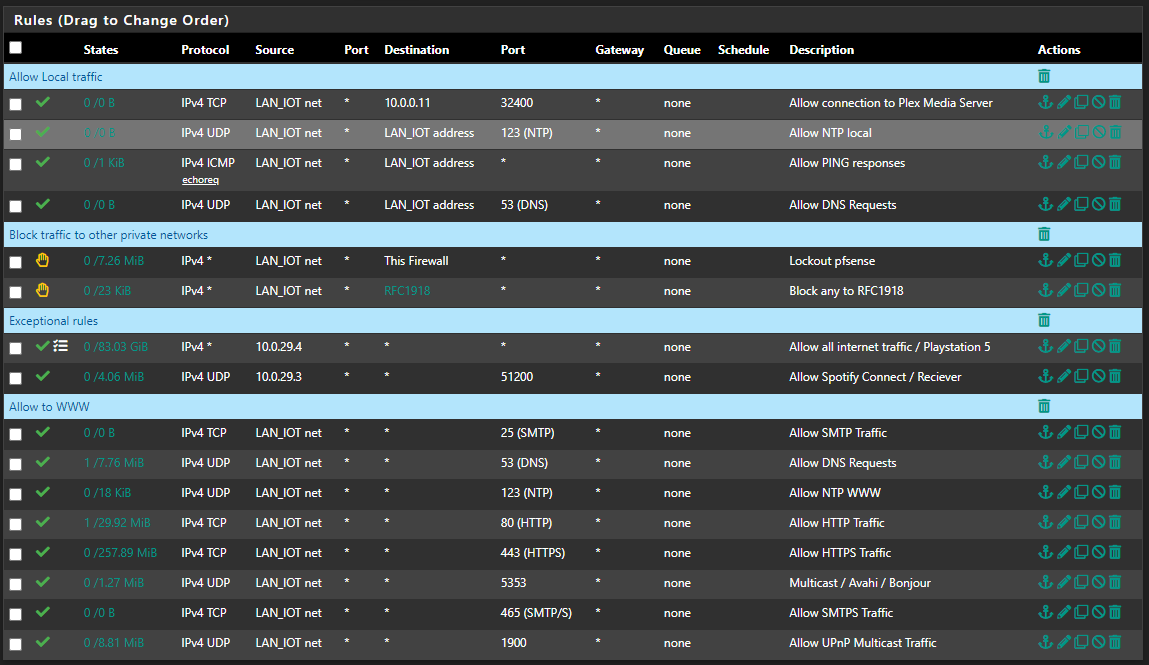
<ul>
<li>All IOT devices can access PLEX media Server</li>
<li>All IOT devices can access local DNS Server, NTP Service and perform pings in VLAN</li>
<li>Traffic to "This firewall" and "privat networks" is blocked for all devices (exempt plex which has its allow rule before)</li>
<li>PS5 and the AV-Reciever have some IP based special rules</li>
<li>Allow basic Internet access</li>
</ul>
<p dir="auto">Note: LAN_IOT consists of multiple devices. TV´s, AV-Receiver, LAN Radio, etc.</p>
<p dir="auto">Rest is blocked as not explicitly allowed<br />
Hope I got it now :)</p>
<p dir="auto"><img src="/assets/uploads/files/1629720160702-df72239e-3f3b-4493-bd5c-710ff974065e-image.png" alt="df72239e-3f3b-4493-bd5c-710ff974065e-image.png" class=" img-fluid img-markdown" /></p>
<p dir="auto">Thank you for your advices</p>
]]></description><link>https://forum.netgate.com/post/998319</link><guid isPermaLink="true">https://forum.netgate.com/post/998319</guid><dc:creator><![CDATA[Frosch1482]]></dc:creator><pubDate>Mon, 23 Aug 2021 12:19:16 GMT</pubDate></item><item><title><![CDATA[Reply to Firewall rules &#x2F; problem with blocked traffic &#x2F; no clue what goes wrong on Mon, 23 Aug 2021 11:40:03 GMT]]></title><description><![CDATA[<p dir="auto">Your first rule allows talking to the firewall on any of its IPs, your 2nd rule blocks everything else..</p>
<p dir="auto">No that is not going to work for internet access..</p>
<p dir="auto">edit: Oh you have that set as inverted rule?  Why?</p>
<p dir="auto">Your blocks are Ack, so out of state.. See how your syn there is allowed to 2.18.255.130 on 443</p>
<p dir="auto">edit2:  Your rule being an inverted rule, allows anything not to the firewall, so those rules at the bottom allowing like smtp, etc. are all pointless..</p>
<p dir="auto">edit3:  The use of inverted rules can be problematic, at least they use to be - if you had vips on the interface, etc.  I wouldn't do the rules like that at all..  Also with your ! rule to firewall, you could talk to any of your other networks/vlans, so those rules blocking access are also pointless since you allowed them in the first rule.  Rules are evaluated top down, first rule to trigger wins, no other rules are evaluated.</p>
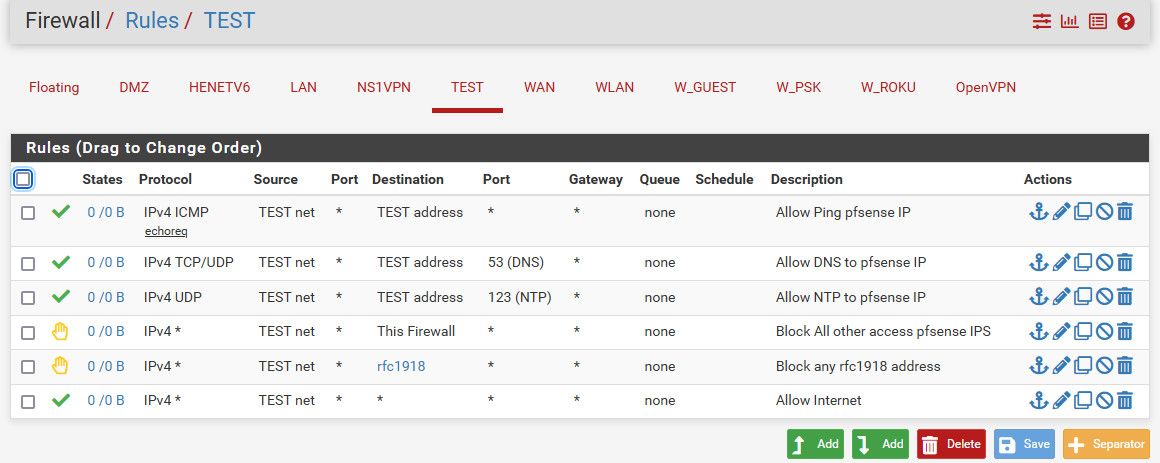
<p dir="auto">Here is a basic set of rules that allow anything to internet, which your trying to do with the first rule, but blocks all other stuff.</p>
<p dir="auto"><img src="/assets/uploads/files/1629718444455-rules.jpg" alt="rules.jpg" class=" img-fluid img-markdown" /></p>
<p dir="auto">Allows ntp, dns and ping to the firewall.. This is normal stuff you would want to be able to do to the firewall - ping to validate you can talk to it :) and then dns and ntp.</p>
<p dir="auto">There is no need for a block rule at the end, unless you don't want to log or something - since by default all traffic is blocked unless allowed in a rule.</p>
]]></description><link>https://forum.netgate.com/post/998317</link><guid isPermaLink="true">https://forum.netgate.com/post/998317</guid><dc:creator><![CDATA[johnpoz]]></dc:creator><pubDate>Mon, 23 Aug 2021 11:40:03 GMT</pubDate></item></channel></rss>