Vivo Fibra + IPv6 +PFsense + PPPoE
-
@cafecomleiteee eu só consegui o ipv6 funcionando quando coloquei o dhcpv6 delegation prefix no valor correto para minha regiao (64). Sugiro vc começar copiando as configurações que coloquei acima e ir alterando o prefix até funcionar.
-
IPv6 para mim funciona normal, com dhcpv6 delegation prefix 64.
Mas meu gateway WAN_PPPOE está sempre offline, só o WAN_DHCP6 que fica online.
-
Funcionou por alguns meses e parou do nada no último dia 10. Vendo as postagens até pensei que a Vivo pudesse ter alterado o tamanho delegado. Mas não!
Tentei um a um do do 48 ao 64 e nada. A Lan continua apenas com IPv4.
No syslog dhcp, tem entradas repetidas do bloco abaixo. Pela primeira linha parece que realmente não estão enviando a delegação.
A Wan fica com ipv6 perfeitamente e consigo pingar endereços fora sem problemas. So que isso não serve de nada já que a rede interna fica sem endereçamento.
Mar 16 21:03:56 dhcp6c 42111 advertise contains no address/prefix
Mar 16 21:03:56 dhcp6c 42111 server ID: 00:03:00:01:40:7c:7d:05:a8:01, pref=-1
Mar 16 21:03:56 dhcp6c 42111 status code: no prefixes
Mar 16 21:03:56 dhcp6c 42111 get DHCP option status code, len 32
Mar 16 21:03:56 dhcp6c 42111 IA_PD: ID=0, T1=0, T2=0
Mar 16 21:03:56 dhcp6c 42111 get DHCP option IA_PD, len 48
Mar 16 21:03:56 dhcp6c 42111 DUID: 00:01:00:01:29:c3:93:99:00:0c:29:3f:4e:3d
Mar 16 21:03:56 dhcp6c 42111 get DHCP option client ID, len 14
Mar 16 21:03:56 dhcp6c 42111 DUID: 00:03:00:01:40:7c:7d:05:a8:01
Mar 16 21:03:56 dhcp6c 42111 get DHCP option server ID, len 10
Mar 16 21:03:56 dhcp6c 42111 receive advertise from fe80::427c:7dff:fe05:a801%pppoe1 on pppoe1
Mar 16 21:03:56 dhcp6c 42111 reset a timer on pppoe1, state=SOLICIT, timeo=368, retrans=123540
Mar 16 21:03:56 dhcp6c 42111 send solicit to ff02::1:2%pppoe1
Mar 16 21:03:56 dhcp6c 42111 set IA_PD
Mar 16 21:03:56 dhcp6c 42111 set IA_PD prefix
Mar 16 21:03:56 dhcp6c 42111 set option request (len 4)
Mar 16 21:03:56 dhcp6c 42111 set elapsed time (len 2)
Mar 16 21:03:56 dhcp6c 42111 set client ID (len 14)
Mar 16 21:03:56 dhcp6c 42111 Sending Solicit
Mar 16 21:02:01 dhcp6c 42111 advertise contains no address/prefix -
Acabei de tentar as configurações indicadas porém não tive sucesso.
Alguém tem conseguido configurar o IPv6 na vivo com o modem em Bridge?
-
Tenho meu modem em bridge e IPv6 funciona:
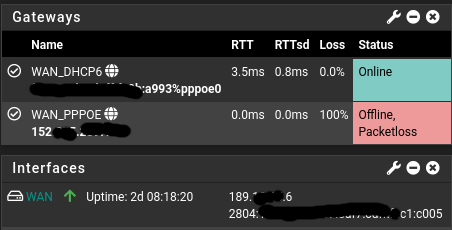
Tenho essas configs:
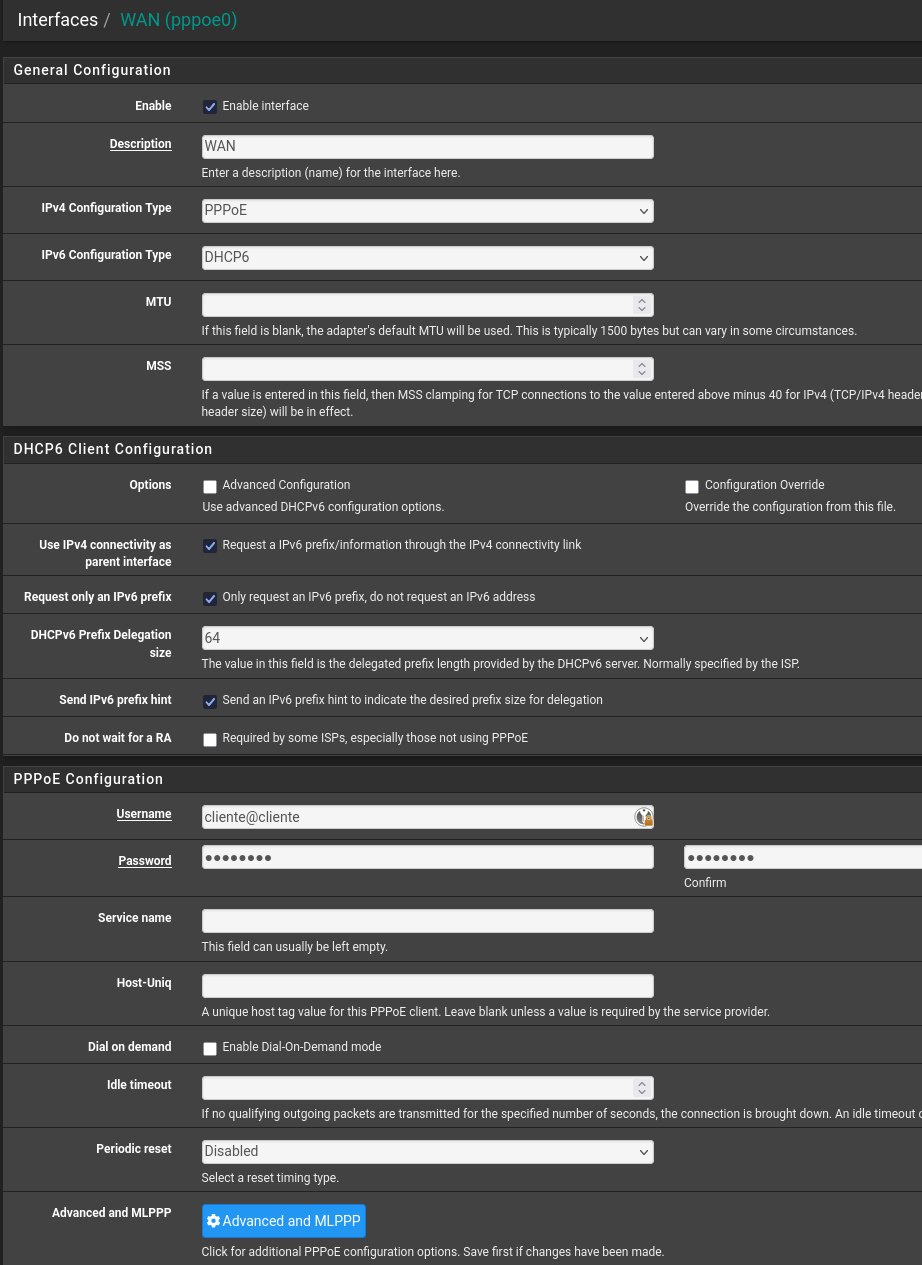
E também o "block bogon networks" ativado (não coube na screenshot)
-
Até hoje de manhã, minha internet da Vivo funcionava sem problemas no pfSense. De repente parou de funcionar. o PPP não consegue mais conectar. Não alterei em nada as configurações do meu pfSense.
Se eu resetar o modem para as configurações de fábrica, tenho internet de volta.
Mais alguém com esse problema?
-
@wololo666 Você está conseguindo o ipv4?
-
@rokam Estou com IPv4 e IPv6. O problema que tinha era o modem que morreu. O técnico trocou por um novo e está tudo de volta ao normal. Você está sem IPv4?
-
@wololo666 a melhor coisa é comprar uma ONU e tirar o da operadora, uma onu marca vsol é top, NIO e Vivo vai liso.
-
@dorabiatto aqui em casa comprei uma gbic xpon, e uso com uma conversor de mídia. Funciona tudo tbm. Comprei 2 placas SFP (uma Intel e outra Broadcom) para conectar essa gbic direto no pfsense, mas por algum motivo ela não sobe como gigabit no freebsd. Se uso com windows, funciona normalmente.
-
The SFP behavior you're seeing on FreeBSD is worth isolating before blaming the module. If the same card negotiates gigabit under Windows but not FreeBSD, the driver and link settings are the likely culprits, not the XPON GBIC itself. Checking what ifconfig reports for media and link state would tell you whether it's stuck at a lower speed or failing to sync at all. I'm curious whether your media converter path behaves identically or only the direct SFP install does—that distinction would narrow it down.
Hello! It looks like you're interested in this conversation, but you don't have an account yet.
Getting fed up of having to scroll through the same posts each visit? When you register for an account, you'll always come back to exactly where you were before, and choose to be notified of new replies (either via email, or push notification). You'll also be able to save bookmarks and upvote posts to show your appreciation to other community members.
With your input, this post could be even better 💗
Register LoginPrivacy Policy · Cookie Policy