Multi Wan and PFSense Updates
-
Hi,
I am using PFSense on 2.5.2 and am very happy with it.
Here, where I have my office, i can only get 16MB/s Copper DSL.
So I use the 16MB/s circuit for everything, where i need a fixed IP and for VoIP.
Everything else I am sending through my 5G router.Works perfect.
I have just one issue with my firewall itself:
I can no longer install packages or update PFSense, unless i shut down one interface and gateway, so that there is only one WAN circuit. Then i can look for packages and updates.Does someone have a hint for me? I have no idea how i could set up a rule, so that the firewall is using just one of the circuits for its own traffic.
Thanks a million,
Cristian -
@gliddie said in Multi Wan and PFSense Updates:
I have just one issue with my firewall itself:
I can no longer install packages or update PFSense, unless i shut down one interface and gateway,So it works on both connections, if only one is up?
So I use the 16MB/s circuit for everything, where i need a fixed IP and for VoIP.
How did you determine the WAN connection to be used?
Have you both gateway added to a gateway group?
-
Hey,
- So it works on both connections, if only one is up?
If i disable one interface and I try the update, or look for available Packages, then it works. I had only tried it with one of the 2 interfaces. Havent tried to disable the other.
Can do it, if it helps.- How did you determine the WAN connection to be used?
I do that through the firewall rules on the LAN onterface.
Based on Source IP Subnet and Destination Subnet.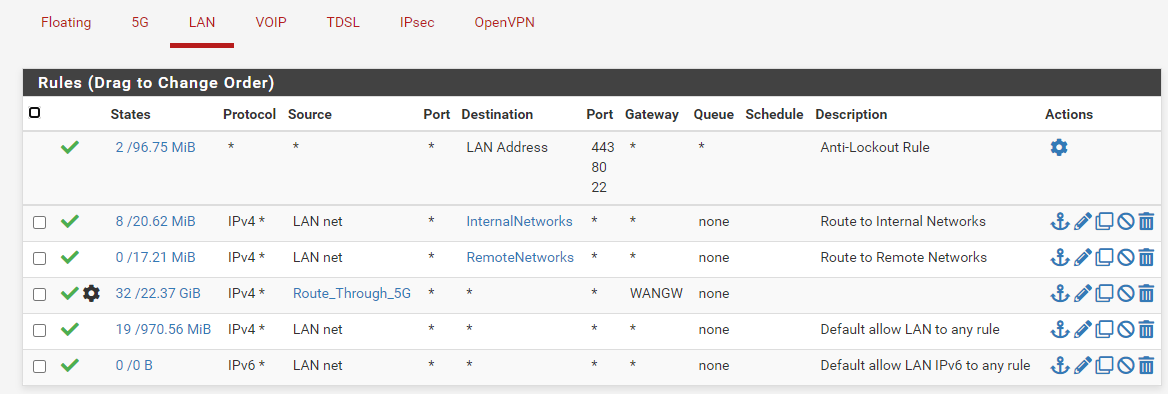
- Have you both gateway added to a gateway group?
Nope havent tried that. As I did not wanted to do load balancing or failover routing.
Sorry if i am not using the right format for the quotes.
Its my first post in this forum :-)Thank you,
Cristian -
Sorry for the VoIP Stuff, I use an own Interface. And own rules for that:
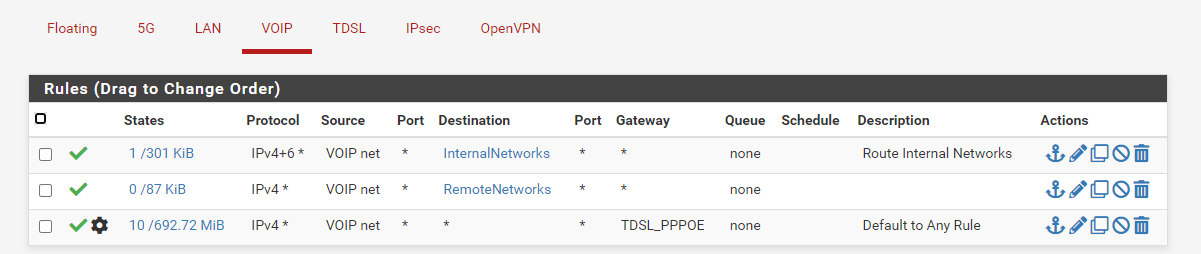
-
@gliddie
pfSense uses the default gateway for accessing the internet if both are up.
You can define, which one should be the default, in System > Routing.Also ensure that there is a DNS server available in System > General and that there no gateway stated if it's a public DNS server, which are reachable over both WAN connections anyway.
-
The DSL GW, I had defined as the default GW:
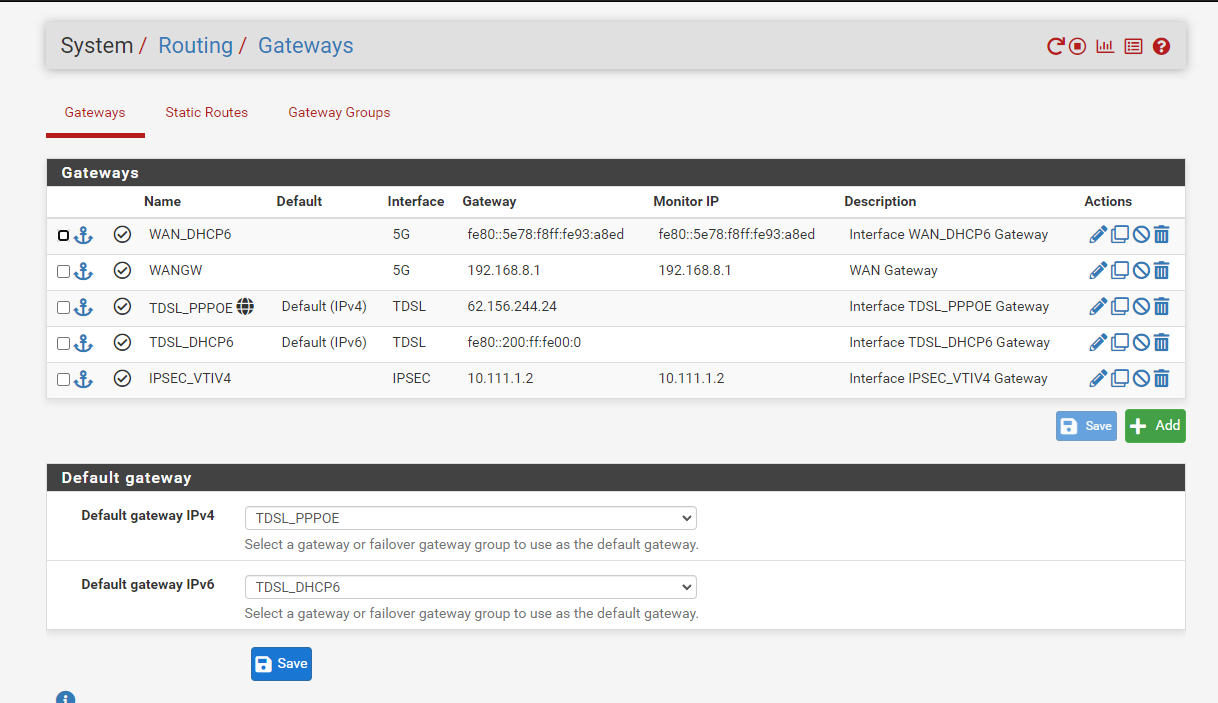
And under General, I also have the Google DNS Server defined.
Have never tried DNS through that interface. I bet thats it.
I give it a try later today.Thank you for your help,
Cristian -
Hello,
I am a newcomer,
I have just updated, I am still waiting...

Hello! It looks like you're interested in this conversation, but you don't have an account yet.
Getting fed up of having to scroll through the same posts each visit? When you register for an account, you'll always come back to exactly where you were before, and choose to be notified of new replies (either via email, or push notification). You'll also be able to save bookmarks and upvote posts to show your appreciation to other community members.
With your input, this post could be even better 💗
Register LoginPrivacy Policy · Cookie Policy