Netgate Discussion Forum
    • Categories
    • Recent
    • Tags
    • Popular
    • Search
    • Register
    • Login
    Introducing Netgate Nexus: Multi-Instance Management at Your Fingertips.

    Another Netgate with storage failure, 6 in total so far

    Scheduled Pinned Locked Moved Official Netgate® Hardware
    330 Posts 45 Posters 271.3k Views 41 Watching
    Loading More Posts
    • Oldest to Newest
    • Newest to Oldest
    • Most Votes
    Reply
    • Reply as topic
    Log in to reply
    This topic has been deleted. Only users with topic management privileges can see it.
    • A
      andrew_cb
      last edited by

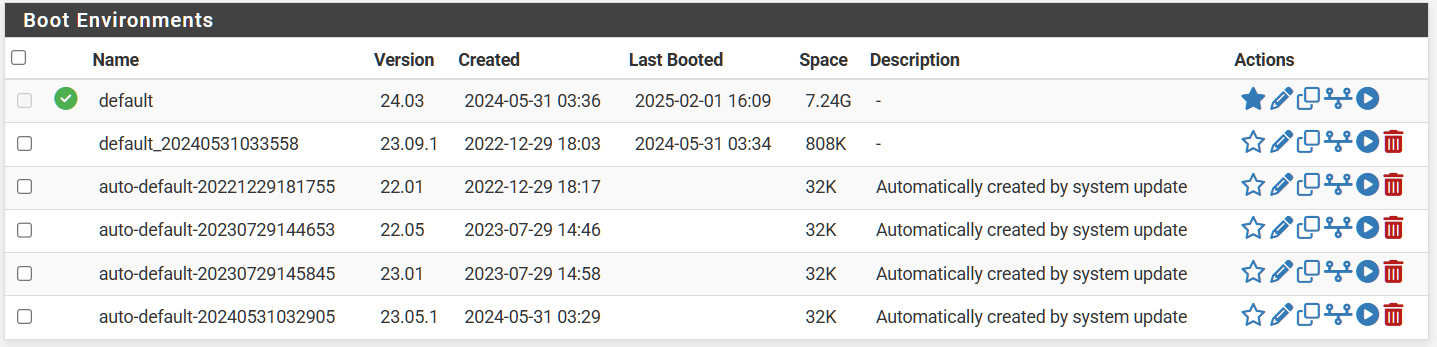
      I checked our firewalls and found that they all had boot environments, with many going back to 22.01. I deleted all the boot environments, and all firewalls showed an increase in disk size. Here are a few examples:

      FW1 before:
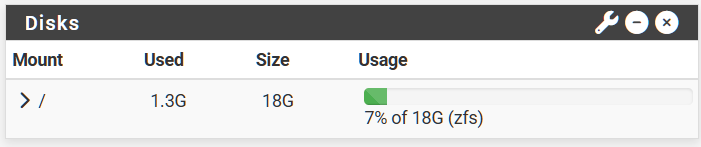
      3e7e19bf-6d47-47da-a077-24beb26f2c9f-image.png

      FW1 Boot environments:
      0a9fc27b-33f6-4abf-93ed-6332dc3df29f-image.png

      FW1 after deleting boot environments:
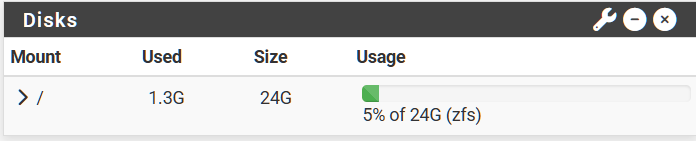
      b687ba1b-3442-44a3-9567-0a17e0a651df-image.png

      FW1 Result: 6GB more space after deleting 5 boot environments (avg 1.2GB per boot environment).

      FW2 before:
      4088910d-4b97-487d-a564-2d232213b1a9-image.png

      FW2 Boot environments:
      26c95d75-bd99-4598-86be-3cee2bed2f1b-image.png

      FW2 after deleting boot environment:
      2782c642-9ad2-412b-a3e5-c3cc1e705762-image.png

      FW2 result: 1GB more space after deleting 1 boot environment (avg 1GB per boot environment).

      FE3 before:
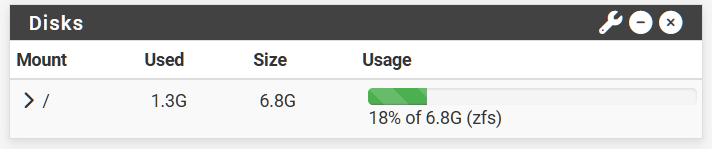
      c306cd4b-8834-414c-a458-2eee06dc8153-image.png

      FW3 boot environments:
      02fb3e1d-5453-4ddd-9398-615420e57db9-image.png

      FW3 after deleting boot environments:
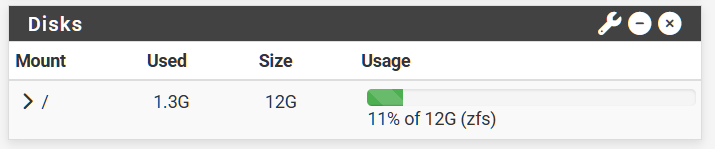
      7319aad8-300a-497f-8bbd-57085210fee2-image.png

      FW3 result: 5.2GB more free space after deleting 4 boot environments (avg 1.3GB per boot environment).

      SteveITSS 1 Reply Last reply
      Reply Quote 1
      • SteveITSS
        SteveITS Galactic Empire @andrew_cb
        last edited by

        @andrew_cb said in Another Netgate with storage failure, 6 in total so far:

        FW1 Result: 6GB more space after deleting 5 boot environments (avg 1.2GB per boot environment).

        FWIW that's pretty typical, it just depends on how much changed on disk in between. The "32K" or whatever shows in the GUI is very misleading there, IMO.

        To upgrade, select your branch in System/Update/Update Settings. When upgrading, allow 10-15 minutes to reboot, or more depending on packages, CPU, and/or disk speed.
        Only install packages for your version of pfSense.
        Upvote 👍 helpful posts!

        A 1 Reply Last reply
        Reply Quote 2
        • A
          andrew_cb @SteveITS
          last edited by

          @SteveITS said in Another Netgate with storage failure, 6 in total so far:

          @andrew_cb said in Another Netgate with storage failure, 6 in total so far:

          FW1 Result: 6GB more space after deleting 5 boot environments (avg 1.2GB per boot environment).

          FWIW that's pretty typical, it just depends on how much changed on disk in between. The "32K" or whatever shows in the GUI is very misleading there, IMO.

          Yes, I figured that the 32K was not accurate.
          The size of the current boot environment decreases to 1.7-1.9GB after the other boot environments are deleted, which is more in line with the actual space consumed.

          1 Reply Last reply
          Reply Quote 0
          • C
            chrcoluk @tinfoilmatt
            last edited by

            @tinfoilmatt said in Another Netgate with storage failure, 6 in total so far:

            But so basically you agree that increasing the vfs.zfs.txg.timeout parameter is a net good thing...

            For sure.

            pfSense CE 2.8.1

            1 Reply Last reply
            Reply Quote 2
            • valnarV
              valnar
              last edited by

              As someone about to buy a 4200, does anyone know if Netgate has implemented any of these strategies in their latest pfSense Plus? If not, can somebody summarize the recommended tweaks?

              M SteveITSS A FireOdoF 4 Replies Last reply
              Reply Quote 0
              • M
                Mission-Ghost @valnar
                last edited by

                @valnar buy a plus, set the vfs.zfs.txg.timeout to a value of between 15 and 30 seconds, connect it to an apc ups and use apcupsd package to initiate low power safe shutdown.

                A bonus would be to buy a fan so it runs cool. Not necessary by any means but would probably help with overall service life.

                My feeble understanding is that Netgate is working on zfs adjustments to address the poor ssd life but has released nothing yet.

                valnarV 1 Reply Last reply
                Reply Quote 1
                • valnarV
                  valnar @Mission-Ghost
                  last edited by

                  @Mission-Ghost Thank you.

                  1 Reply Last reply
                  Reply Quote 0
                  • SteveITSS
                    SteveITS Galactic Empire @valnar
                    last edited by

                    @valnar said in Another Netgate with storage failure, 6 in total so far:

                    summarize the recommended tweaks

                    See this post:
                    https://forum.netgate.com/topic/195990/another-netgate-with-storage-failure-6-in-total-so-far/21

                    To upgrade, select your branch in System/Update/Update Settings. When upgrading, allow 10-15 minutes to reboot, or more depending on packages, CPU, and/or disk speed.
                    Only install packages for your version of pfSense.
                    Upvote 👍 helpful posts!

                    1 Reply Last reply
                    Reply Quote 1
                    • SteveITSS SteveITS referenced this topic on
                    • A
                      andrew_cb @valnar
                      last edited by

                      @valnar For now, I recommend these two changes:

                      Navigate to System > Advanced > System Tunables and add a new tunable:

                      • Tunable vfs.zfs.tgx.timeout
                      • Value 30

                      Navigate to Diagnostics > Command Prompt and run
                      zfs set sync=always pfSense/ROOT/default/cf

                      A M JonathanLeeJ 3 Replies Last reply
                      Reply Quote 1
                      • A
                        azdeltawye @andrew_cb
                        last edited by

                        @andrew_cb

                        Thanks for the easy step-by-step instruction!

                        Quick question - Do you have to run the zfs set command on each subsequent reboot or just the first time after adding the tunable?

                        M 1 Reply Last reply
                        Reply Quote 0
                        • M
                          Mission-Ghost @andrew_cb
                          last edited by

                          @andrew_cb said in Another Netgate with storage failure, 6 in total so far:

                          Navigate to Diagnostics > Command Prompt and run
                          zfs set sync=always pfSense/ROOT/default/cf

                          Note: the command should read:

                          zfs set sync=always pfSense/ROOT/Default/cf
                          
                          Default
                          

                          starts with a capital D.

                          1 Reply Last reply
                          Reply Quote 0
                          • M
                            Mission-Ghost @azdeltawye
                            last edited by

                            @azdeltawye said in Another Netgate with storage failure, 6 in total so far:

                            Quick question - Do you have to run the zfs set command on each subsequent reboot or just the first time after adding the tunable?

                            I'd be interested in the answer as well. The freeBSD help and Google Gemini (which is often wrong but never in doubt) suggests it's a one-time setting.

                            I missed this setting in earlier discussions, so I just executed it and it's set in the zfs config now. I haven't rebooted. Yet.

                            FireOdoF 1 Reply Last reply
                            Reply Quote 0
                            • FireOdoF
                              FireOdo @Mission-Ghost
                              last edited by FireOdo

                              @Mission-Ghost said in Another Netgate with storage failure, 6 in total so far:

                              I missed this setting in earlier discussions, so I just executed it and it's set in the zfs config now. I haven't rebooted. Yet.

                              If you make a entry in the "system tuning" the setting will survive even a system upgrade (if still necessary)...

                              Kettop Mi4300YL CPU: i5-4300Y @ 1.60GHz RAM: 8GB Ethernet Ports: 4
                              SSD: SanDisk pSSD-S2 16GB (ZFS) WiFi: WLE200NX
                              pfsense 2.9.0 CE
                              Packages: Apcupsd, Cron, Iftop, Iperf, LCDproc, Nmap, pfBlockerNG, RRD_Summary, Shellcmd, Snort, Speedtest, System_Patches.

                              M 1 Reply Last reply
                              Reply Quote 0
                              • E
                                elvisimprsntr
                                last edited by elvisimprsntr

                                Even though I have a Kingston mSATA SDD with 2.1 years power on hours, life is down to 90%

                                
                                ID# ATTRIBUTE_NAME          FLAG     VALUE WORST THRESH TYPE      UPDATED  WHEN_FAILED RAW_VALUE
                                  9 Power_On_Hours          0x0000   100   100   000    Old_age   Offline      -       18867
                                169 Remaining_Lifetime_Perc 0x0000   090   090   000    Old_age   Offline      -       90
                                
                                
                                sysctl vfs.zfs.txg.timeout=30
                                

                                Lower case "default" on 2.7.2 CE

                                zfs list
                                
                                NAME                                 USED  AVAIL  REFER  MOUNTPOINT
                                pfSense                             24.1G   205G    96K  /pfSense
                                pfSense/ROOT                        1.11G   205G    96K  none
                                pfSense/ROOT/default                1.11G   205G  1.10G  /
                                pfSense/ROOT/default/cf             6.88M   205G  6.88M  /cf
                                pfSense/ROOT/default/var_cache_pkg   336K   205G   336K  /var/cache/pkg
                                pfSense/ROOT/default/var_db_pkg     5.42M   205G  5.42M  /var/db/pkg
                                pfSense/home                         108K   205G   108K  /home
                                pfSense/reservation                   96K   227G    96K  /pfSense/reservation
                                pfSense/tmp                         1.37M   205G  1.37M  /tmp
                                pfSense/var                         35.9M   205G  3.45M  /var
                                pfSense/var/cache                     96K   205G    96K  /var/cache
                                pfSense/var/db                      2.38M   205G  2.38M  /var/db
                                pfSense/var/empty                     96K   205G    96K  /var/empty
                                pfSense/var/log                     29.8M   205G  29.8M  /var/log
                                pfSense/var/tmp                      136K   205G   136K  /var/tmp
                                
                                zfs set sync=always pfSense/ROOT/default/cf
                                
                                M 1 Reply Last reply
                                Reply Quote 0
                                • FireOdoF
                                  FireOdo @valnar
                                  last edited by

                                  @valnar said in Another Netgate with storage failure, 6 in total so far:

                                  If not, can somebody summarize the recommended tweaks?

                                  These are my settings:

                                  vfs.zfs.txg.timeout=120 (you can increase this value as you wish - I was gone until 2400 in experiments with no problems)
                                  zfs set sync=disabled zroot/tmp (pfSense/tmp)
                                  zfs set sync=disabled zroot/var (pfSense/var) 
                                  

                                  Regards,
                                  fireodo

                                  Kettop Mi4300YL CPU: i5-4300Y @ 1.60GHz RAM: 8GB Ethernet Ports: 4
                                  SSD: SanDisk pSSD-S2 16GB (ZFS) WiFi: WLE200NX
                                  pfsense 2.9.0 CE
                                  Packages: Apcupsd, Cron, Iftop, Iperf, LCDproc, Nmap, pfBlockerNG, RRD_Summary, Shellcmd, Snort, Speedtest, System_Patches.

                                  JonathanLeeJ 1 Reply Last reply
                                  Reply Quote 2
                                  • M
                                    Mission-Ghost @elvisimprsntr
                                    last edited by

                                    @elvisimprsntr Interesting. Why the inconsistency, I wonder?

                                    1 Reply Last reply
                                    Reply Quote 0
                                    • M
                                      Mission-Ghost @FireOdo
                                      last edited by

                                      @fireodo said in Another Netgate with storage failure, 6 in total so far:

                                      If you make a entry in the "system tuning" the setting will survive even a system upgrade (if still necessary)...

                                      Sweet. Thanks.

                                      FireOdoF 1 Reply Last reply
                                      Reply Quote 0
                                      • FireOdoF
                                        FireOdo @Mission-Ghost
                                        last edited by

                                        @Mission-Ghost said in Another Netgate with storage failure, 6 in total so far:

                                        Sweet.

                                        Nice that it tastes good 😁 😁

                                        Kettop Mi4300YL CPU: i5-4300Y @ 1.60GHz RAM: 8GB Ethernet Ports: 4
                                        SSD: SanDisk pSSD-S2 16GB (ZFS) WiFi: WLE200NX
                                        pfsense 2.9.0 CE
                                        Packages: Apcupsd, Cron, Iftop, Iperf, LCDproc, Nmap, pfBlockerNG, RRD_Summary, Shellcmd, Snort, Speedtest, System_Patches.

                                        1 Reply Last reply
                                        Reply Quote 0
                                        • JonathanLeeJ
                                          JonathanLee @FireOdo
                                          last edited by JonathanLee

                                          @fireodo You should set this in cron right? Because this will default every reboot...

                                          zfs set sync=disabled pfSense/var
                                          zfs set sync=disabled pfSense/tmp

                                          should they no longer show if you run "zfs list" also?

                                          Make sure to upvote

                                          FireOdoF 2 Replies Last reply
                                          Reply Quote 0
                                          • FireOdoF
                                            FireOdo @JonathanLee
                                            last edited by

                                            @JonathanLee said in Another Netgate with storage failure, 6 in total so far:

                                            You use the zfs set sync=disabled pfSense/var in cron right?

                                            No.

                                            Because this will default every reboot...

                                            Not here - once set it remains that way even after reboot. (btw. on 23.04.2025 the system was rebooted, after an long power outage that exhausted the UPS, caused by work on the power line by the provider)

                                            Kettop Mi4300YL CPU: i5-4300Y @ 1.60GHz RAM: 8GB Ethernet Ports: 4
                                            SSD: SanDisk pSSD-S2 16GB (ZFS) WiFi: WLE200NX
                                            pfsense 2.9.0 CE
                                            Packages: Apcupsd, Cron, Iftop, Iperf, LCDproc, Nmap, pfBlockerNG, RRD_Summary, Shellcmd, Snort, Speedtest, System_Patches.

                                            cmcdonaldC 1 Reply Last reply
                                            Reply Quote 0

                                            Hello! It looks like you're interested in this conversation, but you don't have an account yet.

                                            Getting fed up of having to scroll through the same posts each visit? When you register for an account, you'll always come back to exactly where you were before, and choose to be notified of new replies (either via email, or push notification). You'll also be able to save bookmarks and upvote posts to show your appreciation to other community members.

                                            With your input, this post could be even better 💗

                                            Register Login
                                            • First post
                                              Last post
                                            Copyright 2026 Rubicon Communications LLC (Netgate). All rights reserved.
                                            Privacy Policy · Cookie Policy