WebUI is confused about package updates
-
The issue has been around for a while, but it can be condensed to this:
Trying to update a package which has a new version available with 100% certainty leads to this:
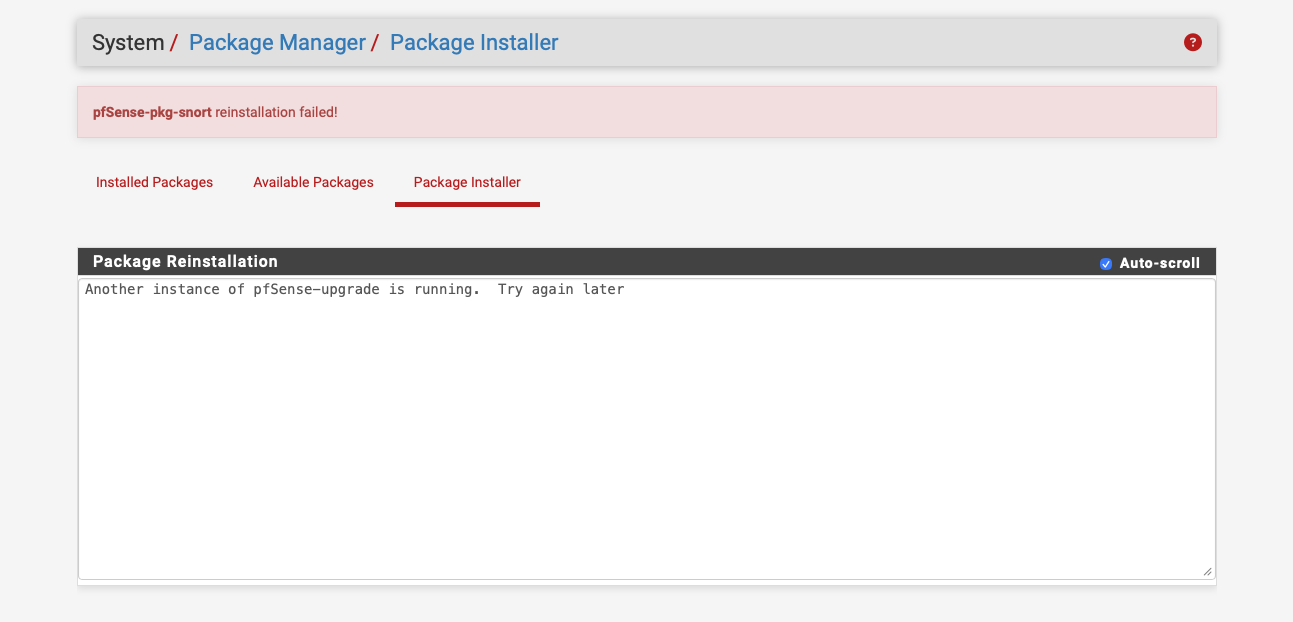
Meanwhile, updating the same package from the shell works like a charm:
[2.8.1-RELEASE][root@host.domain.tld]/root: pkg-static install pfSense-pkg-snort
Updating pfSense-core repository catalogue...
Fetching meta.conf:   0%
Fetching data.pkg:   0%
pfSense-core repository is up to date.
Updating pfSense repository catalogue...
Fetching meta.conf:   0%
Fetching data.pkg:   0%
pfSense repository is up to date.
All repositories are up to date.
The following 1 package(s) will be affected (of 0 checked):

Installed packages to be UPGRADED:
	pfSense-pkg-snort: 4.1.6_26 -> 4.1.6_28 [pfSense]

Number of packages to be upgraded: 1

210 KiB to be downloaded.

Proceed with this action? [y/N]: y
[1/1] Fetching pfSense-pkg-snort-4.1.6_28.pkg: 100%  210 KiB 215.3kB/s    00:01
Checking integrity... done (0 conflicting)
[1/1] Upgrading pfSense-pkg-snort from 4.1.6_26 to 4.1.6_28...
[1/1] Extracting pfSense-pkg-snort-4.1.6_28: 100%
Removing snort components...
Menu items... done.
Services... done.
Loading package instructions...
Saving updated package information...
overwrite!
Loading package configuration... done.
Configuring package components...
Loading package instructions...
Custom commands...
Executing custom_php_install_command()...Saved settings detected.
Migrating settings to new configuration... done.
Downloading configured rule sets. This may take some time...
Downloading Snort Subscriber rules md5 file... done.
Checking Snort Subscriber rules md5 file... done.
There is a new set of Snort Subscriber rules posted.
Downloading snortrules-snapshot-29200.tar.gz... done.
Downloading Snort OpenAppID detectors md5 file... done.
Checking Snort OpenAppID detectors md5 file... done.
There is a new set of Snort OpenAppID detectors posted.
Downloading snort-openappid.tar.gz... done.
Downloading Snort AppID Open Text Rules md5 file... done.
Checking Snort AppID Open Text Rules md5 file... done.
There is a new set of Snort AppID Open Text Rules posted.
Downloading appid_rules.tar.gz... done.
Downloading Snort GPLv2 Community Rules md5 file... done.
Checking Snort GPLv2 Community Rules md5 file... done.
There is a new set of Snort GPLv2 Community Rules posted.
Downloading community-rules.tar.gz... done.
Downloading Emerging Threats Open rules md5 file... done.
Checking Emerging Threats Open rules md5 file... done.
There is a new set of Emerging Threats Open rules posted.
Downloading emerging.rules.tar.gz... done.
Downloading Feodo Tracker Botnet C2 IP rules file... done.
Installing Feodo Tracker Botnet C2 IP rules...Feodo Tracker Botnet C2 IP rules were updated.
Installing Snort Subscriber ruleset...Copying md5 signature to snort directory... done.
Installing Snort OpenAppID detectors...Copying md5 signature to snort directory... done.
Installing Snort OpenAppID Rules...Copying md5 signature to snort directory... done.
Installing Snort GPLv2 Community Rules... done.
Installing Emerging Threats Open rules...Copying md5 signature to snort directory... done.
Updating rules configuration for: WAN ... done.
Updating rules configuration for: LAN ... done.
Updating rules configuration for: DMZ ... done.
Cleaning up temp dirs and files... done.
The Rules update has finished.
Generating snort.conf configuration file from saved settings.
Generating configuration for WAN... done.
Generating configuration for LAN... done.
Generating configuration for DMZ... done.
Generating snort.sh script in /usr/local/etc/rc.d/... done.
Finished rebuilding Snort configuration files.
done.
Executing custom_php_resync_config_command()...done.
Menu items... done.
Services... done.
Writing configuration... done.
Please visit Services - Snort - Interfaces tab first and select your desired rules. Afterwards visit the Updates tab to download your configured rulesets.
[2.8.1-RELEASE][root@host.domain.tld]/root:
How does the web UI decide that "Another instance of pfSense-upgrade is running" when clearly it is not? Are there lock files that don’t get cleared out, or how does that message come about?
-
It tries to check by running
pfSense-upgrade -dc. That will show that error if it's already running.


Copyright 2025 Rubicon Communications LLC (Netgate). All rights reserved.