Why is pfblocker blocking pfsense.org
-
Wen i want to visit doc.pfsense.org, forum.pfsense.org or www.pfsense.org I can't reach those servers. I looked in the syslog of my dns server and saw many lines like this:
Jun 1 03:35:38 ns named[28242]: error (connection refused) resolving 'dns5.registrar-servers.com/A/IN': 98.124.194.1#53So i went to the firewall log of my pfsense router and found there lines like this:
block Jun 2 01:02:47 DMZ pfBlockerBadguys auto rule (@126) 192.168.x.x:x 98.124.194.1:53 UDP98.124.194.1 is a ip address of a hosting company were pfsense is hosted so the blocklists i have configured has the ip adresses of this hosting company in its list.
I have these lists configured:
http://list.iblocklist.com/?list=bt_proxy&fileformat=p2p&archiveformat=gz
http://list.iblocklist.com/?list=bt_ads&fileformat=p2p&archiveformat=gz
http://list.iblocklist.com/?list=bt_spyware&fileformat=p2p&archiveformat=gz
http://list.iblocklist.com/?list=bt_dshield&fileformat=p2p&archiveformat=gz
http://list.iblocklist.com/?list=bt_hijacked&fileformat=p2p&archiveformat=gz
http://feeds.dshield.org/top10-2.txt
http://www.spamhaus.org/drop/drop.txt
http://www.spamhaus.org/drop/edrop.txt
http://list.iblocklist.com/?list=bt_spider&fileformat=p2p&archiveformat=gzWhy are the DNS servers of the hosting company where pfsense.org is hosting blocked wen I use above blocklists?
-
Our nameservers are currently hosted by our domain registrar, Namecheap. The servers are separate, in our Austin colo primarily. I don't see that IP or any subnet containing it listed in anything on iblocklist nor the other lists. What specifically do you have in "pfBlockerBadguys"? Has to be more than what you have listed there. Or maybe briefly there was a mistake in one of those lists that's since been corrected.
-
@cmb:
Our nameservers are currently hosted by our domain registrar, Namecheap. The servers are separate, in our Austin colo primarily. I don't see that IP or any subnet containing it listed in anything on iblocklist nor the other lists. What specifically do you have in "pfBlockerBadguys"? Has to be more than what you have listed there. Or maybe briefly there was a mistake in one of those lists that's since been corrected.
I use 50 Blocklists and its not currently listed in any of those.
I did't find this thou?
http://kb.bothunter.net/ipInfo/nowait.php?IP=98.124.194.1
https://www.virustotal.com/en/ip-address/98.124.194.1/information/
-
oke so its a good thing this ip is blocked. Strange it resolves to a other domain as it did yesterday.
@cmb:
What specifically do you have in "pfBlockerBadguys"? Has to be more than what you have listed there. Or maybe briefly there was a mistake in one of those lists that's since been corrected.
Nope those are the lists i have in the Badguys list else it wouldn have no sense to ask for help here if i wasn't honest about that. At the moment everything seems to be normal. The above mentioned ip resolves to something else and pfsense.org and its subdomains are all reachable. I searched my systems like crazy if and what could be wrong. Strange thing is dnsstuff.com resolved the ip yesterday also different as it does today, very confusing to figure out whats going on.
-
Wel today the problems are back. The only way i can get to the pfsense.org forum is bij going to https://208.123.73.68/ like i'm doing now or to disable pfblocker. Every time i try to go to pfsense.org or one of its subdomains i see a line like this in the firewall log:
Jun 4 12:42:03 DMZ pfBlockerBadguys auto rule (@126) 192.168.xxx.xxx:xxx 98.124.192.1:53 UDPAnd a line like this in de syslog of my dns vps system:
Jun 4 12:53:56 ns named[259]: error (connection refused) resolving 'dns2.registrar-servers.com/A/IN': 98.124.192.1#53Then i do:
nslookup dns2.registrar-servers.com 8.8.8.8
wich gives
Naam: dns2.registrar-servers.com
Addresses: 208.64.122.244
208.64.122.242
????????And
nslookup 98.124.192.1 8.8.8.8
gives:
Naam: dns1.name-services.com
Address: 98.124.192.1So here is definetly something wrong
because wen i don't use the google dns server i can't resolve those ip's and domain names at all
Server can't find the domain server failed.I use dns forwarder and a own dns server. All my systems are set to my router to resolve dns not directly to the dns server. wich doesn't make a difference because if i manualy do a lookup directly with my own dns server i get the same results. its is blocked by pfblocker.
Smoke is coming from my brain from thinking about this :)
Whats is going on here? -
@cmb:
Our nameservers are currently hosted by our domain registrar, Namecheap. The servers are separate, in our Austin colo primarily. I don't see that IP or any subnet containing it listed in anything on iblocklist nor the other lists. What specifically do you have in "pfBlockerBadguys"? Has to be more than what you have listed there. Or maybe briefly there was a mistake in one of those lists that's since been corrected.
Namecheap and registrars-servers.com have some kind of relation with each other i think see https://www.namecheap.com/support/knowledgebase/article.aspx/536/51/how-do-i-set-my-domain-to-use-namecheaps-name-servers
I stil cannot surf to *.pfsense.org i have to use the ip's to get to the forum or disable pfblocker.
Also cannot reach update servers wen i want to update firmware.Downloading new version information…done
Unable to check for updates.
Could not contact custom update server.Wen I add a dns forwarder ( 8.8.8.8 ) in my bind9 config everything is working as it should but then the blocked domain are resolved by that forwarder ofcourse my own local dns server is still blocked.
-
I use 50 Blocklists and its not currently listed in any of those.
In this list:
http://list.iblocklist.com/?list=bt_ads&fileformat=p2p&archiveformat=gz
I found for example this:
eNom, Incorporated, DEMAND MEDIA INC:98.124.192.0-98.124.255.255 -
You clearly have something wrong with your dns.. pfsense.org dns servers are these
Name Server:DNS1.REGISTRAR-SERVERS.COM
Name Server:DNS2.REGISTRAR-SERVERS.COM
Name Server:DNS3.REGISTRAR-SERVERS.COM
Name Server:DNS4.REGISTRAR-SERVERS.COM
Name Server:DNS5.REGISTRAR-SERVERS.COMIf you query the root servers for .org this is exactly what they tell you to go to one of these for org
dig @m.root-servers.net org NS
;; AUTHORITY SECTION:
org. 172800 IN NS b2.org.afilias-nst.org.
org. 172800 IN NS d0.org.afilias-nst.org.
org. 172800 IN NS b0.org.afilias-nst.org.
org. 172800 IN NS c0.org.afilias-nst.info.
org. 172800 IN NS a0.org.afilias-nst.info.
org. 172800 IN NS a2.org.afilias-nst.info.You then ask one of them for pfsense.org NS
;; AUTHORITY SECTION:
pfsense.org. 86400 IN NS dns1.registrar-servers.com.
pfsense.org. 86400 IN NS dns2.registrar-servers.com.
pfsense.org. 86400 IN NS dns3.registrar-servers.com.
pfsense.org. 86400 IN NS dns4.registrar-servers.com.
pfsense.org. 86400 IN NS dns5.registrar-servers.com.None of those NS are that netblock that is blocked.
Do a simple dig +trace to find how pfsense.org is resolved - here I snipped out bunch of noise but this gives you the full path
ubuntu:~$ dig www.pfsense.org +trace
; <<>> DiG 9.9.5-3-Ubuntu <<>> www.pfsense.org +trace
;; global options: +cmd
. 290996 IN NS l.root-servers.net.
. 290996 IN NS a.root-servers.net.
<snipped>;; Received 397 bytes from 192.168.1.253#53(192.168.1.253) in 39 msorg. 172800 IN NS c0.org.afilias-nst.info.
org. 172800 IN NS b0.org.afilias-nst.org.
<snipped>;; Received 689 bytes from 199.7.91.13#53(d.root-servers.net) in 46 mspfsense.org. 86400 IN NS dns2.registrar-servers.com.
pfsense.org. 86400 IN NS dns1.registrar-servers.com.
<snipped>;; Received 653 bytes from 199.19.53.1#53(c0.org.afilias-nst.info) in 103 mswww.pfsense.org. 3600 IN A 208.123.73.69
;; Received 49 bytes from 173.245.59.16#53(dns1.registrar-servers.com) in 13 msedit:
Not sure where you resolved this from
'dns2.registrar-servers.com/A/IN': 98.124.192.1#53Oh here is the problem
; <<>> DiG 9.9.5-3-Ubuntu <<>> registrar-servers.com NS
;; global options: +cmd
;; Got answer:
;; ->>HEADER<<- opcode: QUERY, status: NOERROR, id: 10405
;; flags: qr rd ra; QUERY: 1, ANSWER: 5, AUTHORITY: 0, ADDITIONAL: 6;; OPT PSEUDOSECTION:
; EDNS: version: 0, flags:; udp: 4000
;; QUESTION SECTION:
;registrar-servers.com. IN NS;; ANSWER SECTION:
registrar-servers.com. 3600 IN NS dns1.name-services.com.
registrar-servers.com. 3600 IN NS dns4.name-services.com.
registrar-servers.com. 3600 IN NS dns3.name-services.com.
registrar-servers.com. 3600 IN NS dns2.name-services.com.
registrar-servers.com. 3600 IN NS dns5.name-services.com.;; ADDITIONAL SECTION:
dns4.name-services.com. 243 IN A 98.124.194.1
dns3.name-services.com. 197 IN A 98.124.193.1
dns2.name-services.com. 91 IN A 98.124.197.1
dns5.name-services.com. 50 IN A 98.124.196.1
dns1.name-services.com. 171 IN A 98.124.192.1Those are the NS for the registrar-servers.com domain.. So you can not look up dnsX.registrar-servers.com.. Since the NS are not in their own domain, there is no glue..
I would say remove that list.. That is going to cause you all kinds of problems looking any domains off any of those NS.. That list has bad entries..</snipped></snipped></snipped>
-
Thank you for your help. I tested everything you said and advised, everything is exactly as you wrote here too the same.
No difference there.My "Badguys" list, which is blocking *.pfsense.org, is set to block incoming ánd outgoing traffic. When I switch it to inbound only i can reach *.pfsense.org normaly. Maybe that explains something. I set it to both because I noticed wen i visit websites ad companies harvest information from site visitors. My workstation makes a lot of outgoing connections to ad servers all over the world wen i visit websites. Websites like webshops, online newspapers etc. etc. I wanted to block that so i switched to block both inbound ánd outbound traffic for my Badguys list.
Result is that some websites are not reachable anymore. I don't mind that but a site like pfsense i can't reach thats strange and i want to be able to reach the pfsense websites so thats why i asked here why *.pfsense.org is blocked.
BTW I also flushed the cache of my dns server "rndc flush" which made no difference either.
-
Hi Gé,
When you setup pfBlocker did you use "Aliases"?
If yes, you can create a new alias "SAFE_LIST" and insert any safe ip into this list.
In Firewall:Rules, Put a pass rule for this alias list. You can configure additional settings if you like in the rule. This rule needs to be above the pfBlocker Block/Reject Rules on each interface.
You will get false positives every now and then, so this is the best way to handle that.
-
No i didn't set it to alias but i stil can do it that way because pfblocker insers the Badguys list in de rules of the selected interfaces i can stil set a rule or alias based rule to let pass some ip's/ranges but then stil strange why this happens i would realy like to know why this is happening with the *.pfsense.org domains. I can also surf the pfsense pages with their ip's in my browser i'm just curious whats going on. Is it explainable, is something wrong then where / what? :)
This is how i set up the badguys list.
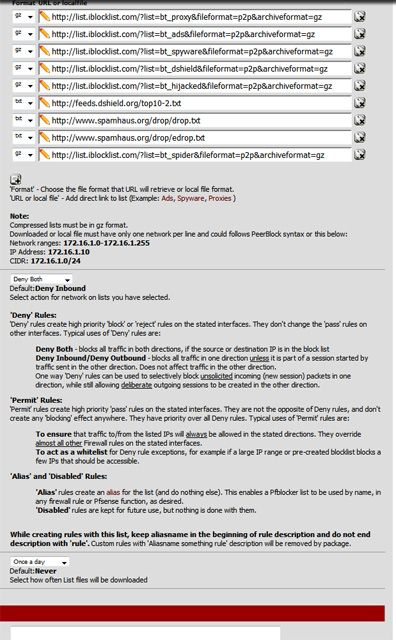
-
The Blocklists can sometimes make a mistake and block a Good Address. Or its possible that the address was involved in some malicious activity.
You can't control the Blocklist, so you have two options
- remove the Blocklist
- add the IPs to a Whitelist.
Using Alias's is better as you can control how the Blocklists behaves. So you can block to certain LAN Destinations, or ports or a combination of different settings that are available in the RULES configuration. I usually "Block" on the WAN and "reject" on the LAN side.
This is the recommended method to use pfBlocker.
-
Yes maybe thats an idea to make aliases for different block and safe lists instead of one list with a ton of blocklists. I'm going to play around with that idea this week. Thank you for your help and advise.
I have it also this way block on the wan and reject on the other inbound interfaces.
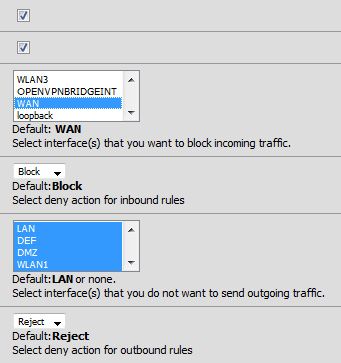
Wen i remove
http://list.iblocklist.com/?list=bt_ads&fileformat=p2p&archiveformat=gz
from the badguys list i can reach *.pfsense.org. -
In pfBlocker "General" Tab, you can ignore all of the "Inbound/Outbound" settings. The Alias's don't use those settings.
When you setup a "List" for pfBlocker, for the "List Action" Select "Alias only"
Do that for each list you have.
After that, goto the Firewall Tab, and create "Rules" to Pass/Reject or Block on the Interfaces you want to setup.
Than add a Whitelist Alias above those Block/Reject Rules.
So pfBlocker can also download a "Safe List of Addresses" and you can create a "Pass" rule.
I like to seperate the Lists so I can see what is Blocking or Passing etc… So I put all of "Iblock" into one List for example.
-
Thank you great tips. I'm going to do it this way.
Its more versatile this way.