Netgate Discussion Forum
    • Categories
    • Recent
    • Tags
    • Popular
    • Users
    • Search
    • Register
    • Login

    Any / Any Rules not working?

    Scheduled Pinned Locked Moved Firewalling
    15 Posts 6 Posters 1.5k Views
    Loading More Posts
    • Oldest to Newest
    • Newest to Oldest
    • Most Votes
    Reply
    • Reply as topic
    Log in to reply
    This topic has been deleted. Only users with topic management privileges can see it.
    • J Offline
      JimPhreak
      last edited by

      I'm trying to get two devices on separate VLANs (configured in pfSense) to talk.

      So I have a PC in VLAN 100 (10.0.100.60) trying to talk to a PC in VLAN 10 (10.0.10.100).  For the moment I have Any/Any rules (Protocol = Any, Source = Any, Destination = Any) setup on the firewall for both interfaces but the firewall will still not allow traffic between the two devices.  Furthermore what's even weirder is that from 10.0.100.60 I can communicate with a different device on VLAN 10 (10.0.10.208).

      Now first look at this scenario says to anyone "It must be an issue with a client firewall on 10.0.10.100."  Not only have I confirmed the firewall is off on that device, but as soon as I disable the firewall on pfSense (pfctl -d) I can communicate immediately.  Turning the firewall back on (pfctl -e) stops them from communicating.  This is confirmed with constant ping.

      So I know it's something on pfSense that's blocking me, the question is…what?

      1 Reply Last reply Reply Quote 0
      • GruensFroeschliG Offline
        GruensFroeschli
        last edited by

        Are you sure that the pfSense is set as gateway for both clients?

        We do what we must, because we can.

        Asking questions the smart way: http://www.catb.org/esr/faqs/smart-questions.html

        1 Reply Last reply Reply Quote 0
        • J Offline
          JimPhreak
          last edited by

          @GruensFroeschli:

          Are you sure that the pfSense is set as gateway for both clients?

          Yup, both have the gateway set to the VLAN interface (10.0.10.1/10.0.100.1) and their IPs were assigned through DHCP.

          1 Reply Last reply Reply Quote 0
          • KOMK Offline
            KOM
            last edited by

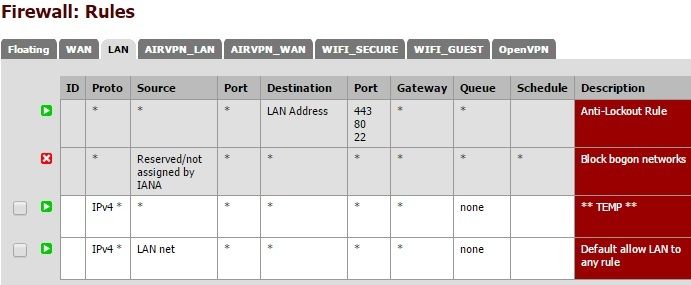
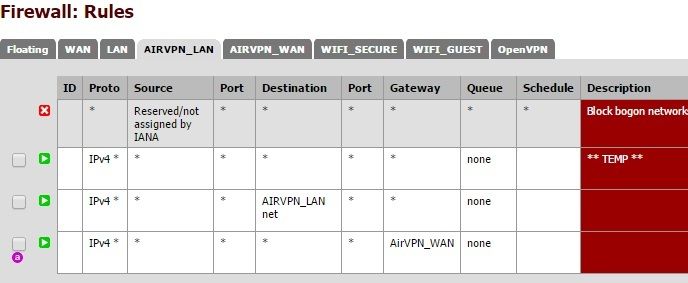
            Post screencaps of your LAN rules for both VLANs.

            1 Reply Last reply Reply Quote 0
            • J Offline
              JimPhreak
              last edited by

              @KOM:

              Post screencaps of your LAN rules for both VLANs.

              VLAN 10

              VLAN 100

              1 Reply Last reply Reply Quote 0
              • D Offline
                doktornotor Banned
                last edited by

                Remove the block bogon networks!!! EPEBKAC.

                1 Reply Last reply Reply Quote 0
                • J Offline
                  JimPhreak
                  last edited by

                  @doktornotor:

                  Remove the block bogon networks!!! EPEBKAC.

                  Just did.  No change.

                  1 Reply Last reply Reply Quote 0
                  • jahonixJ Offline
                    jahonix
                    last edited by

                    Try a reboot.

                    1 Reply Last reply Reply Quote 0
                    • KOMK Offline
                      KOM
                      last edited by

                      Yeah, your LANs should not have Bogon blocks.

                      1 Reply Last reply Reply Quote 0
                      • DerelictD Offline
                        Derelict LAYER 8 Netgate
                        last edited by

                        Check the local firewalls on your damn hosts.

                        Chattanooga, Tennessee, USA
                        A comprehensive network diagram is worth 10,000 words and 15 conference calls.
                        DO NOT set a source address/port in a port forward or firewall rule unless you KNOW you need it!
                        Do Not Chat For Help! NO_WAN_EGRESS(TM)

                        1 Reply Last reply Reply Quote 0
                        • J Offline
                          JimPhreak
                          last edited by

                          @Derelict:

                          Check the local firewalls on your damn hosts.

                          Did you read the OP?  They are off.  If they were on, disabling the pf would not allow access like it does.

                          1 Reply Last reply Reply Quote 0
                          • DerelictD Offline
                            Derelict LAYER 8 Netgate
                            last edited by

                            If it was configured like you say it would be working.  Check everything again.  Stop doing stupid stuff like disabling the packet filter in your firewall.

                            Chattanooga, Tennessee, USA
                            A comprehensive network diagram is worth 10,000 words and 15 conference calls.
                            DO NOT set a source address/port in a port forward or firewall rule unless you KNOW you need it!
                            Do Not Chat For Help! NO_WAN_EGRESS(TM)

                            1 Reply Last reply Reply Quote 0
                            • GruensFroeschliG Offline
                              GruensFroeschli
                              last edited by

                              This might sound dumb, but are you sure that your VLAN switch is correctly configured?

                              Step by step debugging.
                              Can you ping the pfSense on its VLAN10 interface from VLAN10 PC?
                              Can you ping the pfSense on its VLAN100 interface from VLAN10 PC?
                              Can you ping the pfSense on its VLAN100 interface from VLAN100 PC?
                              Can you ping the pfSense on its VLAN10 interface from VLAN100 PC?

                              The same in the other direction.
                              ping the PCs from the pfSense.

                              We do what we must, because we can.

                              Asking questions the smart way: http://www.catb.org/esr/faqs/smart-questions.html

                              1 Reply Last reply Reply Quote 0
                              • J Offline
                                JimPhreak
                                last edited by

                                @Derelict:

                                If it was configured like you say it would be working.  Check everything again.  Stop doing stupid stuff like disabling the packet filter in your firewall.

                                I disabled it for 5 seconds (with my WAN connection unplugged) to isolate the issue.  I don't see how that's dumb.

                                1 Reply Last reply Reply Quote 0
                                • DerelictD Offline
                                  Derelict LAYER 8 Netgate
                                  last edited by

                                  You isolated nothing.  Without a full understanding of how states are created when you're enabling and disabling the firewall, you really don't know what you were seeing.

                                  Perform simple, basic layer 2/3 troubleshooting.

                                  Again, if it was configured how you say it is it would be working.  Check everything.  Both hosts, all interfaces, all netmasks, all gateways, all firewalls, etc.

                                  And don't just leave a ping running as a test.  When you change your rules start a new one so a new state gets created.  Clearing states in Diagnostics > States after changing the rules is another (probably unnecessary) step.


                                  Chattanooga, Tennessee, USA
                                  A comprehensive network diagram is worth 10,000 words and 15 conference calls.
                                  DO NOT set a source address/port in a port forward or firewall rule unless you KNOW you need it!
                                  Do Not Chat For Help! NO_WAN_EGRESS(TM)

                                  1 Reply Last reply Reply Quote 0
                                  • First post
                                    Last post
                                  Copyright 2025 Rubicon Communications LLC (Netgate). All rights reserved.