Netgate Discussion Forum
    • Categories
    • Recent
    • Tags
    • Popular
    • Users
    • Search
    • Register
    • Login
    Introducing Netgate Nexus: Multi-Instance Management at Your Fingertips.

    Certain Websites not working on VLAN - Working fine on LAN

    Scheduled Pinned Locked Moved Firewalling
    1 Posts 1 Posters 306 Views 1 Watching
    Loading More Posts
    • Oldest to Newest
    • Newest to Oldest
    • Most Votes
    Reply
    • Reply as topic
    Log in to reply
    This topic has been deleted. Only users with topic management privileges can see it.
    • S Offline
      shanedel
      last edited by shanedel

      Hi everyone,
      I'm very new to networking and I'm having an issue with certain websites not loading on my VLANS (https://mail.yahoo.com/ https://community.spiceworks.com/), a couple of them load slowly without any .CSS styling (http://community.ubnt.com), and others work perfectly fine.

      On my LAN network all these websites work fine.

      I can ping these websites on VLANS fine just get an ERR_TIMED_OUT error.
      I tried reducing the MTU but it makes no change.

      I also have whole network PIA VPN configured but disabled, when its enabled on the VLAN these websites work fine.

      Here is my Firewall rules on VLAN10

      0_1529454905874_Capture.PNG

      Automatic Outbound NAT rules enabled
      0_1529455134459_Capture.PNG

      Trace route for community.spiceworks.com
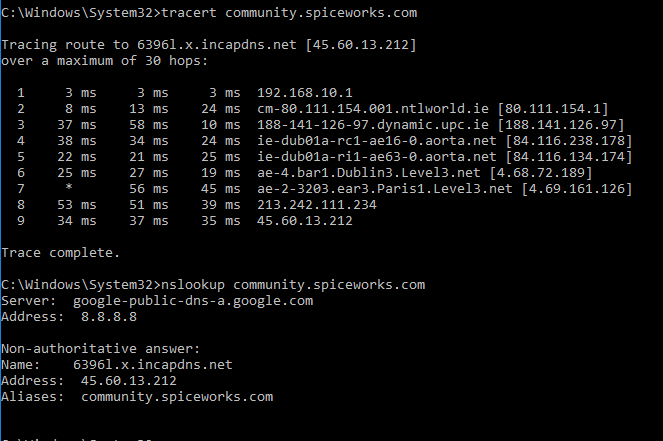
      0_1529455848149_Capture.PNG

      PFSense is installed Virtually on XCP-NG on a dell r710 if it makes a difference.
      I have no packages snort, etc. installed
      PF Sense Version 2.4.3-RELEASE-p1

      Any input from experienced user would be greatly appreciated.

      1 Reply Last reply Reply Quote 0
      • First post
        Last post
      Copyright 2026 Rubicon Communications LLC (Netgate). All rights reserved.
      Privacy Policy · Cookie Policy
