Missing correct firewall rule
-
Hello,
I am missing some firewall rule that is just not allowing passing data from a VPN connection to the primary server on the LAN. I can see where ping packets are making it to the LAN interface but on the machine I never see the actual response. Here is what I see:
13:58:48.419210 ARP, Request who-has 10.4.4.10 tell 10.4.4.2, length 46
13:58:48.495713 ARP, Reply 10.4.4.10 is-at xx:xx:04:ca:2e:f6, length 28
13:58:49.443188 ARP, Request who-has 10.4.4.10 tell 10.4.4.2, length 46
13:58:49.501898 ARP, Reply 10.4.4.10 is-at xx:xx:04:ca:2e:f6, length 28
13:58:50.467058 ARP, Request who-has 10.4.4.10 tell 10.4.4.2, length 46However on 10.4.4.2, the ping initiator, I can never see that response. I have a packet dump of the time and can see the ping and ARP request go out, but not the ARP response. So it looks like I am down to a rule not set right, but not sure what that might be.
My set up is this: I have OpenVPN set up as a tap and passes DHCP and bridges to the LAN. I need this bridge as there are some applications I am using that expect to have access to layer 2 data. The tap DHCP start is at 10.4.4.10 and ends at .20, which is in the LAN ip range but doesn't conflict with anything. I have created an interface for the OpenVPN connection and bridged it to the LAN via a new bridge interface. I have also created firewall rules for that bridge, one for VPN and one for LAN that is wide open. So nothing should be blocked.
What I see is that the VPN client comes in, connects and gets an IP address of 10.4.4.10 (first DHCP address). It can ping the LAN address of pfsense at 10.4.4.1 successfully. It cannot ping anything on the LAN side, dues to this blocking of rules. I have a VM connected to the LAN at 10.4.4.2. That interface can ping to the 10.4.4.1 as well. I can see on both the LAN interface and the Bridge where the ARP request comes in from 10.4.4.2 asking for the MAC of the other interface and where the connected device is responding. So traffic is crossing the bridge. The active LAN rules look like this.
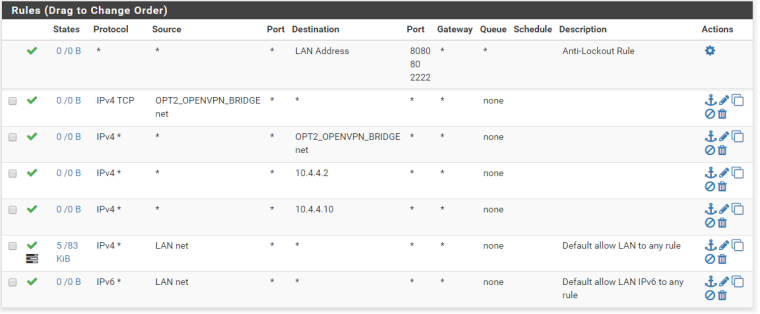
Any thoughts on what is keeping the 10.4.4.2 from getting the responses?
-
Why are you trying to bridge your vpn into your lan via tap? Use Tun its is so much easier and less complex and less overhead. There is rarely any actual legit reason to try and bridge your vpn clients into your lan..
Nor would you be putting rules on the LAN interface anyway..
-
Yeah, I wish I could just use tun. I had that originally set up but I have a RF piece of equipment that must access the server and will not work behind any kind of NAT or IP forward. The RF equipment is remote and can't run the openVPN client directly so it is connected to a linux pc, which is running the openVPN client. The second ethernet port of the pc is where the radio is connected to and bridged to the OpenVPN tap interface. That side is working fine.
I'm very close to what I need. Just seems there is one thing keeping the LAN side from receiving the packets. They are able to transmit across the bridge fine, but not the other way.
-
And what protocol is it using to access the server? Why does it have to be on the same Layer 2? Please post link to what this software is..
-
You want the SW of the pfsense? 2.4.3-RELEASE-p1
The protocol is using a mixture of UDP and SCTP. So rules I have been playing with are for the "any" protocol. It is doing some routing beyond itself to others and so expects to be able to update the server with information on its routes and MAC addresses of its devices. -
UDP does not need to be on the same layer 2, sctp yeah that is odd bird.. There was someone else wanting to use that as well... Maybe that was you? ;)
-
@johnpoz
Probably, I use pfsense in a couple of scenarios and have found myself needing sctp in a few spots recently.So any thoughts on the one-way traffic and why that may be in this case?
-
I probably should have mentioned that pfsense is running in a VMware VM. Not sure if that makes any difference for bridging purposes.
-
So any thoughts on what I might be missing?