Portmap.io openvpn client
-
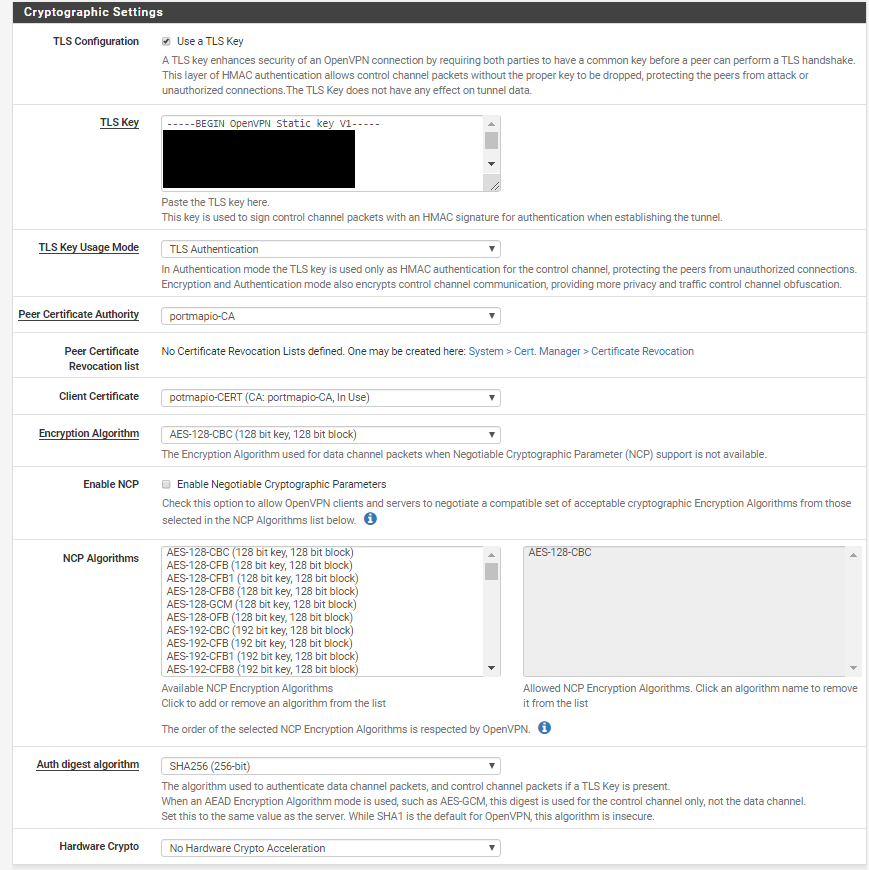
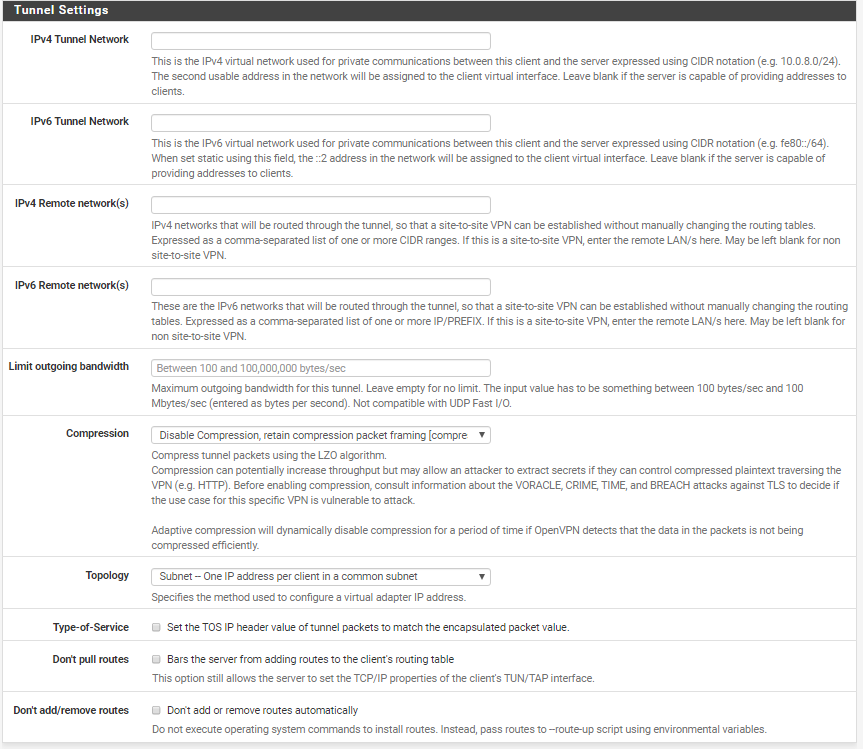
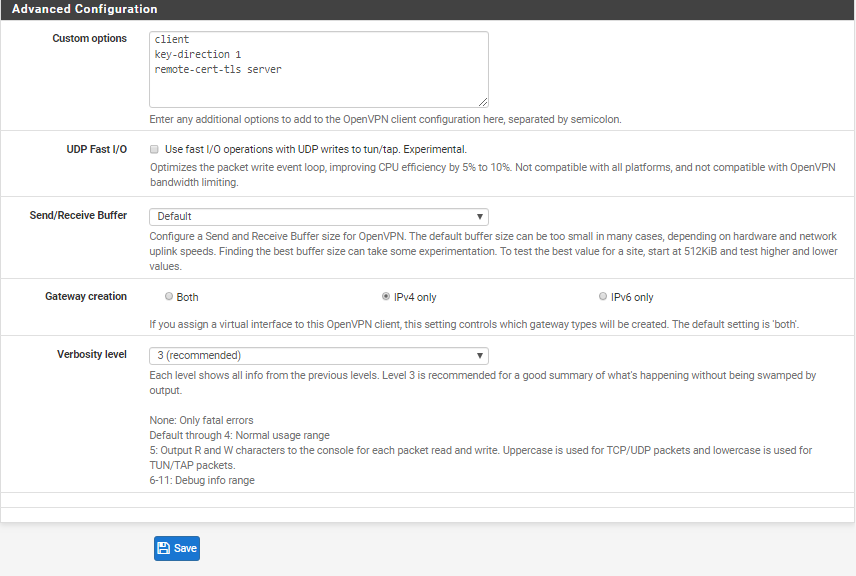
Im struggling to get portmap.io set up as a vpn client. It seems to connect just fine according to the logs, but the openvpn status page shows Local/remote host as (pending) and I am unable to get any traffic in or out.
The portmap.io ovpn file works if I run it on the windows client, so everything is fine on their end. Can anyone spot what i have setup wrong?
client
nobind
dev tun
key-direction 1
remote-cert-tls server

remote 67.205.154.243 1194 udp


<key>
-----BEGIN PRIVATE KEY-----
*****************************
-----END PRIVATE KEY-----
</key>
<cert>
-----BEGIN CERTIFICATE-----
****************************************
-----END CERTIFICATE-----
</cert>
<ca>
-----BEGIN CERTIFICATE-----
*******************************************
-----END CERTIFICATE-----
</ca>
<tls-auth>
#
# 2048 bit OpenVPN static key
#
-----BEGIN OpenVPN Static key V1-----
********************************
-----END OpenVPN Static key V1-----
</tls-auth>
key-direction 1

cipher AES-128-CBC
Sep 16 23:28:15 openvpn 6540 OpenVPN 2.4.6 amd64-portbld-freebsd11.2 [SSL (OpenSSL)] [LZO] [LZ4] [MH/RECVDA] [AEAD] built on Oct 3 2018 Sep 16 23:28:15 openvpn 6540 library versions: OpenSSL 1.0.2o-freebsd 27 Mar 2018, LZO 2.10 Sep 16 23:28:15 openvpn 6742 MANAGEMENT: unix domain socket listening on /var/etc/openvpn/client2.sock Sep 16 23:28:15 openvpn 6742 NOTE: the current --script-security setting may allow this configuration to call user-defined scripts Sep 16 23:28:15 openvpn 6742 Outgoing Control Channel Authentication: Using 256 bit message hash 'SHA256' for HMAC authentication Sep 16 23:28:15 openvpn 6742 Incoming Control Channel Authentication: Using 256 bit message hash 'SHA256' for HMAC authentication Sep 16 23:28:15 openvpn 6742 TCP/UDP: Preserving recently used remote address: [AF_INET]67.205.154.243:1194 Sep 16 23:28:15 openvpn 6742 Socket Buffers: R=[42080->42080] S=[57344->57344] Sep 16 23:28:15 openvpn 6742 UDPv4 link local (bound): [AF_INET]100.64.5.187:0 Sep 16 23:28:15 openvpn 6742 UDPv4 link remote: [AF_INET]67.205.154.243:1194 Sep 16 23:28:20 openvpn 6742 MANAGEMENT: Client connected from /var/etc/openvpn/client2.sock Sep 16 23:28:20 openvpn 6742 MANAGEMENT: CMD 'state 1' Sep 16 23:28:20 openvpn 6742 MANAGEMENT: Client disconnected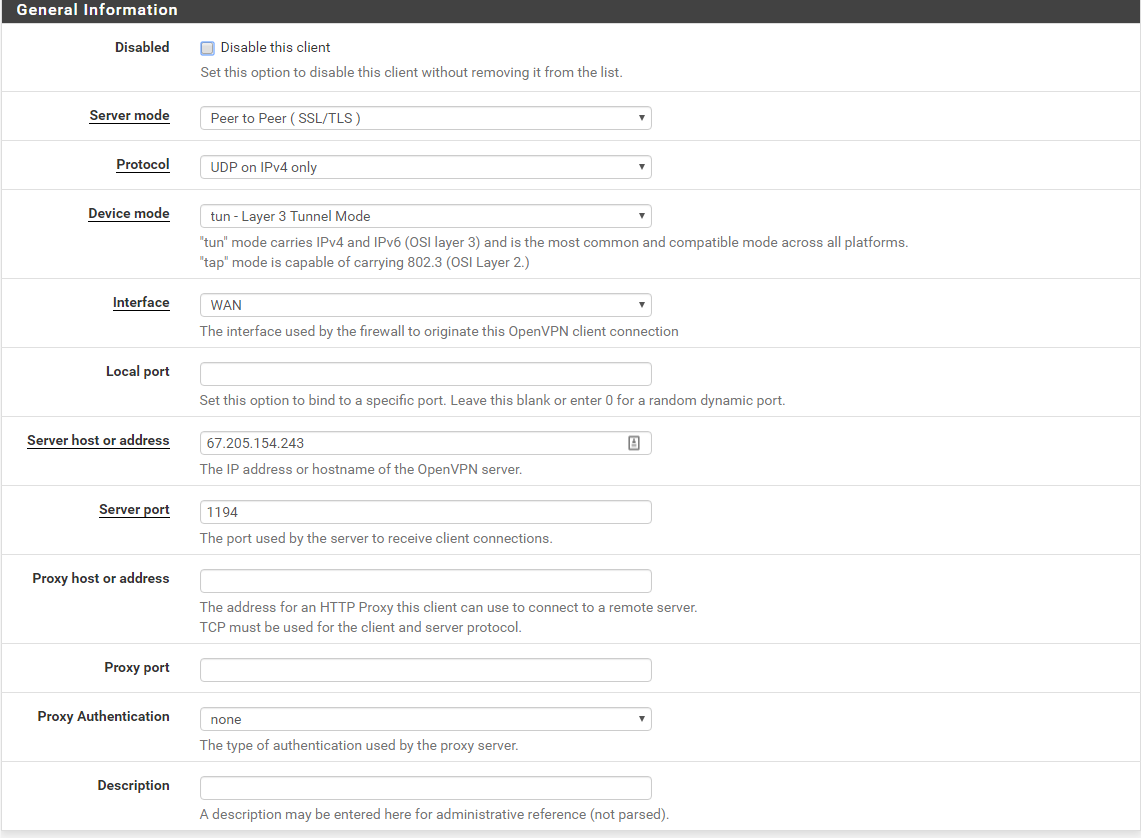
Hello! It looks like you're interested in this conversation, but you don't have an account yet.
Getting fed up of having to scroll through the same posts each visit? When you register for an account, you'll always come back to exactly where you were before, and choose to be notified of new replies (either via email, or push notification). You'll also be able to save bookmarks and upvote posts to show your appreciation to other community members.
With your input, this post could be even better 💗
Register LoginPrivacy Policy · Cookie Policy