Remote access to site-to-site lan issues
-
Hello all,
I'm sure this is probably straight forward and just missing something in the config. The issue I'm experiencing is the remote access client cannot reach the 10.55.55.0 network. The LAN 10.87.87.0 network is able to do so. I believe I just need to advertise the 10.55.55.0 route to the 10.87.88.x client but not sure where exactly to make that change. Below is a network diagram.
What is working:
- 10.87.87.0 network can reach/ping 10.55.55.0 network
What is not working:
- Remote access client 10.87.88.x cannot reach 10.55.55.0 network
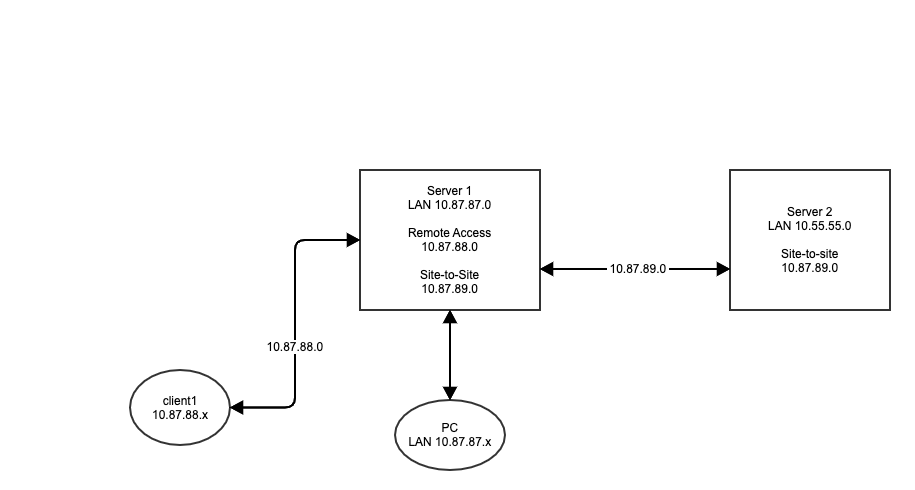
-
Can the client reach server 1?
I suspect you have a routing problem. Client 1 doesn't know how to reach the 10.55.55.0 network, unless there's a specific route or the default route goes to the 10.87.87.0 network.
-
@JKnott Hello. Thanks for your response. Yes client 1 is able to reach server 1 LAN 10.87.87.0 and also 10.87.87.x devices. Previously, I added "iroute 10.55.55.0 255.255.255.0" on the client specific override in order to allow that connectivity.
This is the guide I followed for the Site-to-Site setup.
https://docs.netgate.com/pfsense/en/latest/book/openvpn/site-to-site-example-configuration-ssl-tls.html -
@lzimbelman
Seems, such questions are coming every day at this time. We had it yesterday: https://forum.netgate.com/topic/151934/in-one-vpn-out-another/4
And the day before, and...
Did a forum search? -
With such a descriptive title “in one VPN out another” I can’t believe I missed that in my searches.
Thanks. I’ll give it a read.
-
@lzimbelman
I agree.
-
@viragomann in the other post you mention
at your parents box in the site2site settings, option "Remote Network/s": 10.0.8.0/24 (comma seperated from the other entries
My Server 2 is an asus router with merlin firmware using OpenVPN. Would the equivalent of this "Remote Network/s" (since its not pfsense) be a custom config like
push "route 10.87.88.0 255.255.255.0" (since that is what the network for remote access client1 is on?)
Edit - nevermind. After a little more digging i added "route 10.87.88.0 255.255.0" to my config on server 2 and now when I'm in as a RA client on 10.87.88.x I can get to 10.55.55.0. Thanks!

Hello! It looks like you're interested in this conversation, but you don't have an account yet.
Getting fed up of having to scroll through the same posts each visit? When you register for an account, you'll always come back to exactly where you were before, and choose to be notified of new replies (either via email, or push notification). You'll also be able to save bookmarks and upvote posts to show your appreciation to other community members.
With your input, this post could be even better 💗
Register LoginPrivacy Policy · Cookie Policy