Netgate Discussion Forum
    • Categories
    • Recent
    • Tags
    • Popular
    • Search
    • Register
    • Login
    Introducing Netgate Nexus: Multi-Instance Management at Your Fingertips.

    ClamAV de PfSense no me funciona

    Scheduled Pinned Locked Moved Español
    13 Posts 3 Posters 3.3k Views 3 Watching
    Loading More Posts
    • Oldest to Newest
    • Newest to Oldest
    • Most Votes
    Reply
    • Reply as topic
    Log in to reply
    This topic has been deleted. Only users with topic management privileges can see it.
    • L
      lucasll @starnix
      last edited by

      @starnix
      Prueba este test. Es un poco clásico, pero te ayudará.
      https://www.eicar.org --> link "download testfile"

      Enlace directo http (o sea, no https):
      http://2016.eicar.org/download/eicar.com

      1 Reply Last reply
      Reply Quote 0
      • S
        starnix
        last edited by

        @lucasll
        Metiendome en la página https://www.eicar.org --> link "download testfile" y clickando sobre los zips, me deja ejecutar y guardarlo sin ningún problema.

        Si me meto en el enlace directo con http http://2016.eicar.org/download/eicar.com me sale lo siguiente:

        En la barra de direcciones aparece mi dominio acompañado de lo siguiente

        eeee.PNG
        http://2016.eicar.org/download/eicar.com
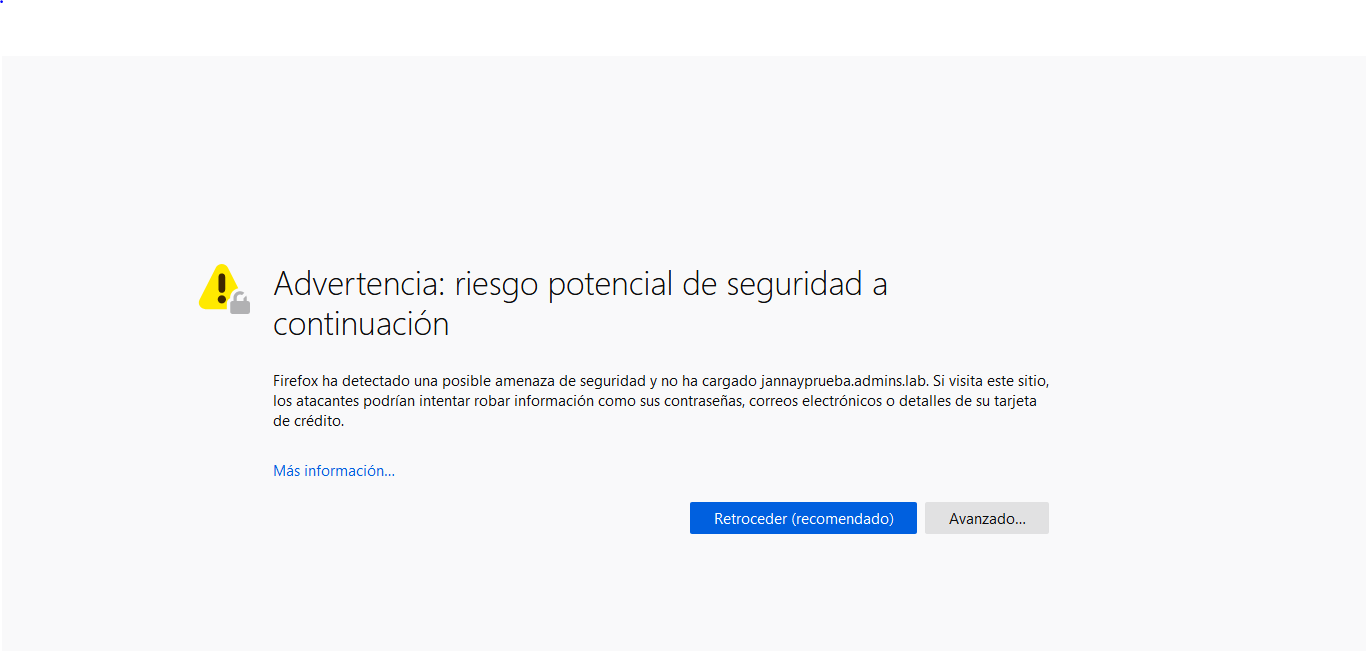
        eicar.PNG

        1 Reply Last reply
        Reply Quote 0
        • S
          starnix
          last edited by

          @DaddyGo Does this mean that it will only work with pages that have an http certificate? well, nowadays almost no page uses http, now almost all uses https, then it is almost useless

          1 Reply Last reply
          Reply Quote 0
          • DaddyGoD
            DaddyGo
            last edited by

            You understand the situation exactly well.
            ClamAV cannot scan https pages due to MITM

            Cats bury it so they can't see it!
            (You know what I mean if you have a cat)

            1 Reply Last reply
            Reply Quote 0
            • DaddyGoD
              DaddyGo
              last edited by

              For a long time there was a problem with the redirect url and own pfSense system domain name,
              in case it works well, this page should get you
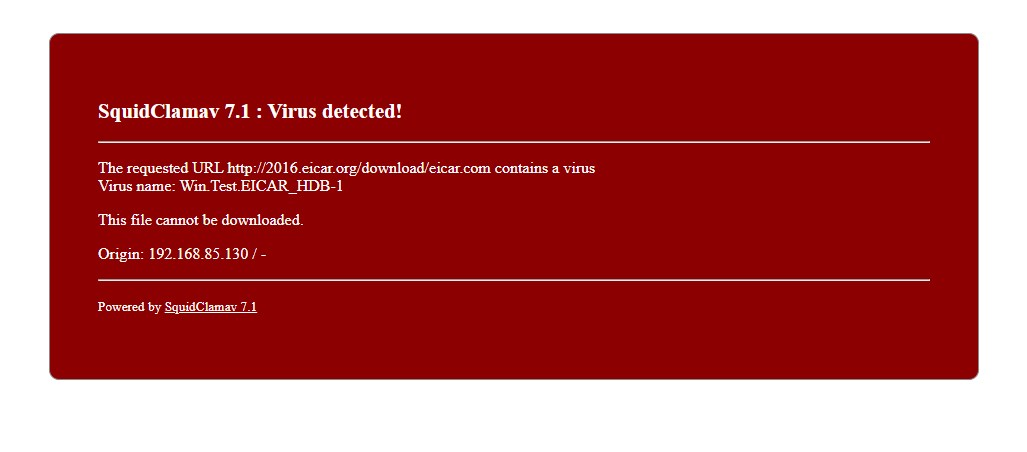
              d3aea393-b614-4c2a-960e-b797c91153c1-image.png

              Cats bury it so they can't see it!
              (You know what I mean if you have a cat)

              1 Reply Last reply
              Reply Quote 0
              • S
                starnix
                last edited by

                @DaddyGo The person above gave me that same website, one with https and one with http.
                If I try to enter the web page with https, I enter without problem and I can download the zips without any problem.

                Instead in http I get the image that I have attached

                L 1 Reply Last reply
                Reply Quote 0
                • DaddyGoD
                  DaddyGo
                  last edited by

                  Yes this is a fairly common test page among IT professionals.
                  In my example, I used that too.
                  As I mentioned, this configuration is a problem (redirect url):
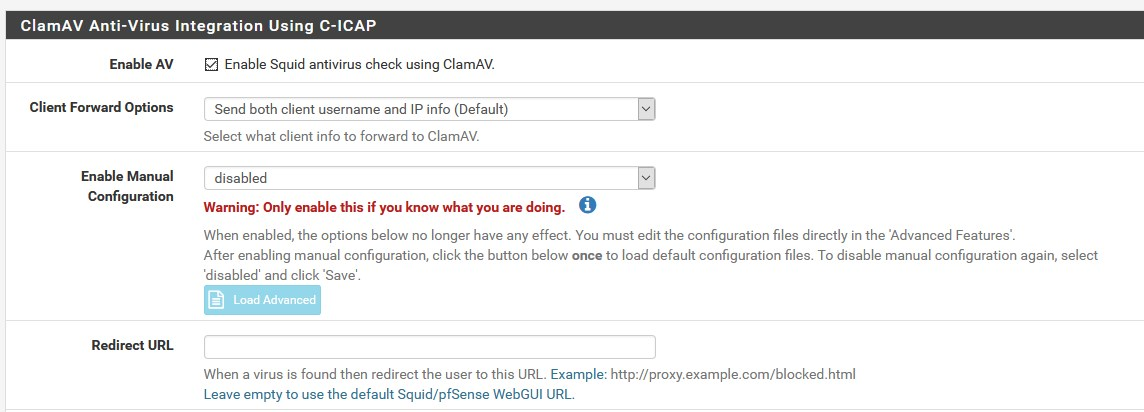
                  347b6040-3246-4447-8c08-8d48ae008d5a-image.png

                  Anyway, try to upgrade to 2.4.5, it's your responsibility, but I can say that we've upgraded nearly 25 pfSense devices on our system without any problems. If you are using a virtual machine, be careful.

                  In 2.4.5 there is a pair of Squid and along with ClamAV update and patch

                  Cats bury it so they can't see it!
                  (You know what I mean if you have a cat)

                  S 1 Reply Last reply
                  Reply Quote 0
                  • L
                    lucasll @starnix
                    last edited by

                    @starnix
                    También puedes hacer pruebas configurando el proxy explícitamente en el navegador. Es decir, sin modo transparente.

                    S 1 Reply Last reply
                    Reply Quote 0
                    • S
                      starnix @lucasll
                      last edited by

                      @lucasll Para configurarlo como tu dices simplemente desactivo la opción de modo transparente y ya?

                      1 Reply Last reply
                      Reply Quote 0
                      • S
                        starnix @DaddyGo
                        last edited by

                        @DaddyGo I will try to update my pfsense in case that is what gives error

                        1 Reply Last reply
                        Reply Quote 0
                        • DaddyGoD
                          DaddyGo
                          last edited by

                          The non-transparent mode (implicit) requires multiple configurations, which can be inconvenient on a large system

                          https://docs.netgate.com/pfsense/en/latest/cache-proxy/wpad-autoconfigure-for-squid.html
                          https://www.ssltrust.com.au/help/setup-guides/setup-squid-proxy

                          Cats bury it so they can't see it!
                          (You know what I mean if you have a cat)

                          1 Reply Last reply
                          Reply Quote 0

                          Hello! It looks like you're interested in this conversation, but you don't have an account yet.

                          Getting fed up of having to scroll through the same posts each visit? When you register for an account, you'll always come back to exactly where you were before, and choose to be notified of new replies (either via email, or push notification). You'll also be able to save bookmarks and upvote posts to show your appreciation to other community members.

                          With your input, this post could be even better 💗

                          Register Login
                          • First post
                            Last post
                          Copyright 2026 Rubicon Communications LLC (Netgate). All rights reserved.
                          Privacy Policy · Cookie Policy