Extremely Frustrating Outages
-
I don't really know what to say at this point but I really hope someone has been through this and has a solution. I have a modem with 5 static IPs. (I've also tried it in bridge mode to get DHCP IPs instead in case that would help). What happens is; the modem starts dropping packets left and right and the packets that do get through have very high latency. Originally I assumed that since I can't reach the modem remotely it must be an ISP issue but it doesn't seem to be.
When my laptop and firewall are both plugged into the modem and the issues begin, both the laptop and firewall experience the packet loss. As soon as I unplug the cable from the WAN port of the firewall my laptop connection to the modem returns to normal. When I plug the firewall back in, my laptop loses connection to the modem again; pings go from just a few ms to hundreds and packet loss skyrockets. Eventually it all evens out and is fine again, usually after about 15 minutes. It could happen a few times a day, or a few times a week. It's a bit sporadic and intermittent. I can't find anything relevant in the logs other than interfaces restarting which makes sense because of the high packet loss. I've already put in a new box and imported the config with no luck. I also tried moving the cable from WAN to OPT1 (for a Layer 1 test) and have found that the problem only happens in the WAN port. Any help would be greatly appreciated!
I'm using an APU2 with pfSense 2.4.5.
Edit: I've tried replacing cables on both the LAN and WAN ports as well.
-
I still don't know what to make of this. I don't see any drops or errors inside of the network. The drops only happen outside of the network with communication between the pfSense box and the modem, or really the modem and anything else.
What seems to have fixed the issue is to unplug the access points in the network and get all the wireless devices offline. With them unplugged for a day they had no issues. We've plugged them back in and changed the SSID and password. We've been monitoring as we slowly have moved devices back on and so far no issues. I'm thinking it's one of the computers that connect but I have no idea how a PC with a chatty wnic could cause this type of issue. No problems inside of the network but it causes the modem to lose the ability to route or pass traffic. So bizarre.
-
I would run a packet capture on the WAN when its happening see what that reveals.
Sounds like it could be a conflict of some sort there. IP, ARP perhaps.
Does it get a different public IP on the OPT interface?Steve
-
The WAN is the only internet connection. OPT1 is reserved for administrative connections, in case something happens to the LAN it gives us a backup. Just DHCP and open firewall rules in case we plug into it. What am I looking for in the WAN capture? While at the site I mentioned above we found the issue to be a device connecting to the wifi, I've been made aware that it is happening to another client of ours so I'm just beginning this all over again. I'm not aware of any possible way that something inside of the network can cause the firewall and modem to lose communication so this is new to me. Thanks for the assistance!
-
The only thing I could imagine causing a problem from inside is something spoofing the MAC or IP maybe. Even then it would prevent the inside clients connect9ing but should not stop pfSense seeing the modem.
One thing we do se relatively often is a rogue DHCP server. A router being used as an access point that decided to go back to being an access point for example. Or I once saw a situation with a cell phone configured in hotspot mode that stole dhcp clients when it was broughr into the office. Tough to troubleshoot because it only happened when all the employees were present.
That can appear as really weird behavior.I only asked about OPT1 because you said you tested using that port as WAN and it was OK. But presumably it has a different MAC so might pull a different IP?
Steve
-
@stephenw10 said in Extremely Frustrating Outages:
The only thing I could imagine causing a problem from inside is something spoofing the MAC or IP maybe. Even then it would prevent the inside clients connecting but should not stop pfSense seeing the modem.
Which is exactly my thoughts. How could something in the network prevent the firewall from seeing the modem? How could something in the network prevent even other devices from seeing the modem? That's what makes it so frustrating as it just doesn't seem possible.
One thing we do se relatively often is a rogue DHCP server. A router being used as an access point that decided to go back to being an access point for example. Or I once saw a situation with a cell phone configured in hotspot mode that stole dhcp clients when it was broughr into the office. Tough to troubleshoot because it only happened when all the employees were present.
That can appear as really weird behavior.I've seen plenty of times with routers resetting breaking a network. I usually find those with devices outside of the network scope or if I unplug the router and arp the IP. Never thought of a phone hotspot mucking up DHCP, though. Regardless, all those would do is stop internal traffic from getting out.
I only asked about OPT1 because you said you tested using that port as WAN and it was OK. But presumably it has a different MAC so might pull a different IP?
Steve
I see. I plugged in OPT1 purely from a Layer 1 perspective to see if some kind of voltage on the line (since Spectrum was blaming voltage feedback) would be causing the issue. However this is happening, everything appears fine inside of the network. The modem just becomes unresponsive, dropping packets and facing very high latency. To me, that would indicate a modem issue but, at least at 1 client, it isn't.
-
Ok pcap on the WAN when this is happening. Try to access the modem. See what's happening in the capture. Is the modem actually talking that long to respond? Errors? Re-transmissions?
Steve
-
@stephenw10 said in Extremely Frustrating Outages:
Ok pcap on the WAN when this is happening. Try to access the modem. See what's happening in the capture. If the modem actually talking thar long to respond? Errors? Re-transmissions?
Steve
This site is remote to me so I'm a little limited on what I can do. I was remotely connected into the firewall when they started having issues again. I managed to get a pcap but couldn't connect to a PC to try to log into the modem as the service was too bad. By the time I got in the service had corrected itself. I'm not sure what I'm looking for in the pcap, though. Normally I'd go pick it apart by protocol to diagnose an SMB, FTP or SIP issue. I do see a lot of Protocol=QUIC, Info=.....Len=55[Malformed Packet]. Not sure how normal that is.
-
@stewart said in Extremely Frustrating Outages:
QUIC
Here's what QUIC is. If you're getting malformed packets, that tends to indicate a hardware issue nearby. Malformed packets shouldn't be passing through routers or switches, as they'd be caught with the CRC check. What MAC address are they coming from? That would indicate the failing hardware.
-
Hardware offloading in the NIC can make the checksum appear invalid in a pcap.
I would disable all hardware offloading anyway in Sys > Adv > Net.
Steve
-
@jknott said in Extremely Frustrating Outages:
@stewart said in Extremely Frustrating Outages:
QUIC
Here's what QUIC is. If you're getting malformed packets, that tends to indicate a hardware issue nearby. Malformed packets shouldn't be passing through routers or switches, as they'd be caught with the CRC check. What MAC address are they coming from? That would indicate the failing hardware.
I see the Malformed Packets coming into my pfSense box from the modem MAC address but I also see them leaving my pfSense box going into the modem MAC address. That would indicate that Wireshark is saying that packets coming and going are all malformed. Perhaps that is due to the Hardware offloading that @stephenw10 was mentioning?
-
I've now checked the Disable hardware checksum offload box.
I did manage to get another packet capture. There are hundreds, if not more, of
-TCP Retransmissions
-TCP Dup ACK
-TCP Out of Order
-TCP Previous segment not captured -
-
You mean throw a switch in there with port mirroring into a PC and run wireshark on there?
-
Yes, just in case the pfsense NIC is the source. If the errors appear in Packet Capture, but not Wireshark that's likely the cause.
-
@jknott said in Extremely Frustrating Outages:
Yes, just in case the pfsense NIC is the source. If the errors appear in Packet Capture, but not Wireshark that's likely the cause.
In the first site that had this issue, that's what I thought as a possibility so I swapped the firewall. Can't say for sure that it's the same as this site but at the last site it didn't help. The errors persisted across 2 firewalls.
-
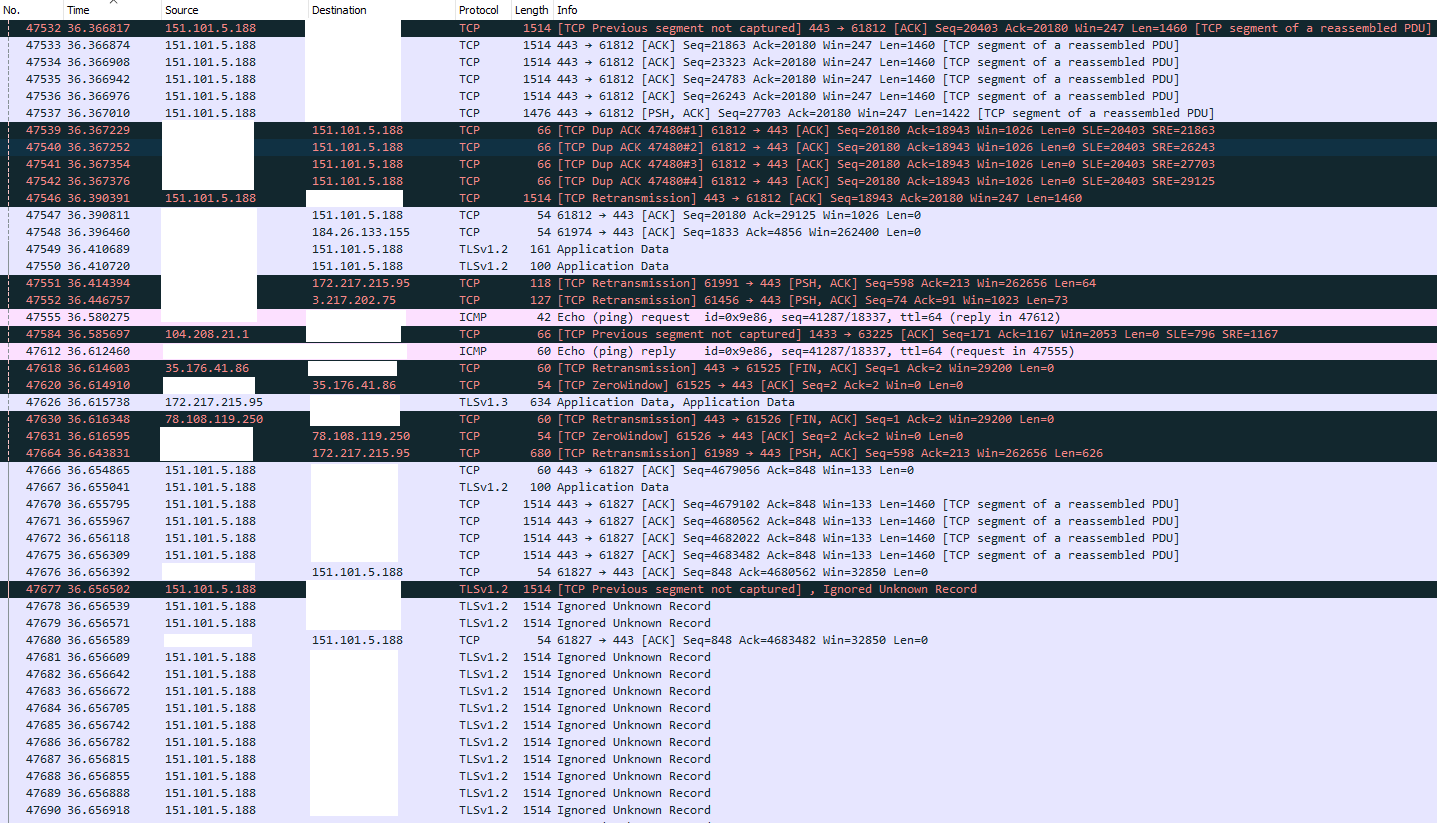
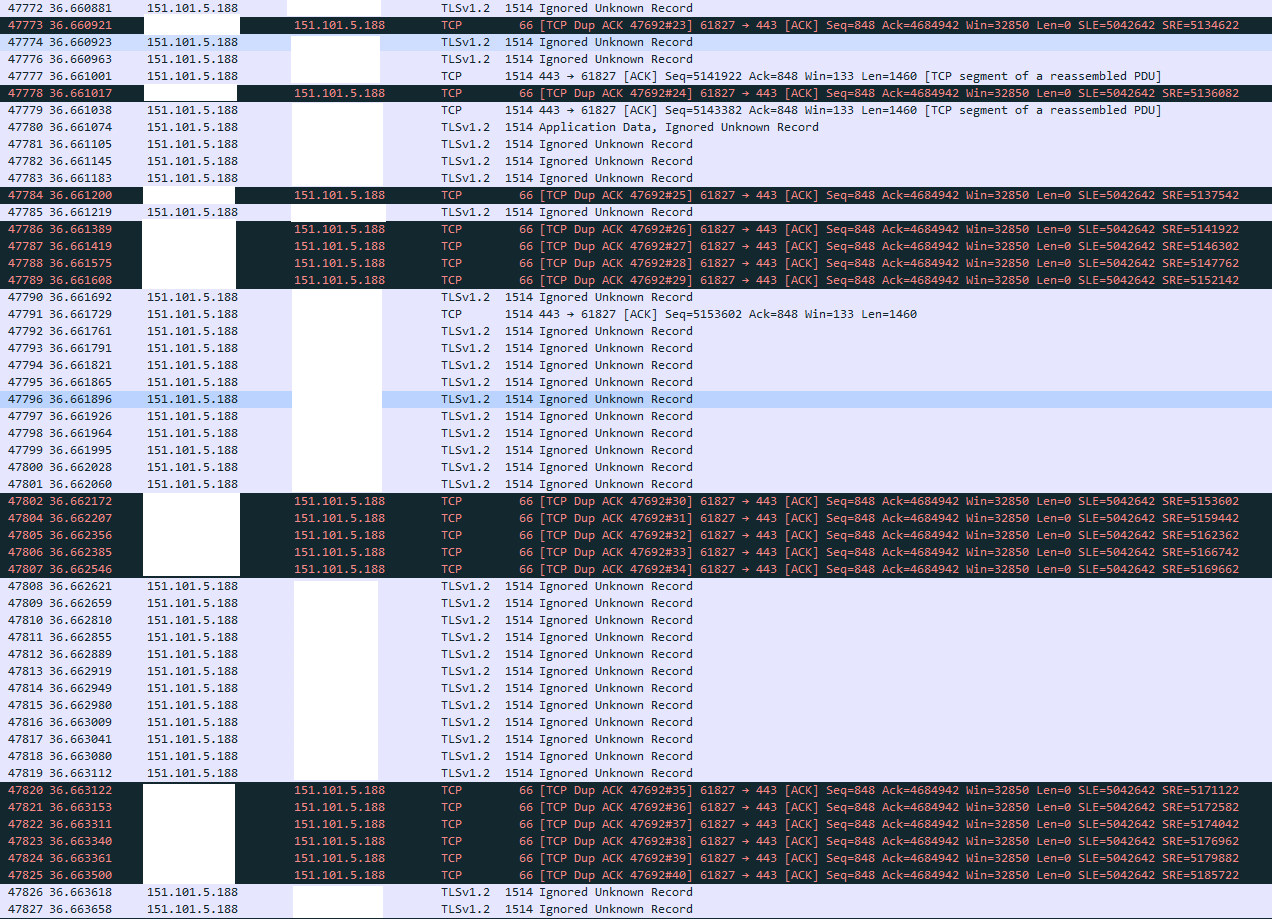
Here's a snippet from when things are bad.
-
Can you upload the capture?
-
@jknott I can tomorrow, but wouldn't want it public? How should I send it to you?
-


Hello! It looks like you're interested in this conversation, but you don't have an account yet.
Getting fed up of having to scroll through the same posts each visit? When you register for an account, you'll always come back to exactly where you were before, and choose to be notified of new replies (either via email, or push notification). You'll also be able to save bookmarks and upvote posts to show your appreciation to other community members.
With your input, this post could be even better 💗
Register LoginPrivacy Policy · Cookie Policy