SNGREP would be a great tool to have!
-
Hello all,
I was wondering if SNGrep or something similar is available on pfsense.
This would be amazingly helpful when trying to troubleshoot VOIP issues without needing to download a PCAP. -
@thoxle Yes.
It's in the FreeBSD package tree...
https://www.freshports.org/net/sngrep/caveat: Install things like this at your own risk!
e.g. amd64 (or aarch64, etc)
fetch https://pkg.freebsd.org/FreeBSD:12:amd64/quarterly/All/sngrep-1.4.8.txz pkg add ./sngrep-1.4.8.txzRemember, if you get this error:
Couldn't activate capture: BIOCSETIF failed: Device not configuredIt's because FreeBSD doesn't support
'any'for capture interface the way Linux does.
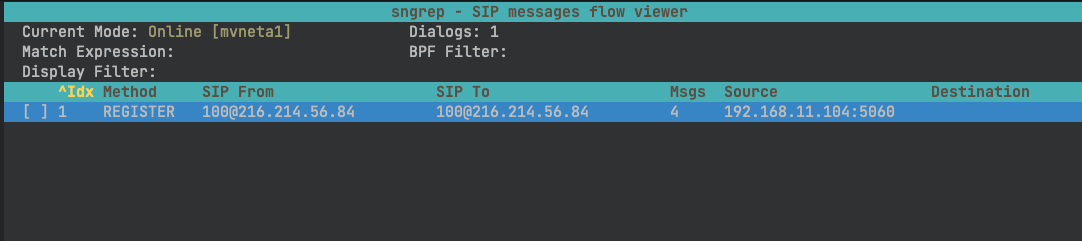
Use the-dflag and pass an interface name, e.g.sngrep -d mvneta1Here it is running on an SG-2100...

-
@luckman212 said in SNGREP would be a great tool to have!:
fetch https://pkg.freebsd.org/FreeBSD:12:amd64/quarterly/All/sngrep-1.4.8.txz
Trying to fetch this file comes up with not found. Could you assist at all?
regards
cyber7 (aka Aubrey) -
@cyber7 Did you ever find a fix to the repository?
-
@thogan32 nope, not any...
-
https://pkg.freebsd.org/FreeBSD:12:amd64/quarterly/All/sngrep-1.6.0.pkg
as always at your own risk -
@kiokoman Do you have a link fo FreeBSD 14? Your link was able to fetch but unable to install because it is the wrong architecture "pkg: wrong architecture: FreeBSD:12:amd64 instead of FreeBSD:14:amd64"
-
@thogan32
https://pkg.freebsd.org/FreeBSD:14:amd64/latest/All/sngrep-1.6.0.pkg -
Latest as of 2024-Aug is 1.7.0_1 (although the upstream github is at 1.8.2).
Link: https://pkg.freebsd.org/FreeBSD:14:amd64/latest/All/sngrep-1.7.0_1.pkg

-
@luckman212 Back again! Any idea how to make this work with ports? AKA freeBSD 15
-
@thogan32 Did you try installing the FreeBSD 16 flavor of the package? I haven't tried it myself but don't see why it wouldn't work... (it's the outdated version still sadly, I guess the port is semi-unmaintained)
pkg add -f https://pkg.freebsd.org/FreeBSD:16:amd64/latest/All/sngrep-1.7.0_1.pkg -
@luckman212 Thanks for the fast response! I installed 16. Im getting ld-elf.so.1: Shared object "libcrypto.so.35" not found, required by "sngrep"
-
@thogan32 What platform are you on? (hardware + pfSense version)
I just tested on my 6100 running 26.03.a.20260106.2058 and it works fine. If you specifically need the FreeBSD 15 flavor, it's here
pkg add -f https://pkg.freebsd.org/FreeBSD:15:amd64/latest/All/sngrep-1.7.0_1.pkgOther than that, try cleaning up your pkg/repo setup (https://docs.netgate.com/pfsense/en/latest/troubleshooting/pkg-broken-database.html)
pkg-static clean -ay; pkg-static install -fy pkg pfSense-repo pfSense-upgrade...and then try installing again.
-
@luckman212 I think it is a version mismatch. Or I have no version of libcrypto.so
BIOS Vendor: Dell Inc.
Version: A17
Release Date: Wed Oct 24 2018
Boot Method: BIOS
Version 2.8.1-RELEASE (amd64)
built on Thu Aug 28 10:09:00 MDT 2025
FreeBSD 15.0-CURRENTThe system is on the latest version.
Version information updated at Wed Jan 28 14:37:53 MST 2026
CPU Type Intel(R) Core(TM) i3-4160 CPU @ 3.60GHz
4 CPUs : 1 package(s) x 2 core(s) x 2 hardware threads
AES-NI CPU Crypto: Yes (active)
QAT Crypto: No -
@thogan32 can you paste the output of the 4 commands below:
find /lib /usr/lib /usr/local/lib -name "libcrypto.so.35" -ls file /lib/libcrypto.so.35 ldd /usr/local/bin/sngrep pkg info -AB sngrep -
@luckman212 [2.8.1-RELEASE][]/root: find /lib /usr/lib /usr/local/lib -name "libcrypto.so.35" -ls
[2.8.1-RELEASE][]/root: file /lib/libcrypto.so.35
/lib/libcrypto.so.35: cannot open `/lib/libcrypto.so.35' (No such file or directory)
[2.8.1-RELEASE][]/root: ldd /usr/local/bin/sngrep
/usr/local/bin/sngrep:
libcrypto.so.35 => not found (0)
libssl.so.35 => not found (0)
libz.so.6 => /lib/libz.so.6 (0x3be06b0bc000)
libmenuw.so.6 => /usr/lib/libmenuw.so.6 (0x3be06a8b4000)
libformw.so.6 => /usr/lib/libformw.so.6 (0x3be06be4a000)
libpanelw.so.6 => /usr/lib/libpanelw.so.6 (0x3be06cb09000)
libncursesw.so.9 => /lib/libncursesw.so.9 (0x3be06d3f1000)
libtinfow.so.9 => /lib/libtinfow.so.9 (0x3be06da1f000)
libpcap.so.8 => /lib/libpcap.so.8 (0x3be06e8a9000)
libthr.so.3 => /lib/libthr.so.3 (0x3be06ee00000)
libc.so.7 => /lib/libc.so.7 (0x3be0701fe000)
libibverbs.so.1 => /lib/libibverbs.so.1 (0x3be06fafb000)
libmlx5.so.1 => /lib/libmlx5.so.1 (0x3be071a9d000)
libsys.so.7 => /lib/libsys.so.7 (0x3be070a0b000)
[vdso] (0x3be069c58000)
[2.8.1-RELEASE][/root: pkg info -AB sngrep
sngrep-1.7.0_1
Shared Libs required:
libz.so.6
libtinfow.so.9
libthr.so.3
libssl.so.35
libpcap.so.8
libpanelw.so.6
libncursesw.so.9
libmenuw.so.6
libformw.so.6
libcrypto.so.35
libc.so.7
Annotations :
FreeBSD_version: 1600010
build_timestamp: 2026-01-25T17:55:46+0000
built_by : poudriere-git-3.4.4-15-g61aba751
port_checkout_unclean: no
port_git_hash : b64b73fd938d5b2788547d16ed6a76493acc9142
ports_top_checkout_unclean: no
ports_top_git_hash: fd51f5991377a9876c256a7ed9a768d2ca09c99b
[2.8.1-RELEASE][]/root: -
@thogan32 This is the main problem AFAICT:
find /lib /usr/lib /usr/local/lib -name "libcrypto.so.35" -ls (no output)You don't have the shared library on your system at all.
I just tested spinning up a fresh 2.8.1 CE system using the netgate 1.1.1 installer, and the library was present on the system, I was able to install the package, and it runs successfully

I suggest you try a backup/clean install and see if that clears this up.
-
@luckman212 Heck yeah! Thanks for the help!