Firewall Rule to allow my NAS to see outward to the internet
-
Hello,
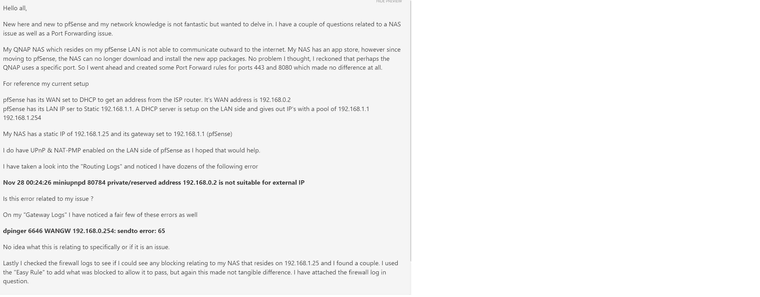
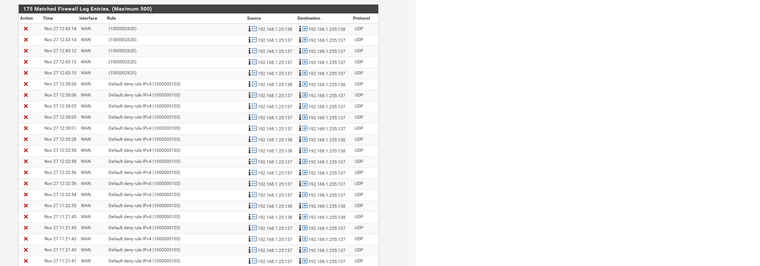
I tried posting but I keep getting blocked by Akismet for some reason, so instead please see my query in the image attached. Please also see my firewall logs in the second image.
Thanks in advance for any help.
-
@panzerscope what would port forwards have to do with your nas going outbound?
The default lan rules are any any - your nas if is on your lan would be able to go to anywhere it wants to go.. Pfsense would not block it.
Your blocks you are showing are on the wan.. Have zero to do with your lan devices going anywhere out to the internet
Are you routing traffic out a vpn or anything, or using ips or proxy?
Thought you said your lan was 192.168.1, why are you seeing blocks for that network on your wan? That makes no sense at all - and suggests you have your network not setup like you think you do..
That is all broadcast traffic that is being blocked - if your network was setup correctly it would be impossible for the wan to see broadcast traffic from your lan network.
-
All very good points. Would you believe I have sorted it. After hours of messing and deciding to reach out for help, I realise what the issue is.
So my NAS had its DNS set to OpenDNS IP's. PfSense is configured to force its own DNS settings upon clients, which ironically is also the OpenDNS settings, so I assumed it would do the same for the NAS. After changing my NAS DNS setting to 192.168.1.1 (Pfense) it started to work.
So all is good! Thanks for triggering something in my brain haha.
-
@panzerscope said in Firewall Rule to allow my NAS to see outward to the internet:
So all is good! Thanks for triggering something in my brain haha.
No that would have ZERO to do with your wan seeing broadcast traffic from your lan network - which is broken!!

Hello! It looks like you're interested in this conversation, but you don't have an account yet.
Getting fed up of having to scroll through the same posts each visit? When you register for an account, you'll always come back to exactly where you were before, and choose to be notified of new replies (either via email, or push notification). You'll also be able to save bookmarks and upvote posts to show your appreciation to other community members.
With your input, this post could be even better 💗
Register LoginPrivacy Policy · Cookie Policy