Netgate Discussion Forum
    • Categories
    • Recent
    • Tags
    • Popular
    • Search
    • Register
    • Login
    Introducing Netgate Nexus: Multi-Instance Management at Your Fingertips.

    Guest WiFi VLAN Unifi

    Scheduled Pinned Locked Moved L2/Switching/VLANs
    4 Posts 3 Posters 1.4k Views 2 Watching
    Loading More Posts
    • Oldest to Newest
    • Newest to Oldest
    • Most Votes
    Reply
    • Reply as topic
    Log in to reply
    This topic has been deleted. Only users with topic management privileges can see it.
    • S
      spencer99
      last edited by

      Hi

      I am trying to set up a guest WiFi for my home, and have gone down the obvious route of setting up a VLAN for this, I have managed to get as far as having a VLAN configured and the WiFi network configured such that you can connect and have an IP assigned via the VLAN DHCP server.

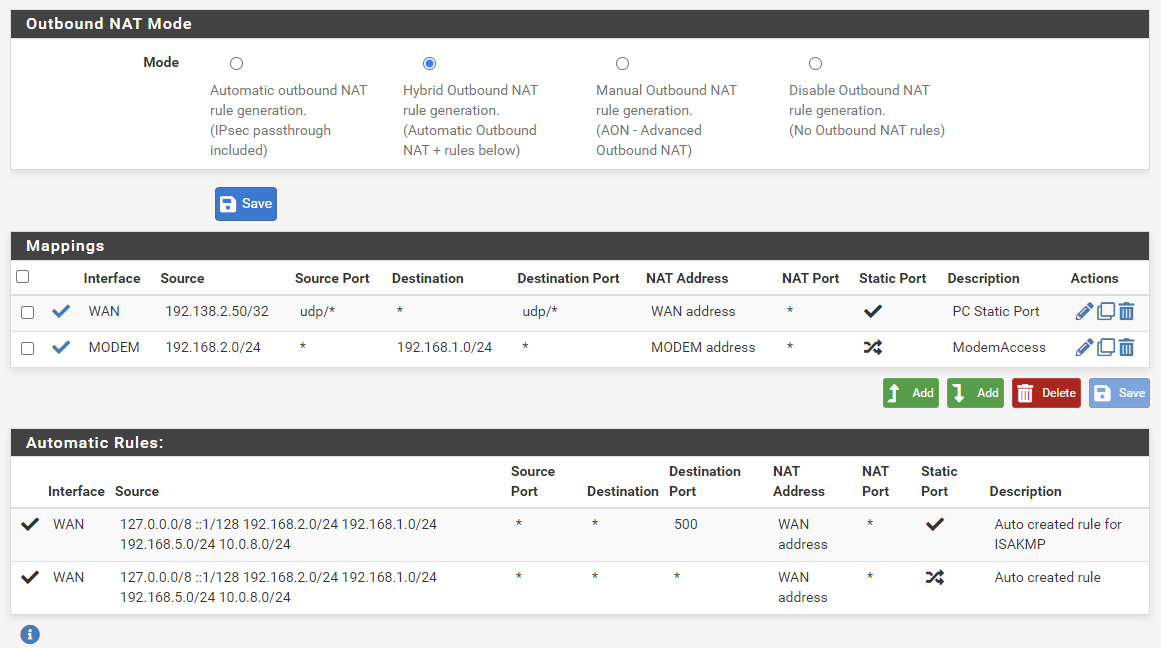
      The issue is that I can't connect to anything, I have no internet access and cant even ping the pfsense router. I have my NAT outbound mode set to Hybrid and no rules have been configured on the VLAN interface. I am a little confused as to what I have gotten wrong.

      Below are some snippets from my config -
      INTERFACE

      f4f3398f-4f3b-4c39-8248-a911b582a6ca-image.png

      VLAN

      6da21aed-fef7-4f7a-851c-d751e2904f59-image.png

      DHCP

      862ae952-c860-4bfe-8519-cc7c442be6e2-image.png

      NAT

      7ead1a0e-38a4-4b09-9c04-18d88c718d21-image.png

      Any ideas what I have missed? No doubt its something silly that I have missed.

      Thanks
      Spencer

      Bob.DigB JKnottJ 2 Replies Last reply
      Reply Quote 0
      • Bob.DigB
        Bob.Dig LAYER 8 @spencer99
        last edited by

        @spencer99 said in Guest WiFi VLAN Unifi:

        and no rules have been configured on the VLAN interface.

        Then it is the expected behavior. You have to create some.

        1 Reply Last reply
        Reply Quote 0
        • JKnottJ
          JKnott @spencer99
          last edited by

          @spencer99

          Have you created the firewall rules?

          Here's what I use:

          8a9bc4a6-ca94-46bf-82e0-be222a316b46-image.png

          These allow access to the Internet and pinging the VLAN interface only. There is no other access to my network.

          PfSense running on Qotom mini PC
          i5 CPU, 4 GB memory, 32 GB SSD & 4 Intel 1 Gb Ethernet ports.
          UniFi AC-Lite access point

          I haven't lost my mind. It's around here...somewhere...

          S 1 Reply Last reply
          Reply Quote 1
          • S
            spencer99 @JKnott
            last edited by

            @jknott Perfect, I have made some similar rules and implemented a speed limiting rule now and it works a dream, thanks!


            1 Reply Last reply
            Reply Quote 0

            Hello! It looks like you're interested in this conversation, but you don't have an account yet.

            Getting fed up of having to scroll through the same posts each visit? When you register for an account, you'll always come back to exactly where you were before, and choose to be notified of new replies (either via email, or push notification). You'll also be able to save bookmarks and upvote posts to show your appreciation to other community members.

            With your input, this post could be even better 💗

            Register Login
            • First post
              Last post
            Copyright 2026 Rubicon Communications LLC (Netgate). All rights reserved.
            Privacy Policy · Cookie Policy