Netgate Discussion Forum
    • Categories
    • Recent
    • Tags
    • Popular
    • Users
    • Search
    • Register
    • Login
    Introducing Netgate Nexus: Multi-Instance Management at Your Fingertips.

    Another Netgate with storage failure, 6 in total so far

    Scheduled Pinned Locked Moved Official Netgate® Hardware
    330 Posts 45 Posters 246.0k Views 41 Watching
    Loading More Posts
    • Oldest to Newest
    • Newest to Oldest
    • Most Votes
    Reply
    • Reply as topic
    Log in to reply
    This topic has been deleted. Only users with topic management privileges can see it.
    • M Offline
      mmkkoo @FSC830
      last edited by

      @FSC830 said in Another Netgate with storage failure, 6 in total so far:

      Wow...
      very interesting thread.
      I found this just yesterday and it takes me half the night to to read it from start to end 😊 .

      same here, just finished.

      I confirm, I had no idea. Don't recall seeing it mentioned in the marketing data, docs, nor by the gurus at YT.
      I've chosen NG's hw specifically for the reliability and minimal maintenance. Knowing this probably would go 'max'.

      Adjusted the timings, no sync for tmp. Soon on my way for new ssd. Thanks.

      Can you advice me how can I check emmc healt in SG2100?

      SteveITSS 1 Reply Last reply Reply Quote 1
      • SteveITSS Offline
        SteveITS Galactic Empire @mmkkoo
        last edited by

        @mmkkoo
        https://docs.netgate.com/pfsense/en/latest/troubleshooting/disk-lifetime.html

        To upgrade, select your branch in System/Update/Update Settings. When upgrading, allow 10-15 minutes to reboot, or more depending on packages, CPU, and/or disk speed.
        Only install packages for your version of pfSense.
        Upvote 👍 helpful posts!

        1 Reply Last reply Reply Quote 2
        • M mmkkoo referenced this topic on
        • A Offline
          ablephri @arri
          last edited by

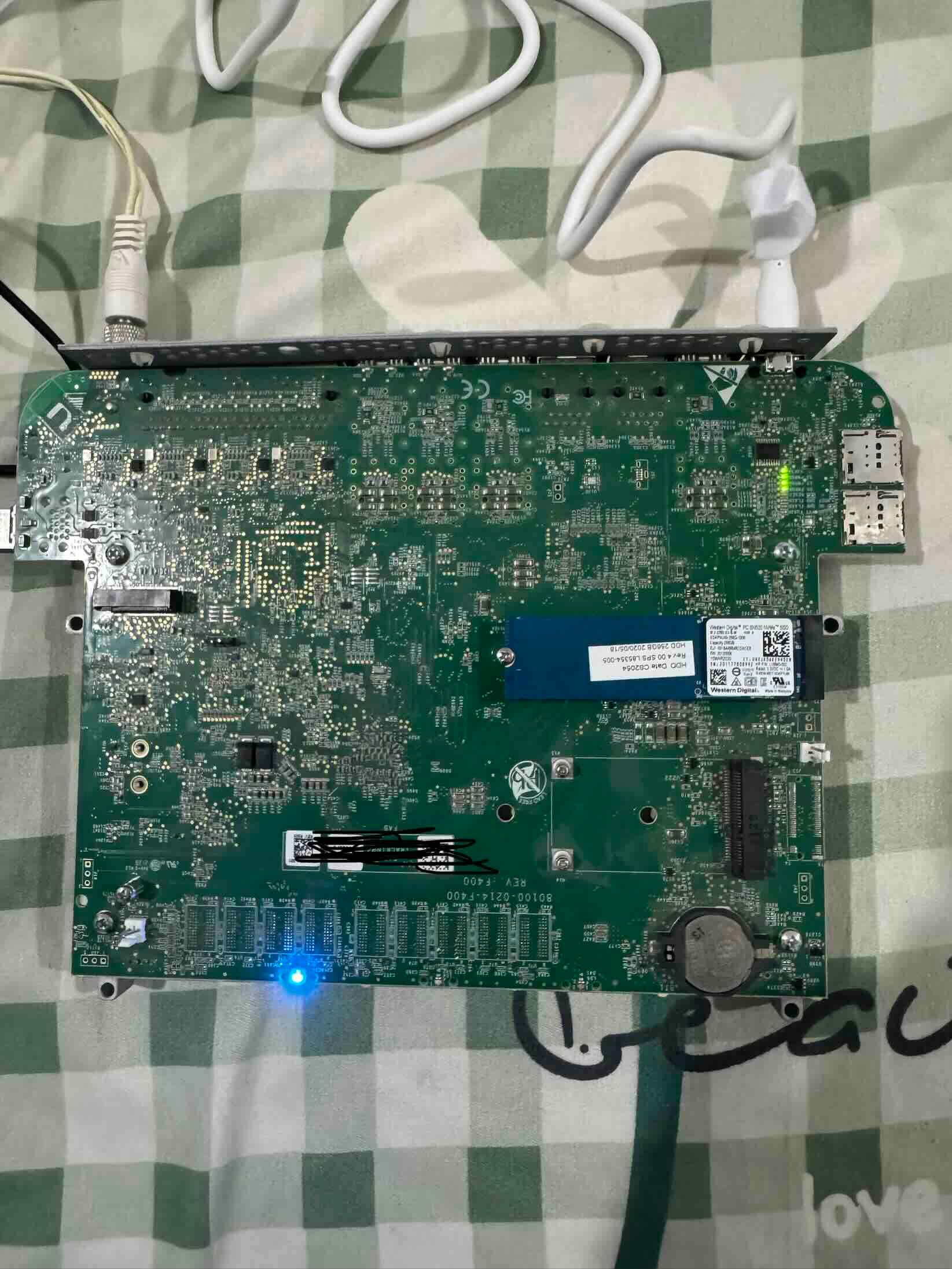
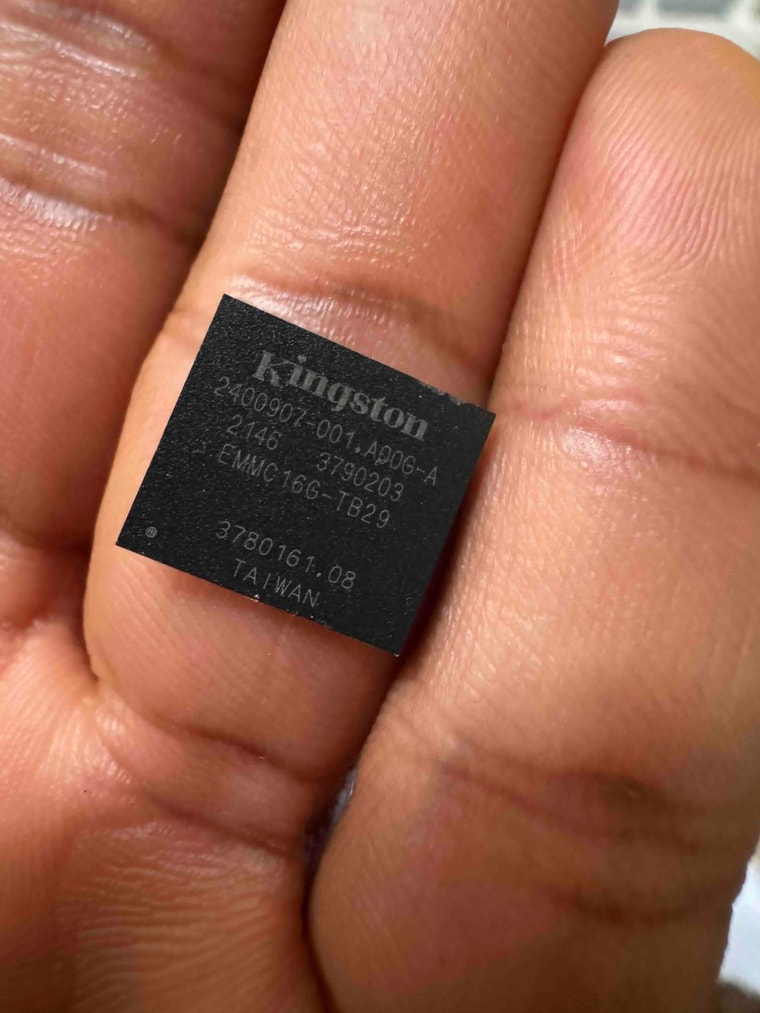
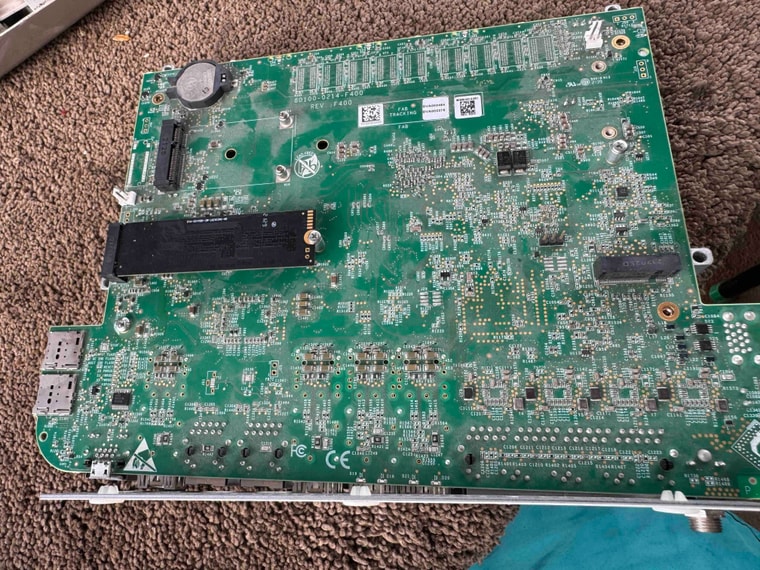
          @arri Please, I need help with my bricked 6100 base model. Everything was working fine until the device stopped booting. I had no console access, and the power LED was solid blue. As many people suggested, I was able to remove the EMMC from the device with professional assistance and slotted in a B+M keyed NVMe SSD. I still don't get console access, and the power LED is solid blue. I have tried the USB installer, and still the same thing. Sadly, I am losing $890. Is there anyone who has been able to succeed with this before?

          IMG_9123.jpegIMG_9127.jpeg

          GertjanG J 2 Replies Last reply Reply Quote 0
          • GertjanG Offline
            Gertjan @ablephri
            last edited by

            @ablephri said in Another Netgate with storage failure, 6 in total so far:

            I had no console access

            By correctly (without creating shorts or cuts in the traces) removing the EMMC and the BIOS can't find it anymore, and will look for other potential "drives" so it can boot from it.

            A broken EMMC, imho, won't stop the processor from running the BIOS and communicate with you over the console.

            No console is scary : no real proof the processor runs.

            You've used the console access before ? Was it working before on this device ? Is your console cable ok ?

            If the power rail is good, but for some reason it sinks the (example) 'common' clock signal to ground, then your processor can't work anymore.
            Some good equipment (scoop, or even logic analyser) and schemas and the knowledge how to (electrically) debug this is now needed. Humm, sorry, I start to feel pessimistic about this.

            No "help me" PM's please. Use the forum, the community will thank you.

            A 1 Reply Last reply Reply Quote 0
            • A Offline
              ablephri @Gertjan
              last edited by

              @Gertjan said in Another Netgate with storage failure, 6 in total so far:

              You've used the console access before? Was it working before on this device? Is your console cable ok?

              Please, the console used to work until the device didn't respond again. But is it possible that the computer can detect the COM port but still not be functional? I am really frustrated. The money wasted is so sad to think about.

              GertjanG 1 Reply Last reply Reply Quote 0
              • GertjanG Offline
                Gertjan @ablephri
                last edited by Gertjan

                @ablephri said in Another Netgate with storage failure, 6 in total so far:

                the console used to work until the device didn't respond again.

                Ok, so chances are good that the cable is ok.
                Removing the EMMC was a guess then ?

                The '6100' is like a PC : removing a drive won't stop the system from booting. You need the console access to select from what device : an EMMC, or some SSD drive or even a USB key drive. Whatever happens with these "drives", the console will give output.

                @ablephri said in Another Netgate with storage failure, 6 in total so far:

                the computer can detect the COM port but still not be functional?

                On the computer side, the USB plug, and the USB chip build into the cable, will power up, and communicate with the USB host (the USB circuitry build in the PC) so the 'PC' knows that an USB device is present, and with the help of the 'ID' of the USB cable chip, it will know what kind of driver it needs. In this case : a serial connection driver, also known as a 'COM' port (in the PC world) type of device. The serial connection itself, 3 wires, a common ground, a transmit and receive line, can not be auto detected like what you see if something is "plug and play". A serial connection is something from te past century.
                So plugin in the cable makes the COM port avaible to the PC, but won't tell you anything about the presence of a connection = the receive line going up and down in a fixed frequency (115000 hz - you checked this bit rate of you port ? ) so a serial connection is establish.
                That's also you final test : on the console port, if you can find these 'TX' and RX' traces, locate the TX line.
                If you see the TX line go up and down frequently (shortly) after power up, you know the 6100 BIOS is outputting text. If it stays silent ........ 😰

                No "help me" PM's please. Use the forum, the community will thank you.

                A 2 Replies Last reply Reply Quote 1
                • A Offline
                  ablephri @Gertjan
                  last edited by

                  @Gertjan Unfortunately, the COM port shows, but there's no connection on Putty.

                  1 Reply Last reply Reply Quote 0
                  • A Offline
                    ablephri @Gertjan
                    last edited by

                    @Gertjan This is the status static lights i get on the device. Do they mean anything?IMG_9152.jpg

                    1 Reply Last reply Reply Quote 0
                    • J Offline
                      jwt Netgate @ablephri
                      last edited by

                      @ablephri come on, post the video of the 1500W heat gun that was used, like you did on reddit. 😁

                      note to others in this thread: I'm working with him off-thread to get him a replacement in exchange for his broken unit.

                      A 1 Reply Last reply Reply Quote 4
                      • stephenw10S Offline
                        stephenw10 Netgate Administrator
                        last edited by stephenw10

                        Does the external LED start orange then change to blue?

                        The diag LEDs look like a normal POST.

                        Did you try both console ports?

                        A 1 Reply Last reply Reply Quote 0
                        • J Offline
                          jwt Netgate
                          last edited by jwt

                          To generally address this thread:

                          A larger flash device is only part of the solution. Netgate moved the entire product line to a larger eMMC device running in pSLC mode much earlier this year, without a price increase.

                          The larger pSLC isn't because there are more flash sectors to write to as much as it is to compensate for running the eMMC in pSLC mode, and yield the same or larger effective capacity. So now you'll see (for example) the Storage capacity on the 6100 Base as

                          Storage: 21.3 GB eMMC

                          This is really a 64GB eMMC running in pSLC mode.

                          Running the eMMC in pSLC mode provides a write endurance far beyond just the capacity increase of the new eMMC.

                          I'll try to write up something more ... technical to explain why soon.

                          Now I see a number of people desoldering the eMMC to try to recover. I'm not saying that isn't necessary, but I will say that it should not be necessary. I'm working with the vendor here to attempt to establish 'why' and issue a remedy.

                          I also want to work with the customer base for existing (pre-SLC eMMC) units to establish a path to getting a working, supported NVMe drive installed in their Netgate device prior to failure of the eMMC.

                          1 Reply Last reply Reply Quote 7
                          • A Offline
                            ablephri @jwt
                            last edited by

                            @jwt Hahaha yeah. I had to give it to a "professional" who used that heat gun. 😆 I am delighted with Netgate's great customer service, and I really appreciate the patience Gonzo had with me trying to fix my problems and also get the unit replaced

                            tinfoilmattT 1 Reply Last reply Reply Quote 3
                            • tinfoilmattT Offline
                              tinfoilmatt LAYER 8 @ablephri
                              last edited by

                              This post is deleted!
                              1 Reply Last reply Reply Quote 0
                              • A Offline
                                aivxtla @stephenw10
                                last edited by aivxtla

                                @stephenw10 Out of curiosity any reason for the Innodidk 3TE6 being shipped with the SG6100/8200? Is it Silicom’s shipping default or Netgate’s selection?
                                https://www.texim-europe.com/getfile.ashx?id=131537
                                Seems endurance is only 93TBW for the 128 GB vs something like the Transcend MTE452T (or MTE352T DRAMless) also an industrial SSD with DRAM cache rated around 270TBW. https://cdn.transcend-info.com/products/images/modelpic/1164/Transcend-MTE452T2_202307.pdf

                                The Transcend model also seems cheaper like ~$86 (when I bought the 256GB) vs $90-100+ for the inndodisk 128 GB at least for consumers, along with lower power draw and faster overall (for 128/256). I take it steeper discounts in bulk on the Innodisk?

                                w0wW 1 Reply Last reply Reply Quote 0
                                • w0wW Offline
                                  w0w @aivxtla
                                  last edited by

                                  @aivxtla said in Another Netgate with storage failure, 6 in total so far:

                                  Seems endurance is only 93TBW for the 128 GB

                                  There’s no official TBW rating for the 128GB SSD version, but based on the type of flash used, I expect it to be similar to Transcend’s TBW.

                                  A 1 Reply Last reply Reply Quote 1
                                  • A Offline
                                    aivxtla @w0w
                                    last edited by aivxtla

                                    @w0w it’s listed as 93TBW in the innodisk data sheet I linked, that texim link is to the official more detailed data sheet. It’s not listed in most places and hard to find normally. It’s not much different in endurance ~100TBW than the WD SN520 which is also cheaper but definitely less than the Transcend MTE352/452, I think the NAND controller also has impact in regards to things like curtailing write amplification etc. Then again some also warranty the TBW to less than max ability depending on sales tier like the WD Blue/Red SATA SSDs with same hw.

                                    w0wW 1 Reply Last reply Reply Quote 2
                                    • w0wW Offline
                                      w0w @aivxtla
                                      last edited by

                                      @aivxtla
                                      Overall, this could simply be variability in how the manufacturer evaluates TBW. As far as I know, there is no strict standard defining how TBW should be tested or calculated. Some manufacturers focus on producing nice-looking numbers for the datasheet, while others prioritize long-term stability.
                                      A real-world example: recently I ran into unexplained issues on a friend’s home PC. It took quite a while to track down the cause, which—unsurprisingly—turned out to be a 5-year-old SSD with about 88% wear reported. The total written data was still far below the rated TBW, and the drive was not at 100% wear, but the problems were severe enough to make the system practically unusable.
                                      In the end, the datasheet even stated in a footnote that the specified TBW does not guarantee stable operation of the drive. Everything depends on the criteria chosen by the manufacturer. I don’t think TBW alone should be taken too seriously, although the controller may also play a role.

                                      P 1 Reply Last reply Reply Quote 1
                                      • P Offline
                                        Patch @w0w
                                        last edited by

                                        @w0w different technology and more than twice the difference in listed performance. That’s not something I would attribute to testing methodology with out real data suggesting otherwise.

                                        Imo a much more likely explanation is Netgate were not focusing on SSD wear as a major limit to device reliability and brand reputation at that time. They are now and I would be surprised if they made the same decision in the future.

                                        1 Reply Last reply Reply Quote 1
                                        • T Offline
                                          TVTS
                                          last edited by

                                          I ended up on this thread after having THREEE SG1100s all die of the same issue, ALL IN THE LAST 60 days! I've used and loved pfsense for years, but I wasn't aware how big of a problem this issue was until recently. Super disappointing to find out... I've opened a ticket, but all of these devices are older than 1 year, so I'm gonna take a wild guess and say the netgate is gonna tell me to go pound sand. Insane that they are VERY aware of this issue yet have done nothing to rectify it in years... I've deployed over 20 1100's, mostly for small business with basic needs and simple networks. They have been great given how feature rich they are for the price tag. Id happily pay an extra $50 for these devices if they would take the time to use better storage. Fingers crossed that netgate will replace any of these failed devices, but seems unlikely..

                                          SteveITSS 1 Reply Last reply Reply Quote 1
                                          • SteveITSS Offline
                                            SteveITS Galactic Empire @TVTS
                                            last edited by

                                            @TVTS https://docs.netgate.com/pfsense/en/latest/releases/25-07.html#:~:text=Changed:%20Reduce%20writes%20to%20disk

                                            To upgrade, select your branch in System/Update/Update Settings. When upgrading, allow 10-15 minutes to reboot, or more depending on packages, CPU, and/or disk speed.
                                            Only install packages for your version of pfSense.
                                            Upvote 👍 helpful posts!

                                            1 Reply Last reply Reply Quote 1
                                            • First post
                                              Last post
                                            Copyright 2026 Rubicon Communications LLC (Netgate). All rights reserved.
                                            Privacy Policy · Cookie Policy