how to make my laptop sending traffic from port 20818 go through wireguard (its working the other way around internet => vps => laptop)
-
tbh this is pretty much copy pasted from: my reddit post (sorry its 2 am)
anywaymy vps is running debian and my system is running nixos (i don't think thats relevant but if someone tries this in another distro and it works that would be helpful)
anyway this is where I'm at basically in a screenshot
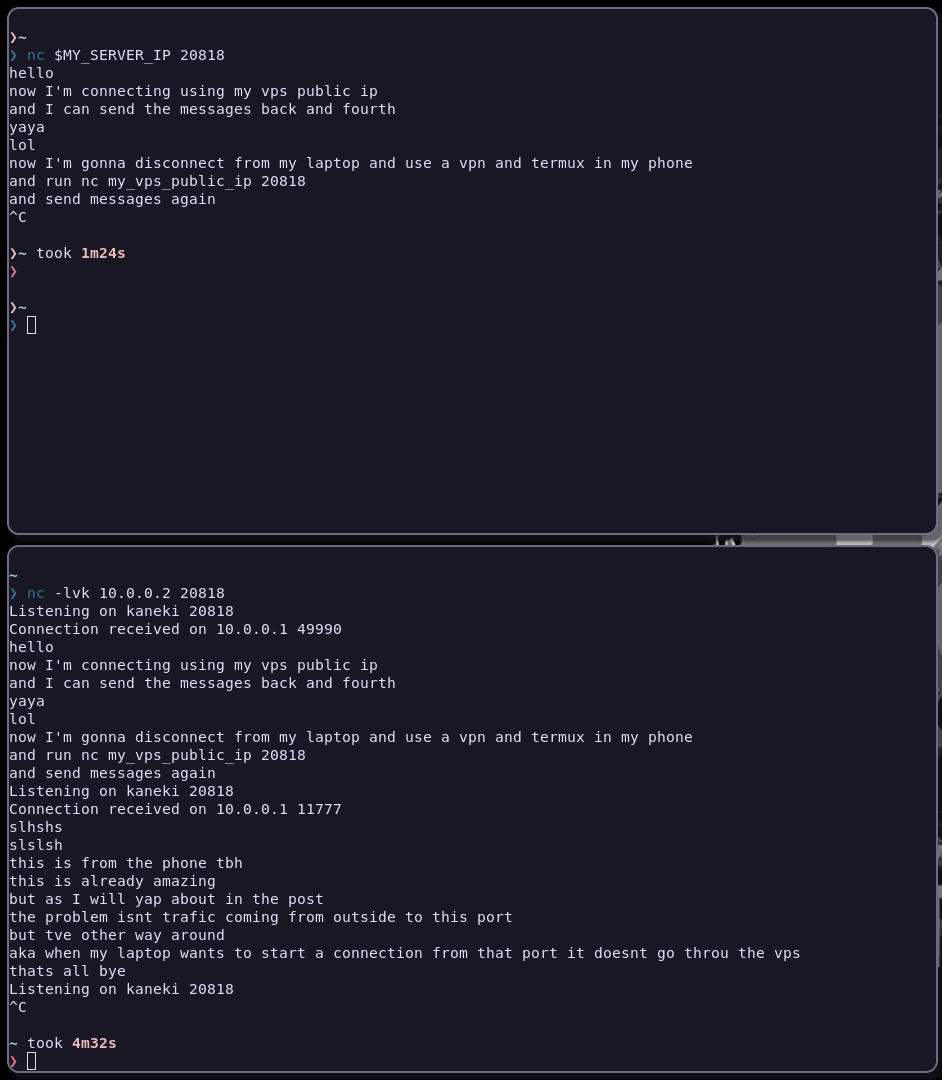
as I said in the screenshot this works
anyone from any ip and any port => vps_ip:20818 => laptop:20818
and when the connection is made it remember it and this will be possible
same person with same ip and port <= vps_ip:20818 <= laptop:20818
I can confirm that this is working by running
sudo tcpdump -i eth0 -n port 20818
in the vps and seeing that my vpn (on the phone) and vps ips are exchanging packets and its length is proportional to the message length
than by runningsudo tcpdump -i wg0 -n port 20818in the laptop I can see that the exchange is between 10.0.0.1 and 10.0.0.2 a screenshot cause why not
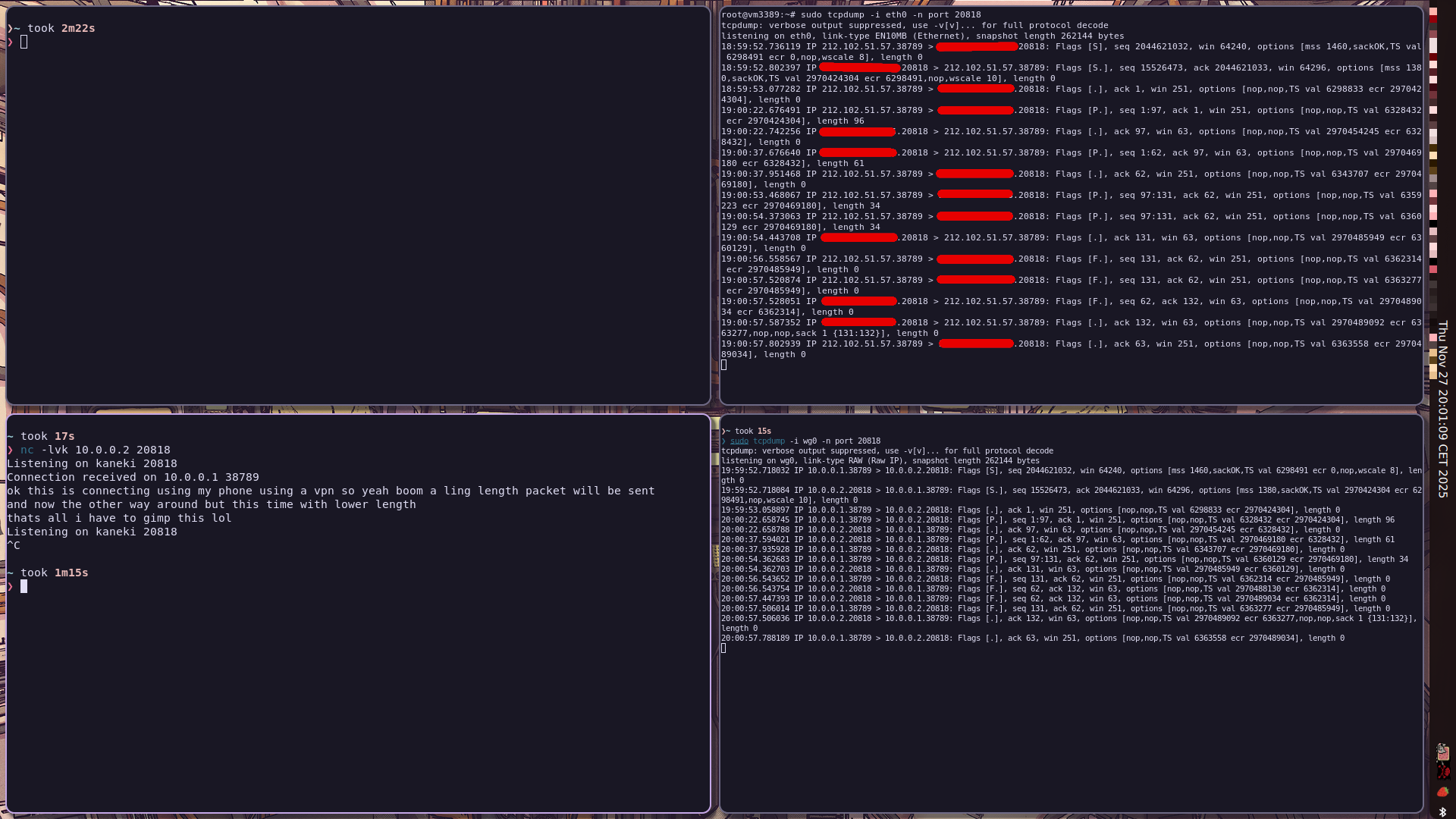
anyway this is working fantastically
now the issue is when I put qbittorrent interface to wg0 this is what I getso my theory is unlike when netcat already initialised the connection and there is a way for the packet to travel now when qbittorrent tries to use the packet its not going through 10.0.0.1 aka my vps and when I run
tcpdump -i wg0 -n port 20818in my laptop (where qbittorrent is running) this is what I get❯ sudo tcpdump -i wg0 -n port 20818 tcpdump: verbose output suppressed, use -v[v]... for full protocol decode listening on wg0, link-type RAW (Raw IP), snapshot length 262144 bytes 20:07:09.076690 IP 10.0.0.2.20818 > 67.(the_ips_are_cut_btw)881: UDP, length 115 20:07:09.076731 IP 10.0.0.2.20818 > 87.(the_ips_are_cut_btw)81: UDP, length 115 20:07:09.076752 IP 10.0.0.2.20818 > 185(the_ips_are_cut_btw).25401: UDP, length 115 20:07:09.076760 IP 10.0.0.2.20818 > 212(the_ips_are_cut_btw)881: UDP, length 115 20:07:13.278473 IP 10.0.0.2.20818 > 197(the_ips_are_cut_btw)0818: UDP, length 104 20:07:14.000201 IP 10.0.0.2.20818 > 185(the_ips_are_cut_btw).80: UDP, length 16 20:07:14.000248 IP 10.0.0.2.20818 > 93.(the_ips_are_cut_btw)337: UDP, length 16 20:07:14.000272 IP 10.0.0.2.20818 > 208(the_ips_are_cut_btw)69: UDP, length 16 20:07:14.000279 IP 10.0.0.2.20818 > 91.(the_ips_are_cut_btw)51: UDP, length 16 20:07:14.048478 IP 10.0.0.2.20818 > 93.(the_ips_are_cut_btw)337: UDP, length 16 20:07:14.048490 IP 10.0.0.2.20818 > 185(the_ips_are_cut_btw)1337: UDP, length 16 20:07:14.048497 IP 10.0.0.2.20818 > 91.(the_ips_are_cut_btw)51: UDP, length 16 20:07:14.048504 IP 10.0.0.2.20818 > 185(the_ips_are_cut_btw).80: UDP, length 16 20:07:14.048510 IP 10.0.0.2.20818 > 222(the_ips_are_cut_btw)969: UDP, length 16 20:07:14.048517 IP 10.0.0.2.20818 > 23.(the_ips_are_cut_btw)969: UDP, length 16 20:07:14.048566 IP 10.0.0.2.20818 > 208(the_ips_are_cut_btw)69: UDP, length 16 20:07:14.049415 IP 10.0.0.2.20818 > 185(the_ips_are_cut_btw).80: UDP, length 16 20:07:14.049432 IP 10.0.0.2.20818 > 93.(the_ips_are_cut_btw)337: UDP, length 16 20:07:14.049439 IP 10.0.0.2.20818 > 208(the_ips_are_cut_btw)69: UDP, length 16 20:07:14.049445 IP 10.0.0.2.20818 > 91.(the_ips_are_cut_btw)51: UDP, length 16 20:07:14.049659 IP 10.0.0.2.20818 > 185(the_ips_are_cut_btw).80: UDP, length 16 20:07:14.049668 IP 10.0.0.2.20818 > 93.(the_ips_are_cut_btw)337: UDP, length 16 20:07:14.049674 IP 10.0.0.2.20818 > 208(the_ips_are_cut_btw)69: UDP, length 16 20:07:14.049679 IP 10.0.0.2.20818 > 91.(the_ips_are_cut_btw)51: UDP, length 16so the real issue is that not each and everyone of them is not doing something like this
10.0.0.2.20818 > 10.0.0.1.20818
than for 10.0.0.1.20818 > goes to wherever qbittorrent wants
anyway
heres my setupin my vps
root@vm3389:~# cat /etc/nftables.conf
flush ruleset
table inet filter {
  chain input {
    type filter hook input priority filter
    policy drop
    ct state invalid drop comment "early drop of invalid connections"
    ct state {established, related} accept comment "allow tracked connections"
    iif lo accept comment "allow from loopback"
    ip protocol icmp accept comment "allow icmp"
    meta l4proto ipv6-icmp accept comment "allow icmp v6"
    tcp dport ssh accept comment "allow sshd"
    #I edited the post since everything still the same even after commenting out these 2 lines so I though to let you know I commmented them out
    #tcp dport 20818 accept comment "allow qbittorrent"
    #udp dport 20818 accept comment "allow qbittorrent"
    iifname "eth0" udp dport 51820 accept
    pkttype host limit rate 5/second counter reject with icmpx type admin-prohibited
    counter
  }
  chain forward {
    type filter hook forward priority filter
    policy accept
  }
}
table inet nat {
    chain prerouting {
        type nat hook prerouting priority -100;
policy accept
tcp dport 20818 iif "eth0" dnat ip to 10.0.0.2:20818
udp dport 20818 iif "eth0" dnat ip to 10.0.0.2:20818
    }
    chain postrouting {
        type nat hook postrouting priority 100;
policy accept
oifname "wg0" masquerade
    }
}
root@vm3389:~# cat /etc/wireguard/wg0.conf
[Interface]
Address = 10.0.0.1/24
ListenPort = 52782
PrivateKey = (redacted)

[Peer]
PublicKey = (redacted)
AllowedIPs = 10.0.0.2/32
and in my laptop
❯ cat /etc/wireguard/wg0.conf
[Interface]
Address = 10.0.0.2/24
PrivateKey = (redacted)

[Peer]
PublicKey = (redacted)
AllowedIPs = 10.0.0.1/32
EndPoint = (redacted):52782
PersistentKeepalive = 25
this should be all the info needed to reproduce the issue I guess vps is using debian 13 and I'm using nixos unstable if that matters
basically the whole issue is why qbittorrent doesn't initialise the traffic and what am I missing ?thats all I tried to cover everything sorry if this is too long