Can somebody help me get to Yamaha YNCA throug a pfSense?
-
I have a virtual pfSense running on my server, connected to 192.168.1.x as WAN and with the internal address of 192.168.6.x. On the inside there is another VM with four Home Assistant instances running in Docker. I use the pfSense to route inbound traffic to the different instances and stop anything inbound that I haven't opened for. Most of my hardware is on the 192.168.1.x network as well, and most of it works without any problems. The only thing I can't get working is the Yamaha YNCA network control.
From the VM running Home Assistant I can open the web interface of any of my four Yamaha receivers (different zones), 192.168.1.200-204. And again all other hardware on the 192.168.1.x network is working from all the Home Assistant instances. But I am unable to get the Yamaha YNCA control running with the plug-in for Home Assistant. It's not the plug-in or the receivers, because I can connect with a Pi with Home Assistant that's connected directly to the 192.168.1.x network.
The port for the YNCA control is 50000, and I have a sneaking suspicion that it may be multicast. I installed Avahi after a bit of googling, but it did not help. I'm not even sure that's the correct plug-in for this.
Can somebody please help me along here?
-
@Mastiff This might help you-
https://forum.netgate.com/topic/139218/sonos-speakers-and-applications-on-different-subnets-vlan-s
-
@chpalmer Thanks, but that is not the same case. I tried it, but it doesn't work. I think it's because that 's between two VLANs on the same pfSense, I need to get it from WAN to LAN.
-
OK, weirder... According to the Plug-in programmer it's a simple TCP socket connection to port 50000 on the reciever. So then I really don't undrestand why I can't connect!
-
The plugin is supposed to connect out to the receivers? Or the receivers send data to the plugin?
If the the protocol is crude you might need to set static outbound NAT for port 50000. The receivers may not allow random source ports. Assuming pfSense is still NATing from LAN to WAN.
-
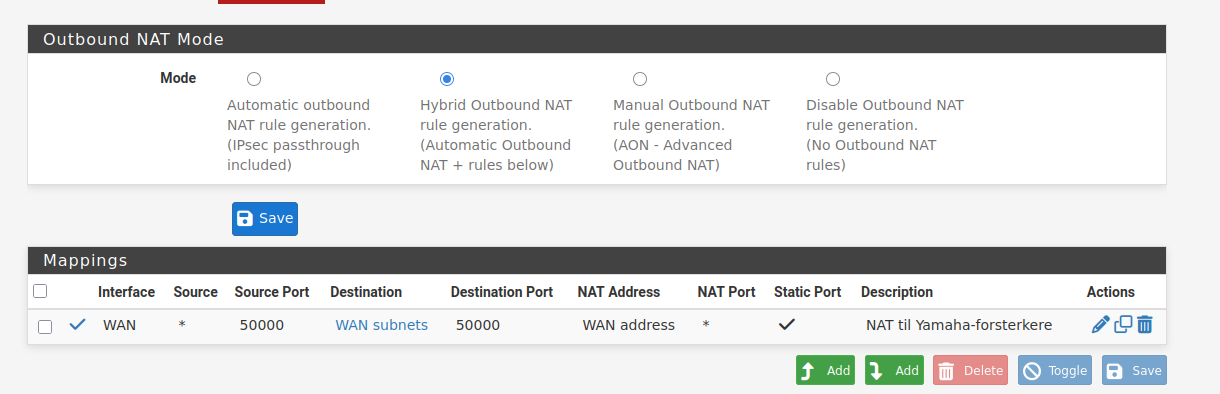
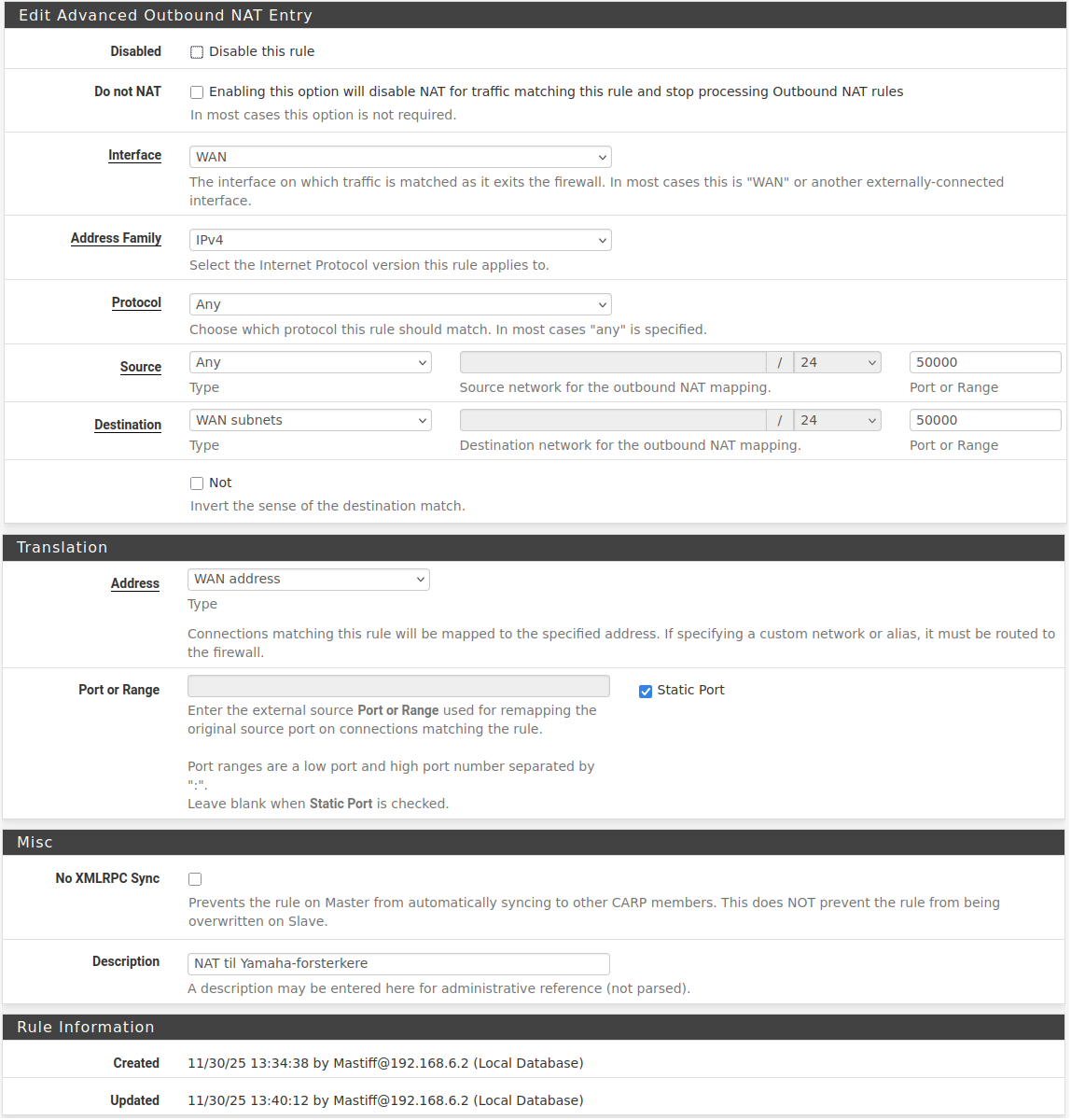
@stephenw10 Thanks for answering! As far as I understand, the plug-in connects to the receiver on 50000 and gets back data on the same port. I have now tried to add an static outbound NAT, but it still doesn't work. Does the rule here seem right? And should I add a Firewall rule as well?
-
@Mastiff said in Can somebody help me get to Yamaha YNCA throug a pfSense?:
According to the Plug-in programmer it's a simple TCP socket connection to port 50000 on the reciever. So then I really don't undrestand why I can't connect!
Maybe one of the involved devices doesn't have a gateway set, or even doesn't have an option for that.
In this case you could nat the traffic to pfSense interface address with an outbound NAT rule.@Mastiff said in Can somebody help me get to Yamaha YNCA throug a pfSense?:
As far as I understand, the plug-in connects to the receiver on 50000 and gets back data on the same port. I have now tried to add an static outbound NAT
Why on WAN?
You need the rule on the interface, which the receiver is connected to. I'm in doubt, it is on the WAN. -
Change the source to only the LAN subnet or only the HA IP specifically. You don't want to over match.
Change the source port to 'any' It may bot be using port 50000 as source.
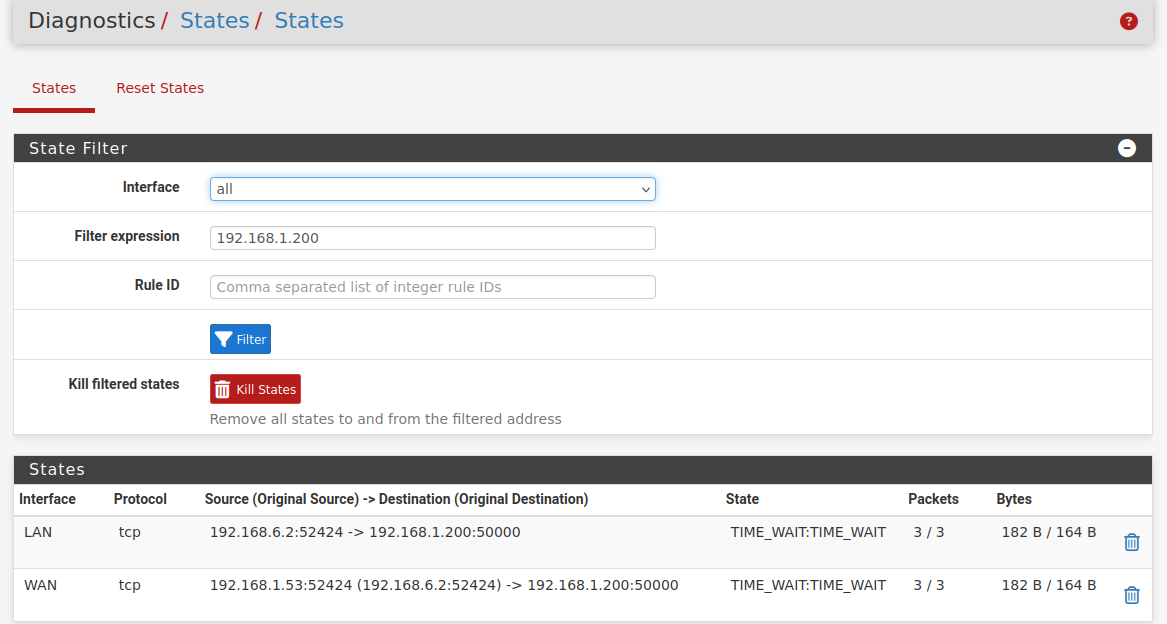
Try checking the state table to see what ports the HA plugin is actually using.
Try a pcap on the WAN side to see if there's any reply traffic.
-
@viragomann You obviously did not read the first post about this setup before you started to doubt that it is on the WAN. It is. If you read the first post you will understand why. Btw I ride a Honda Blackbird.

@stephenw10 I changed those, but will having nothing in Source Port or Range make it any? The word any is not possible there.
-
Yes leave it empty to match any source port.
-
@stephenw10 Here are the states:
And the packet capture, it ran for some seconds before I tried to connect Hass to it:
packet capture Hass Yamaha plug-in.txt
I think this may be the most important stuff, since WAN on my Hass is 192.168.1.53:
14:44:40.749486 IP 192.168.1.53.54230 > 192.168.1.200.50000: tcp 0
14:44:40.750059 IP 192.168.1.200.50000 > 192.168.1.53.54230: tcp 0
14:44:40.750341 IP 192.168.1.53.54230 > 192.168.1.200.50000: tcp 0
14:44:40.753188 IP 192.168.1.53.54230 > 192.168.1.200.50000: tcp 18
Edit: I tried to make a Port Forward NAT rule from WAN to 192.168.6.2 (the IP of the Hass VM), with 54230 as the port, but that did not help.
-
@Mastiff said in Can somebody help me get to Yamaha YNCA throug a pfSense?:
I tried to make a Port Forward NAT rule from WAN to 192.168.6.2 (the IP of the Hass VM), with 54230 as the port, but that did not help.
NAT rules do not determine nor cause ports to be used by network hosts. NAT rule parameters merely specify which parameters (i.e., interface, IP version, protocol, [source IP]:[source port], and [destination IP]:[destination port]) the rule will 'act' on.
-
@Mastiff said in Can somebody help me get to Yamaha YNCA throug a pfSense?:
You obviously did not read the first post about this setup before you started to doubt that it is on the WAN.
Sure, I've read it. But this was yesterday and my brain is aged.

Okay, the receiver is connected to WAN. So pfSense already nats the traffic to it, since your outbound NAT is in hybride mode.
Btw I ride a Honda Blackbird.
But Honda doesn't build AV receivers.

-
@tinfoilmatt I am aware of that. But it seems like the receiver is trying to contact back on 54230.
@viragomann No, you're right. Only Yamaha does both that and motorcycles.
 I used to have an RD350 two stroke some years ago. And the problem (at least if I understand the packet capture) is not that Hass can't contact the receiver, it's that the receiver can't contact back.
 -
@Mastiff said in Can somebody help me get to Yamaha YNCA throug a pfSense?:
I am aware of that. But it seems like the receiver is trying to contact back on 54230.
You can't be aware of what I said if that's your response. The receiver's 'network stack' is apparently programmed to use a range of TCP source ports (presumably somewhere within, but potentially not exclusive to, a
52[xxx]-54[xxx]range).Stephen's advice already accounted for anything your attempting to address on this specific point by suggesting you use a source port
ANY/*in your "NAT til Yamaha-forsterkere" NAT rule. -
@Mastiff said in Can somebody help me get to Yamaha YNCA throug a pfSense?:
is not that Hass can't contact the receiver, it's that the receiver can't contact back.
If you allow traffic out - the return traffic is always allowed back via the state.
Only time you would need a port forward is if something on your wan was trying to initiate traffic.
That you have stuff on your "wan" is curious - why would your stuff not just be on another segment behind pfsense.
An intelligent man is sometimes forced to be drunk to spend time with his fools
If you get confused: Listen to the Music Play
Please don't Chat/PM me for help, unless mod related
SG-4860 25.07.1 | Lab VMs 2.8.1, 25.07.1 -
Something about using RFC1918 on both the WAN and LAN interfaces may require particular static routing and/or reconfiguration of pfSense settings (e.g.,
Interfaces / WAN / Block private networks and loopback addresses). -
@johnpoz As I said in my first message, this is a pfSense on my "outer" LAN, which is defined as WAN in it, that routes traffic to Home Asistant, and only the traffic I want there. So it's not a real WAN.
@tinfoilmatt I have already removed the tick in "Block private networks". And this one plug-in is the only thing that has problems, MQTT, SCRAPE sensors on port 8880-8889 and about ten other services and maybe 50 devices have no problems getting back and forth. Which is why I am not understanding this at all.
-
@Mastiff Can you show your packet capture settings?
-
And what's your 'outer' firewall/gateway? On the
192.168.1.0/24network I mean. Also pfSense? I think you're going to need a static route configured on whatever that gateway is, directing traffic destined for the192.168.6.0/24subnet to use gateway192.168.1.53.(This topology is terribly designed by the way.)