Route mobile IPSec traffic to the other end of a site-to-site tunnel
-
First of all, hello!
i have a rookie routing problem :-
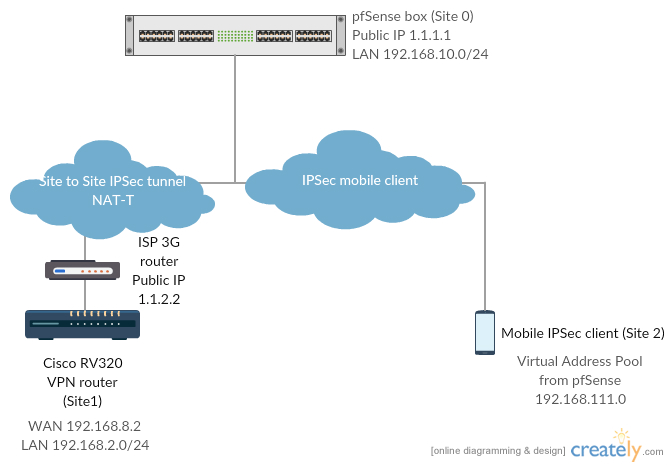
I have a pfSense box setup with 1 site to site ipsec tunnel and 1 mobile ipsec client.
While the traffic is flowing between the pfS box and the remote lan and also between the pfS box and the mobile client, I cannot connect from the mobile (android) client to the site-to-site's remote end.
The mobile android client gets a address from a virtual subnet on the pfS box.
Seems to be a routing problem, but i'm missin it. Could anybody point me in the right direction ? Static routes, pointing to ?Edit: I'll add a basic network layout to get the picture clearer. So i need to access the computers on Site 1 from the mobile device on Site 2. How could i accomplish this ?
-
Updated the first post to make myself clearer, meybe anybody is willing to shed some light into this :)
-
Anybody ? Can this (make all tunnels interroutable) even be done in pfSense or do i need a separate spoke to spoke tunnel ? If not then i have to start messing with SoftEther again, wich worked fine except it didn't like my cisco rv320.
-
Just need another P2 that matches the mobile address pool.
-
@cmb:
Just need another P2 that matches the mobile address pool.
Thank you for the reply. I now tried to add a second P2 with the mobile virtual subnet to the pfS to RV320 tunnel, didn't help.
-
The P2 has to exist on both sides.
-
As cmb said before: You have to setup the corresponding phase 2 on both sites.
Site 0 config:
local subnet: 192.168.111.0/24
Remote subnet: 192.168.2.0/24Site 1 config:
local subnet: 192.168.2.0/24
remote subnet: 192.168.111.0/24Another point may be, that your phase 2 on your mobile phase 1 of Site0 is configured wrong. Try there as local subnet 0.0.0.0/0.
Hello! It looks like you're interested in this conversation, but you don't have an account yet.
Getting fed up of having to scroll through the same posts each visit? When you register for an account, you'll always come back to exactly where you were before, and choose to be notified of new replies (either via email, or push notification). You'll also be able to save bookmarks and upvote posts to show your appreciation to other community members.
With your input, this post could be even better 💗
Register LoginPrivacy Policy · Cookie Policy