openvpn route conflict
-
Hello,
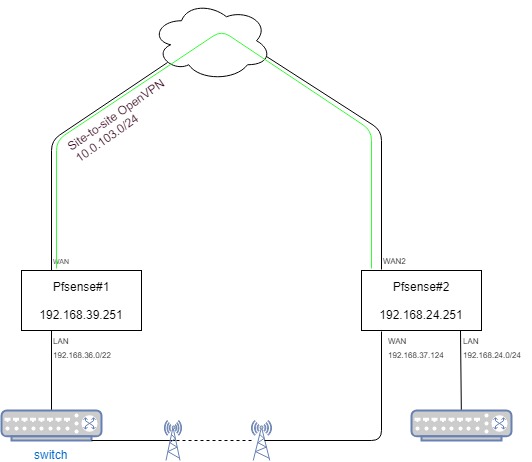
here is what I am trying to do: I have to sites (pfsense#1 and pfsense#2) connected with 2 unifi nanostations. For bandwith reasons, this is the default link between the 2 sites.
If something went wrong with the wireless link, I would like the link to be switched to a site-to-site openvpn connection.
On pfsense#2 I've created a gateway group and set tiering options. I've also set a site-to-site openvpn server on wan2 interface (10.0.103.0/24 virtual network).
On pfsense#1 I've set a site-to-site client connection.
Currently, failover between wan and wan2 on pfsense#2 works well. VPN connection is shown as "up" on both side (client and server), but openvpn fails to add proper route because a route to each network already exists on both pfsense:
pfsense#1
192.168.24.0 192.168.37.124 255.255.255.0 (static route)
pfsense#2
192.168.36.0 192.168.24.251 255.255.252.0How could I tell the 2 pfsense gateways to ignore previous route to each subnet and use route 192.168.24.0 10.0.103.2 255.255.255.0 (on pfsense #1) and 192.168.36.0 10.0.103.1 255.255.252.0 (on pfsense#2) instead?
thanks for your help!
-
If that was me I would put the bridges on their own interface at the pfSense 1 side and create a transit network for the link between the sites.
In other words, I would get the unify bridge off the LAN over there and on its own interface. Then it's a matter of making router decisions in pfSense itself instead of dealing with asymmetric routing for the hosts on the pfSense #1 LAN.
But, yeah. In order to swing the routing for the two networks from one interface to the other you might need to use something like FRR/OSPF.
I would not attempt that before adding the transit network described above though.

Hello! It looks like you're interested in this conversation, but you don't have an account yet.
Getting fed up of having to scroll through the same posts each visit? When you register for an account, you'll always come back to exactly where you were before, and choose to be notified of new replies (either via email, or push notification). You'll also be able to save bookmarks and upvote posts to show your appreciation to other community members.
With your input, this post could be even better 💗
Register LoginPrivacy Policy · Cookie Policy