Manually installing packages from the command line / ssh / console
-
Today I had a far-away unit on 2.4.3-p1 running just fine. I needed Cron on there to schedule some gateway monitoring scripts.
Here's what popped up:
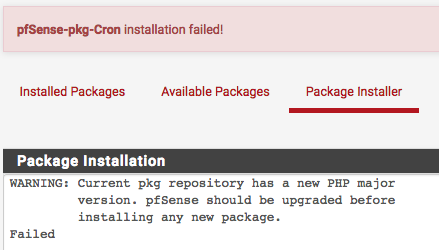
Ugh. I did NOT feel like rolling the dice on a Friday afternoon and risking having to drive out and rescue this thing. 2.4.4 hasn't had a good track record of successful field upgrades for me so far.
Long story short, I gave this a try via ssh and it worked like a charm:
# pkg install pfSense-pkg-CronCron package is now up and running, and I can enjoy my Friday afternoon

Posting in case this helps anyone, posting here since most of the threads I found when I searched for "manually install package" were 2-7 years old... -
Had that pulled in some other dependency incompatible with 2.4.3 you would have just shot your own foot, though. I wouldn't advise anyone do that. :-)
-
Yikes. Ok I guess I dodged a bullet on this one then. Any way to tell via CLI whether such a dependency exists?
-
Well as long as you don't use
-yit will still ask for confirmation after printing the list of changes so it's not awful, but still someone could absentmindedly hitynot realizing the list of changes was bad.You could run
pkg install -n blahand read the output to know for sure in a safe way.


Hello! It looks like you're interested in this conversation, but you don't have an account yet.
Getting fed up of having to scroll through the same posts each visit? When you register for an account, you'll always come back to exactly where you were before, and choose to be notified of new replies (either via email, or push notification). You'll also be able to save bookmarks and upvote posts to show your appreciation to other community members.
With your input, this post could be even better 💗
Register LoginPrivacy Policy · Cookie Policy