Netgate Discussion Forum
    • Categories
    • Recent
    • Tags
    • Popular
    • Search
    • Register
    • Login
    Introducing Netgate Nexus: Multi-Instance Management at Your Fingertips.

    Device's unable connect to chromecast over VLAN

    Scheduled Pinned Locked Moved pfSense Packages
    11 Posts 3 Posters 4.4k Views 4 Watching
    Loading More Posts
    • Oldest to Newest
    • Newest to Oldest
    • Most Votes
    Reply
    • Reply as topic
    Log in to reply
    This topic has been deleted. Only users with topic management privileges can see it.
    • M
      mrhomelabber
      last edited by

      I am sorry if this a stupid thing to ask for help, but apparently using Avahi was supposed to be simple but it driving me bunkers...
      So I followed setup instructions from youtube channel: Lawrence Systems / PC Pickup
      I followed his steps how to set up, So I set up how he did it, Great is works. my device can know to connect to the chromecast over a vlan, But here is the problem, it sees the device, when I try to connect to the chromecasted it says " Connecting to [Device name] takes a while, then it just drops it and doesn't connect.
      Amy I doing something wrong?
      Thank's guys.
      1_1547531230513_Screenshot_274.png 0_1547531230512_Screenshot_272.png

      GertjanG 1 Reply Last reply
      Reply Quote 0
      • GertjanG
        Gertjan @mrhomelabber
        last edited by Gertjan

        @mrhomelabber said in Device's unable connect to chromecast over VLAN:

        my device can know to connect to the chromecast over a vlan,

        Our problem is :
        On what network is this device you connect to the Chromecast ?
        What are the firewall rules on that interface?

        No "help me" PM's please. Use the forum, the community will thank you.

        1 Reply Last reply
        Reply Quote 0
        • M
          mrhomelabber
          last edited by

          We are trying to get IOS, iPhones, Android's to connect to it.
          Not sure what you mean, but we also tried setting pass lan traffic to IOT net, but hasn't worked out.

          GertjanG 1 Reply Last reply
          Reply Quote 0
          • GertjanG
            Gertjan @mrhomelabber
            last edited by Gertjan

            @mrhomelabber said in Device's unable connect to chromecast over VLAN:

            Not sure what you mean, but we also tried setting pass lan traffic to IOT net, but hasn't worked out.

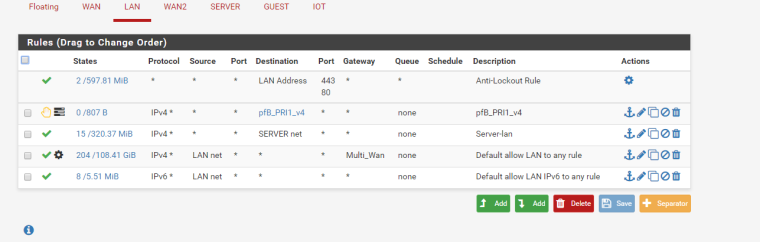
            The default LAN rule is a pass all.
            Traffic from devices connected on the LAN can go anywhere - any interface.

            So, initially, nothing has to be set up on LAN.
            If your Chromecast is on another LAN ( OPTx interface), copy the firewall rule you found on LAN to this interface, and you'll be good.

            No "help me" PM's please. Use the forum, the community will thank you.

            1 Reply Last reply
            Reply Quote 0
            • M
              mrhomelabber
              last edited by

              0_1547588048388_Screenshot_277.png
              Not sure what you mean? Since there is changed. Unless I doing something wrong in my lan

              1 Reply Last reply
              Reply Quote 0
              • GertjanG
                Gertjan
                last edited by

                Put a pass all rule on the top position of your LAN interface and see what happens.

                No "help me" PM's please. Use the forum, the community will thank you.

                1 Reply Last reply
                Reply Quote 0
                • M
                  mrhomelabber
                  last edited by

                  I tried that, and it still not working. Even know my chromecast is not broadcasting the mdns

                  1 Reply Last reply
                  Reply Quote 0
                  • GertjanG
                    Gertjan
                    last edited by Gertjan

                    Hummm.

                    You could "see" what Avahi sees : check out this one https://forum.netgate.com/topic/134339/new-avahi-package/29

                    No "help me" PM's please. Use the forum, the community will thank you.

                    1 Reply Last reply
                    Reply Quote 0
                    • M
                      mrhomelabber
                      last edited by

                      There we go! I checked the logs and found was needed to be fixed! Thank you so much. :)

                      1 Reply Last reply
                      Reply Quote 0
                      • GertjanG
                        Gertjan
                        last edited by

                        For the record : the solution was ?

                        No "help me" PM's please. Use the forum, the community will thank you.

                        1 Reply Last reply
                        Reply Quote 0
                        • J
                          jagradang
                          last edited by

                          What was the outcome of this, I'm hitting the same issue! Any help appreciated.

                          1 Reply Last reply
                          Reply Quote 0

                          Hello! It looks like you're interested in this conversation, but you don't have an account yet.

                          Getting fed up of having to scroll through the same posts each visit? When you register for an account, you'll always come back to exactly where you were before, and choose to be notified of new replies (either via email, or push notification). You'll also be able to save bookmarks and upvote posts to show your appreciation to other community members.

                          With your input, this post could be even better 💗

                          Register Login
                          • First post
                            Last post
                          Copyright 2026 Rubicon Communications LLC (Netgate). All rights reserved.
                          Privacy Policy · Cookie Policy