I broke my Netgate XG-7100 pfsense router by changing switch VLAN config
-
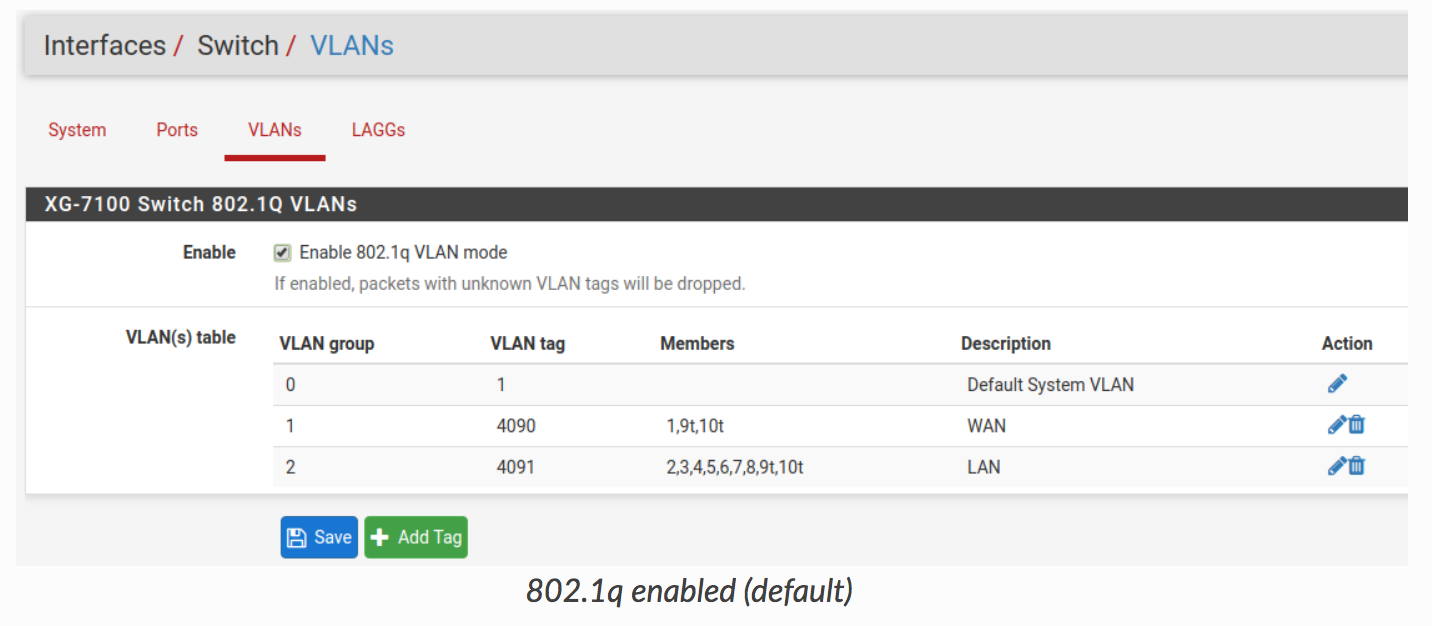
I am hoping someone who has a better understanding of the VLAN setup on the XG-7100 switch can help? I have done something stupid and turned off the 'Enable 802.1q VLAN mode' setting on the switch. The effect of this is that now my pfsense router is completely inaccessible and so I can't change the setting back via the GUI.
Is there another way in? Any pointers on how to roll this back would be amazing. If its not possible to roll back then how do I factory reset the whole unit and re-install pfsense?
Here is pic of the config setting I am talking about:
-
Hmmm the only way I could think of is to use ix0/ix1 or the add-in card.
If this is not possible, connect with the serial console cable and choose Option 4 (Reset to factory defaults). This will of course blow away your config.-Rico
-
Perfect, of course, should have realised I could connect via console. Worked like a dream. Thank you, all up and running again now.
-
Glad you have your XG-7100 back on track.

-Rico

Hello! It looks like you're interested in this conversation, but you don't have an account yet.
Getting fed up of having to scroll through the same posts each visit? When you register for an account, you'll always come back to exactly where you were before, and choose to be notified of new replies (either via email, or push notification). You'll also be able to save bookmarks and upvote posts to show your appreciation to other community members.
With your input, this post could be even better 💗
Register LoginPrivacy Policy · Cookie Policy