Netgate Discussion Forum
    • Categories
    • Recent
    • Tags
    • Popular
    • Search
    • Register
    • Login
    Introducing Netgate Nexus: Multi-Instance Management at Your Fingertips.

    2 LAN with 1 WAN

    Scheduled Pinned Locked Moved General pfSense Questions
    6 Posts 2 Posters 1.2k Views 2 Watching
    Loading More Posts
    • Oldest to Newest
    • Newest to Oldest
    • Most Votes
    Reply
    • Reply as topic
    Log in to reply
    This topic has been deleted. Only users with topic management privileges can see it.
    • K
      kwestby
      last edited by

      I have a very simple setup, 2 LANs and 1 WAN. LAN1 = 192.168.1.0/24 and LAN2 = 192.168.2.0/24

      Internet access works fine from LAN1, but does not work for LAN2. Computer connected to LAN2 interface (opt1) is able to obtain IP address from DHCP server, but cannot ping the firewall IP address 192.168.2.1.

      NAT Outbound is set to Automatic and both LAN1 & LAN2 networks are configured. Firewall run on LAN2 is Allow Any Any

      I've looked at other posts and tried some of the recommendations to no avail.

      This is driving me crazy :-). What am I missing?

      1 Reply Last reply
      Reply Quote 0
      • DaddyGoD
        DaddyGo
        last edited by

        The default (LAN) rule may be missing, such as:
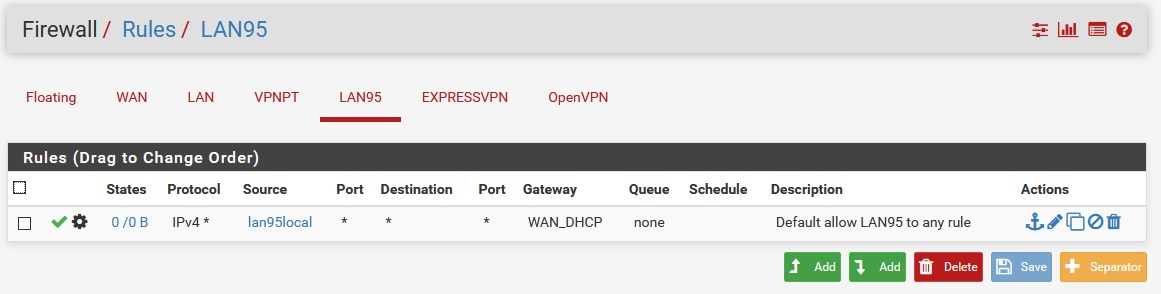
        8f53edcd-cfe5-423e-8402-8ae8ce21ae52-image.png

        in your case: OPT1 interface default rule....

        Cats bury it so they can't see it!
        (You know what I mean if you have a cat)

        1 Reply Last reply
        Reply Quote 0
        • K
          kwestby
          last edited by

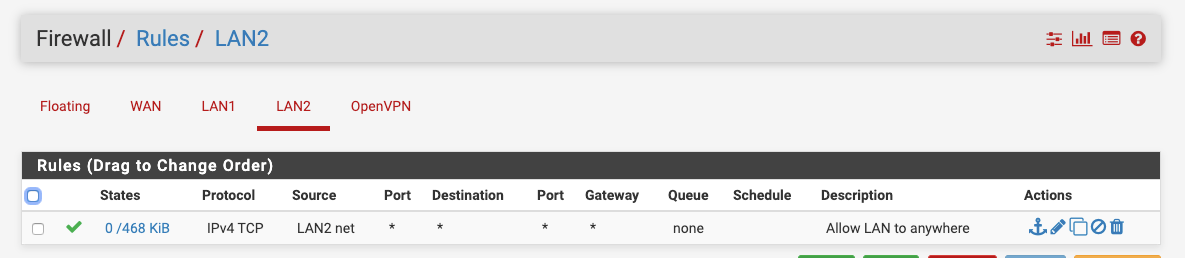
          This is what I have currently

          Screen Shot 2020-05-11 at 1.22.44 PM.png

          1 Reply Last reply
          Reply Quote 0
          • DaddyGoD
            DaddyGo
            last edited by

            IPv4 only TCP?
            and try configuring the gateway as well

            Cats bury it so they can't see it!
            (You know what I mean if you have a cat)

            1 Reply Last reply
            Reply Quote 0
            • K
              kwestby
              last edited by

              Just realized I only had TCP in the firewall rule! You stare at something too long and don't see the details. Changed it to Any and it is working now :-)

              1 Reply Last reply
              Reply Quote 0
              • DaddyGoD
                DaddyGo
                last edited by

                you welcome bro :-)

                Cats bury it so they can't see it!
                (You know what I mean if you have a cat)

                1 Reply Last reply
                Reply Quote 1

                Hello! It looks like you're interested in this conversation, but you don't have an account yet.

                Getting fed up of having to scroll through the same posts each visit? When you register for an account, you'll always come back to exactly where you were before, and choose to be notified of new replies (either via email, or push notification). You'll also be able to save bookmarks and upvote posts to show your appreciation to other community members.

                With your input, this post could be even better 💗

                Register Login
                • First post
                  Last post
                Copyright 2026 Rubicon Communications LLC (Netgate). All rights reserved.
                Privacy Policy · Cookie Policy