Netgate Discussion Forum
    • Categories
    • Recent
    • Tags
    • Popular
    • Search
    • Register
    • Login
    Introducing Netgate Nexus: Multi-Instance Management at Your Fingertips.

    Lose DNS when OpenVPN Client is turned on.

    Scheduled Pinned Locked Moved DHCP and DNS
    11 Posts 4 Posters 1.5k Views 4 Watching
    Loading More Posts
    • Oldest to Newest
    • Newest to Oldest
    • Most Votes
    Reply
    • Reply as topic
    Log in to reply
    This topic has been deleted. Only users with topic management privileges can see it.
    • N
      NasKar
      last edited by

      I'm running 2.4.5.1 and everything was working great. Last Thursday the internet stopped working. After several days of troubleshooting I found that DNS came back after I turned off the OpenVPN client. I don't know what changed as everything was working fine for many months.
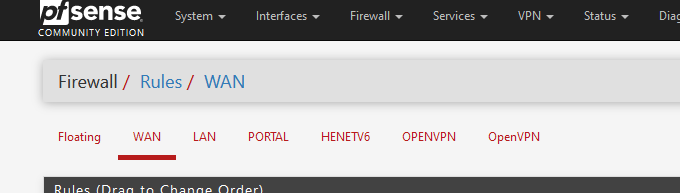
      Gateway

      VPNclient-02.jpg
      My VPN_WAN Rules
      VPNclient-01.jpg
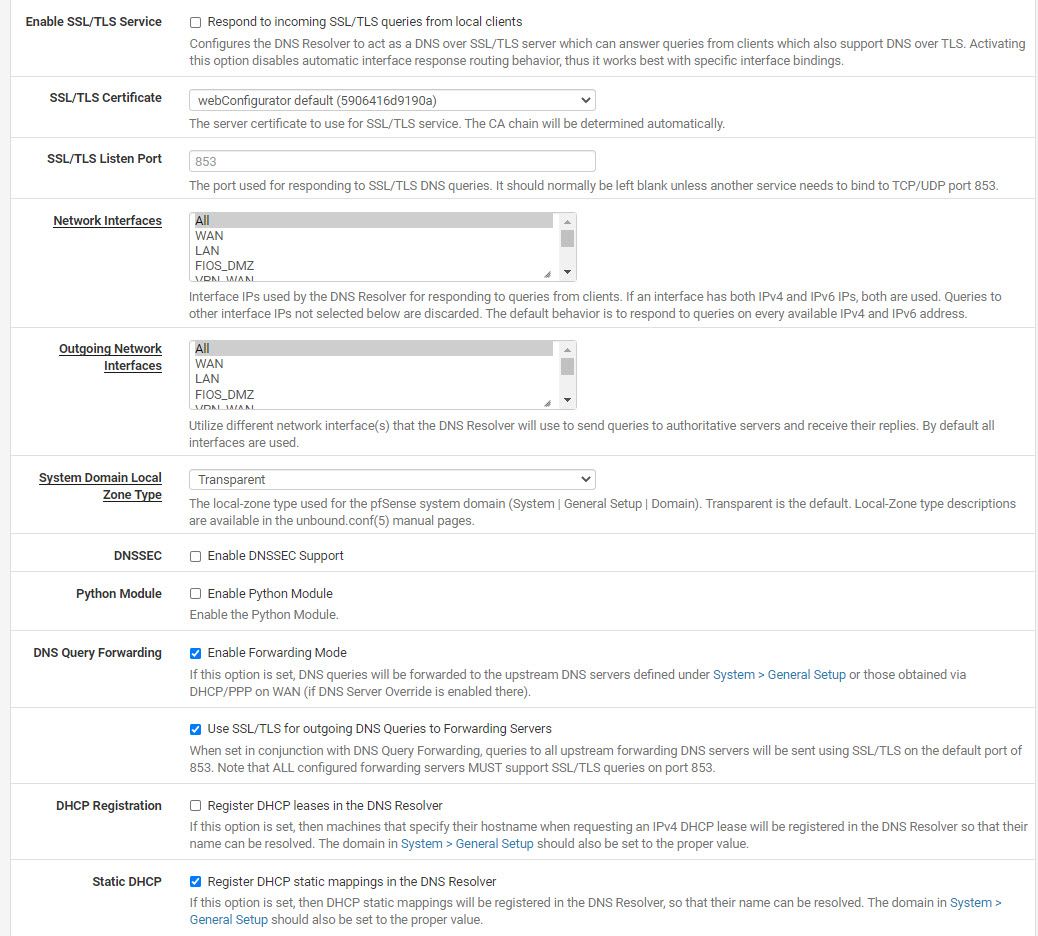
      Resolver
      VPNclient-04.jpg
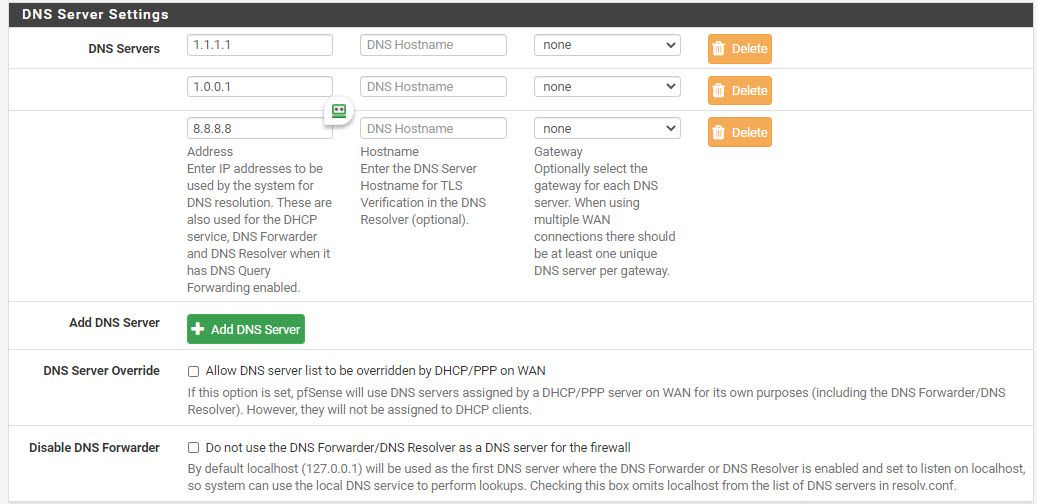
      General DNS settings
      VPNclient-05.jpg

      Intel(R) Core(TM)2 Duo CPU E7500 @ 2.93GHz
      2 CPUs: 1 package(s) x 2 core(s)
      AES-NI CPU Crypto: No
      2 Gigs Ram
      SSD with ver 2.4.0
      IBM Intel Pro PCI-E Quad Port 10/100/1000 Server Adapter 39Y6138 (K210320)

      GertjanG 1 Reply Last reply
      Reply Quote 0
      • N
        NasKar
        last edited by

        Forgot to mention that Ping www.google.com and 8.8.8.8 both fail. Does that mean it's a gateway issue?

        Intel(R) Core(TM)2 Duo CPU E7500 @ 2.93GHz
        2 CPUs: 1 package(s) x 2 core(s)
        AES-NI CPU Crypto: No
        2 Gigs Ram
        SSD with ver 2.4.0
        IBM Intel Pro PCI-E Quad Port 10/100/1000 Server Adapter 39Y6138 (K210320)

        R 1 Reply Last reply
        Reply Quote 0
        • R
          riften @NasKar
          last edited by

          @NasKar - well I don't know enough to tell you where the issue is but if ping to 8.8.8.8 fails it's not a DNS issue. Do you have a WAN IP? Can you ping it? What are your LAN firewall rules? Can you create a allow all outgoing rule on your LAN FIREWALL rules if one is not present, and place it at the top to test if the Firewall settings are doing something?

          Going further, does your computer have a valid IP, assuming it's DHCP from PFSENSE.

          N 1 Reply Last reply
          Reply Quote 0
          • NogBadTheBadN
            NogBadTheBad
            last edited by NogBadTheBad

            What is your default route, there is an option in the OVPN client page Don't pull routes without this enabled the default route will point out your OVPN interface, may be worth checking.

            Diagnostics -> Routes should show you.

            Is it an OVPN client or server on your pfSense box?

            Andy

            1 x Netgate SG-4860 - 3 x Linksys LGS308P - 1 x Aruba InstantOn AP22

            NogBadTheBadN 1 Reply Last reply
            Reply Quote 0
            • N
              NasKar @riften
              last edited by

              @riften said in Lose DNS when OpenVPN Client is turned on.:

              @NasKar - well I don't know enough to tell you where the issue is but if ping to 8.8.8.8 fails it's not a DNS issue. Do you have a WAN IP? Can you ping it? What are your LAN firewall rules? Can you create a allow all outgoing rule on your LAN FIREWALL rules if one is not present, and place it at the top to test if the Firewall settings are doing something?

              Going further, does your computer have a valid IP, assuming it's DHCP from PFSENSE.

              I have WAN IP and can ping it.
              Here are my LAN rules
              VPNclient-06.jpg

              Move the default allow LAN to any rule to the top below the antilockout and still can't ping www.google.com or 8.8.8.8

              @NogBadTheBad It is a OVPN client I do have a server that works fine as a road warrior VPN. Checking the option for Don't pull routes doesn't fix the issue.

              Intel(R) Core(TM)2 Duo CPU E7500 @ 2.93GHz
              2 CPUs: 1 package(s) x 2 core(s)
              AES-NI CPU Crypto: No
              2 Gigs Ram
              SSD with ver 2.4.0
              IBM Intel Pro PCI-E Quad Port 10/100/1000 Server Adapter 39Y6138 (K210320)

              R 1 Reply Last reply
              Reply Quote 0
              • R
                riften @NasKar
                last edited by

                @NasKar
                In reading over your first post again, you turn OFF the OPENVPN CLIENT and it works, turn it ON and you cannot get out. Are you normally funneling all outgoing through the VPN? I think we need to know more about how that is setup, as that is where the issue is.

                N 1 Reply Last reply
                Reply Quote 0
                • N
                  NasKar @riften
                  last edited by

                  @riften My setup is for there to be an alias of computer ip addresses that go out the vpn and another alias of web sites that go out the normal gateway. My main computer is on the vpn ip list.

                  Intel(R) Core(TM)2 Duo CPU E7500 @ 2.93GHz
                  2 CPUs: 1 package(s) x 2 core(s)
                  AES-NI CPU Crypto: No
                  2 Gigs Ram
                  SSD with ver 2.4.0
                  IBM Intel Pro PCI-E Quad Port 10/100/1000 Server Adapter 39Y6138 (K210320)

                  1 Reply Last reply
                  Reply Quote 0
                  • GertjanG
                    Gertjan @NasKar
                    last edited by

                    What is this :

                    @NasKar said in Lose DNS when OpenVPN Client is turned on.:

                    My VPN_WAN Rules

                    ?

                    Your WAN interface ?
                    The OpenVPN interface ?

                    These are mine :

                    d2da6bfd-fd17-4a32-9e5f-105a681fab6a-image.png

                    No "help me" PM's please. Use the forum, the community will thank you.

                    N 1 Reply Last reply
                    Reply Quote 0
                    • NogBadTheBadN
                      NogBadTheBad @NogBadTheBad
                      last edited by

                      @NogBadTheBad said in Lose DNS when OpenVPN Client is turned on.:

                      What is your default route, there is an option in the OVPN client page Don't pull routes without this enabled the default route will point out your OVPN interface, may be worth checking.

                      Diagnostics -> Routes should show you.

                      Is the default route your WAN interface ?

                      Andy

                      1 x Netgate SG-4860 - 3 x Linksys LGS308P - 1 x Aruba InstantOn AP22

                      N 1 Reply Last reply
                      Reply Quote 0
                      • N
                        NasKar @Gertjan
                        last edited by

                        @Gertjan My VPN_WAN is the interface for my OVPN client that I'm trying to get working. I also have a OpenVPN interface that was created for my Ovpn server to login to my system remotely.

                        @NogBadTheBad I will check the Diagnositics ->Router with the client VPN turned on and Don't pull routes unchecked when I get home .

                        Intel(R) Core(TM)2 Duo CPU E7500 @ 2.93GHz
                        2 CPUs: 1 package(s) x 2 core(s)
                        AES-NI CPU Crypto: No
                        2 Gigs Ram
                        SSD with ver 2.4.0
                        IBM Intel Pro PCI-E Quad Port 10/100/1000 Server Adapter 39Y6138 (K210320)

                        1 Reply Last reply
                        Reply Quote 0
                        • N
                          NasKar @NogBadTheBad
                          last edited by

                          @NogBadTheBad The default route is my WAN interface
                          My WAN IP is blurred
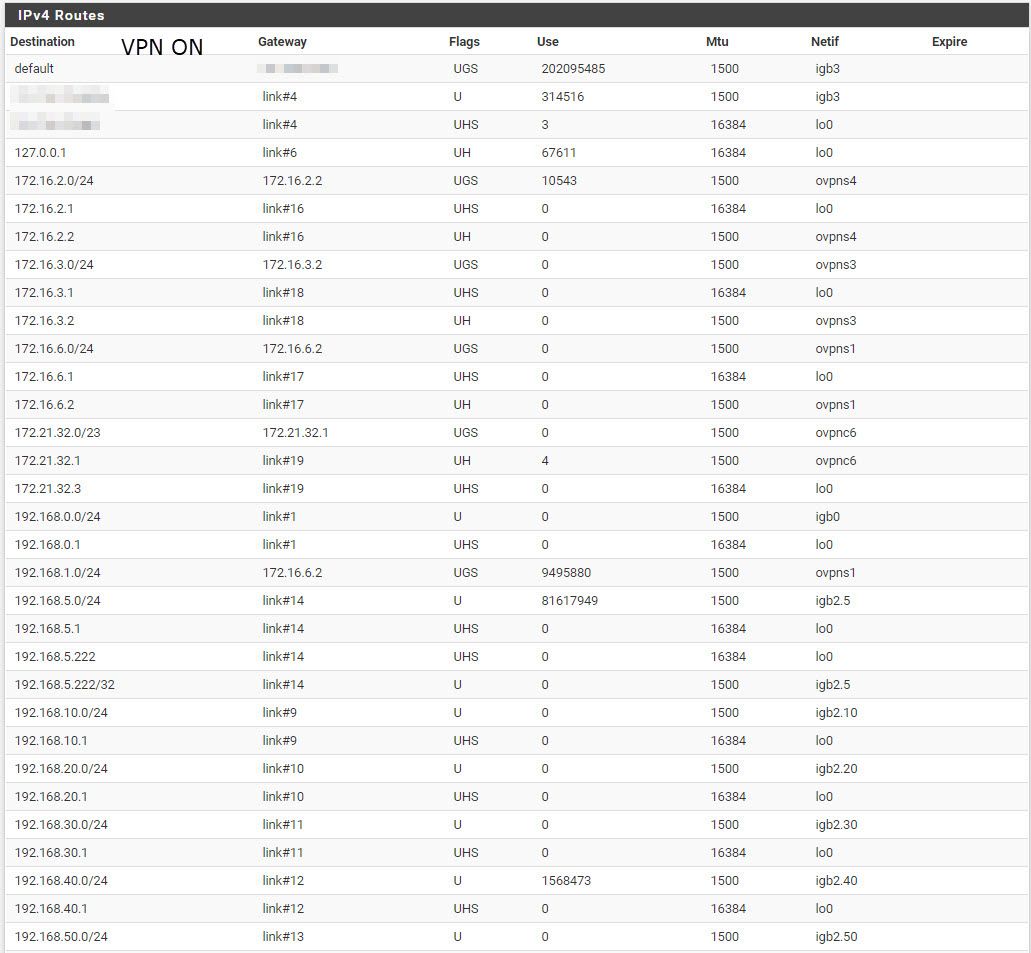
                          VPN ON.jpg
                          The client VPN is on ovpnc6

                          Intel(R) Core(TM)2 Duo CPU E7500 @ 2.93GHz
                          2 CPUs: 1 package(s) x 2 core(s)
                          AES-NI CPU Crypto: No
                          2 Gigs Ram
                          SSD with ver 2.4.0
                          IBM Intel Pro PCI-E Quad Port 10/100/1000 Server Adapter 39Y6138 (K210320)

                          1 Reply Last reply
                          Reply Quote 0

                          Hello! It looks like you're interested in this conversation, but you don't have an account yet.

                          Getting fed up of having to scroll through the same posts each visit? When you register for an account, you'll always come back to exactly where you were before, and choose to be notified of new replies (either via email, or push notification). You'll also be able to save bookmarks and upvote posts to show your appreciation to other community members.

                          With your input, this post could be even better 💗

                          Register Login
                          • First post
                            Last post
                          Copyright 2026 Rubicon Communications LLC (Netgate). All rights reserved.
                          Privacy Policy · Cookie Policy