Finding pfSense on WAN, using Zeroconf
-
I have a pfSense on my LAN, for the purpose of running a test network sub-network. So the pfSense WAN is connected to my LAN, and the test devices are on a pfSense LAN.
I access the pfSense web config via its WAN interface (on my LAN). The pfSense WAN is getting an address via DHCP.
So my question is, how can I find the pfSense address? Can I use the avahi package to make it advertise its web server with DNS-SD, and have a .local hostname on its WAN interface?
-
@cmcqueen said in Finding pfSense on WAN, using Zeroconf:
I access the pfSense web config via its WAN interface (on my LAN
Not a good test test set up.
You should bring a collection of devices, if not all of them, - your "test environment" - and hook them all up to a LAN on pfSense. Then test that LAN segment - and pfSense. You'll be having a router-after-router setup which is for outgoing (== Internet) traffic completely transparent.Making WAN accessible is not part of real set up.
The exception might be : testing a NAT rule (while IPv4 lasts)."Zeroconf" (whatever it actually is) needs ports to be open and/or redirected to some LAN (pfSense) based device with a running service that implements Zeroconf. That will normally never be the case as you do not want the Internet to "Zeroconf" your installation.
Keep in mind that pfSense is a firewall and router : nothing from a WAN perspective can be seen. Shut down the firewall part, define routes on your main LAN's router (the one that hands out a WAN IP to pfSense) and set up pfSEnse as a basic router.
@cmcqueen said in Finding pfSense on WAN, using Zeroconf:
how can I find the pfSense address?
If the initial LAN works well, the DHCP (client) request made by pfSense to the upstream ISP router registers it's DNS name 'pfsense' into the upstream LAN DNS (your ISP router). So, as soon as it is powered on, you could use it's name :
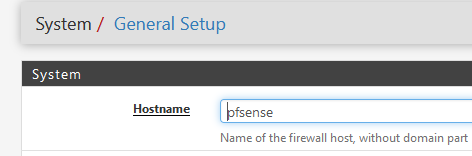
Typically, when you type
ping pfsenseon a PC on the ISP LAn, it (the ISP router) would resolve 'pfsense' to pfSense's IP first, and then starts to ping to this IP.
But nothing will happen ... no reply.
You have to add a firewall rule on the pfSense WAN interface so it can actually receive these ICMP requests - and thus reply.


Hello! It looks like you're interested in this conversation, but you don't have an account yet.
Getting fed up of having to scroll through the same posts each visit? When you register for an account, you'll always come back to exactly where you were before, and choose to be notified of new replies (either via email, or push notification). You'll also be able to save bookmarks and upvote posts to show your appreciation to other community members.
With your input, this post could be even better 💗
Register LoginPrivacy Policy · Cookie Policy