upstream gateway routing issue
-
Hello,
I'm running latest version of pfSense.
Please see the attached schema for architecture description :
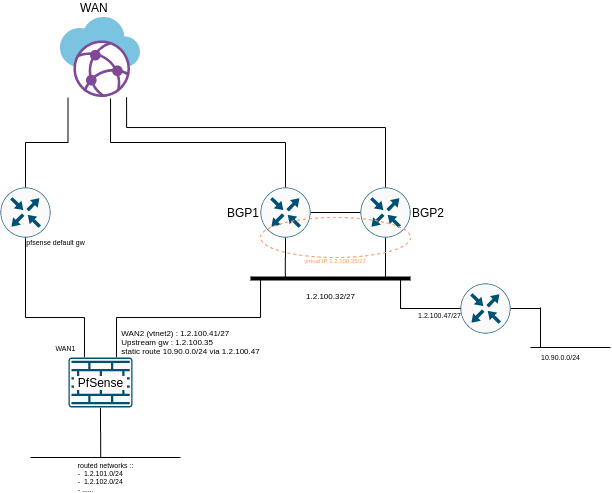
Problem description :
when an upstream gateway is set on WAN2 to 1.2.100.35, 10.90.0.0/24 is unreachable
when no upstream gateway is set on WAN2, 10.90.0.0/24 is reachableupstream gateway HAS TO BE SET on WAN2 for reply-to
pfctl -sa rules diff between with and without upstream gateway :
with upstream gateway set, I have 2 more rules :
- pass out route-to (vtnet2 1.2.100.35) inet from 1.2.100.41 to ! 1.2.100.32/27 flags S/SA keep state allow-opts label "let out anything from firewall host itself"
- pass in quick on vtnet2 reply-to (vtnet2 1.2.100.35) inet proto icmp all keep state label "USER_RULE"
It seems that the first one of these two rules does something wrong but I'm not a pf expert.
can anybody here tell me if there is a solution please ?Regards
-
Still looking for a solution...
-
issue seems to be fixed by adding a rule on top of WAN2 interface :
check "disable reply-to" when src-addr = 10.90.0.0/24 -
Hi,
Without seeing other details of your configuration, it seems that you may have to use "policy based routing" in your LAN rules, meaning you may have to assign two rules and specify which gateway to use for the two different destinations.
in the rules section, click on Advanced, and scroll down and then specify which gateway.
this may help. we had a similar issue recently with our multi-wan setup.
Hello! It looks like you're interested in this conversation, but you don't have an account yet.
Getting fed up of having to scroll through the same posts each visit? When you register for an account, you'll always come back to exactly where you were before, and choose to be notified of new replies (either via email, or push notification). You'll also be able to save bookmarks and upvote posts to show your appreciation to other community members.
With your input, this post could be even better 💗
Register LoginPrivacy Policy · Cookie Policy