Problem, snort block google server
-
Good evening, this is my first post.
I start with a question.
Since a week, snort blocks google servers. All google apps are blocked, drive, classroom, calendar ecc.
I have not made any changes.
What could be the problem?thanks a lot to everyone.
-
Hello!
What do the snort alert log lines from the google servers being blocked look like?
John
-
In blocked there are
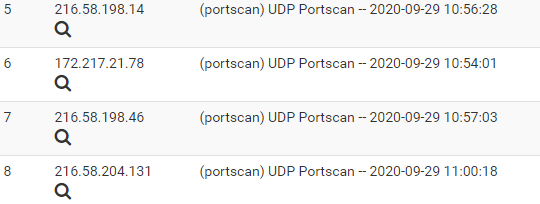
In alerts


etc etc
-
The Portscan preprocessor in Snort can be trigger happy. It is simply incorrectly interpreting some rapid-fire communications as "port scans". You can turn the sensitivity of the preprocessor down to "low", but I would recommend disabling it and the associated rules altogether on a home network.
Or you can simply disable that particular UDP rule by clicking the red X under the GID:SID column. I suggest you try that first.
Tuning an IDS/IPS is a continual job. You don't just install the package, enable some rules and let it run. Doing that will lead to nuisance blocks from false positives. You must tune the setup for your particular network traffic. That means disabling or suppressing certain rules that trigger on non-malicious traffic in your network.
I don't mean to be harsh, but the way you asked your question in this thread and the fact you had no idea why you were getting blocks indicates you are very new to IDS/IPS administration. You really need to run Snort in IDS mode (non-blocking for several weeks) to get a feel for alerts that happen in your network. Then research each alert to figure out why it occurred and if it is a false positive. Then you disable those rules which fire on false positives. After you get the system tuned to the point where you are getting very few alerts, then you enable blocking.
-
thankyou i try.

Hello! It looks like you're interested in this conversation, but you don't have an account yet.
Getting fed up of having to scroll through the same posts each visit? When you register for an account, you'll always come back to exactly where you were before, and choose to be notified of new replies (either via email, or push notification). You'll also be able to save bookmarks and upvote posts to show your appreciation to other community members.
With your input, this post could be even better 💗
Register LoginPrivacy Policy · Cookie Policy