Aiuto per Pfsense Aruba Cloud
-
Buona sera a tutti sono un system integrator piemontese , sono novizio con pfsense :)
Sto configurando un'infrastruttura all'interno del cloud pro di aruba con un macchina virtuale pfsense e una rete con i virtual switch con due macchine server virtuali ( una linux e una windows ).
Il mio scopo e di porre Pssense davanti alle altre macchine , eseguendo una rete virtuale lato Lan che parli con Pfsense > Che parla con il Pubblico.
Configuro il tutto al livello di rete Virtuale interna , dai server pingo l'ip dell'interfaccia Pfsens lato Lan e se eseguo dei Forward dall'ip pubblico di Pfsense raggiungo le macchine dall'esterno perfettamente
Io mio problema è che le macchine interne non escono in esterno ( non navigano )
non ho regole che mi bloccano il traffico dalla LAN verso la WAN , ho la regola " allow LAN to any " su IPV4
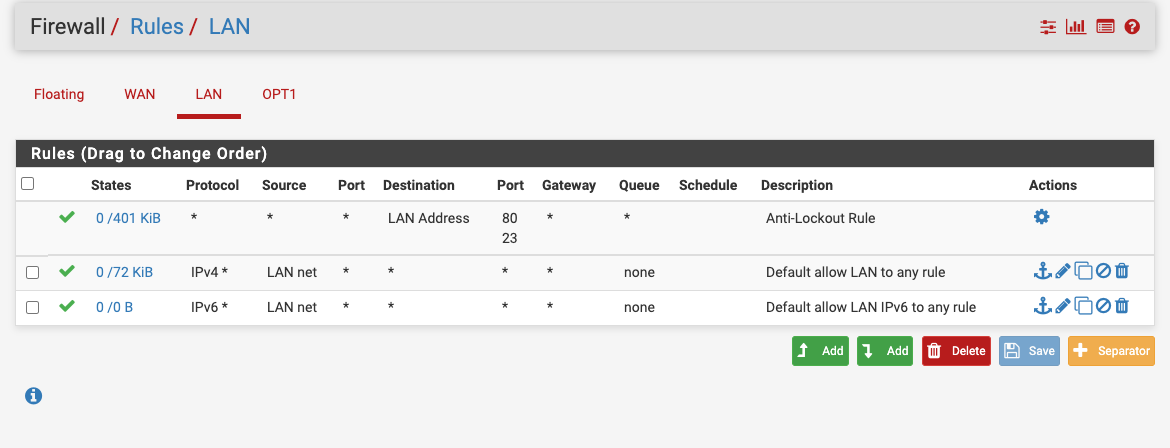
e su WAN non ho blocchi verso la LAN
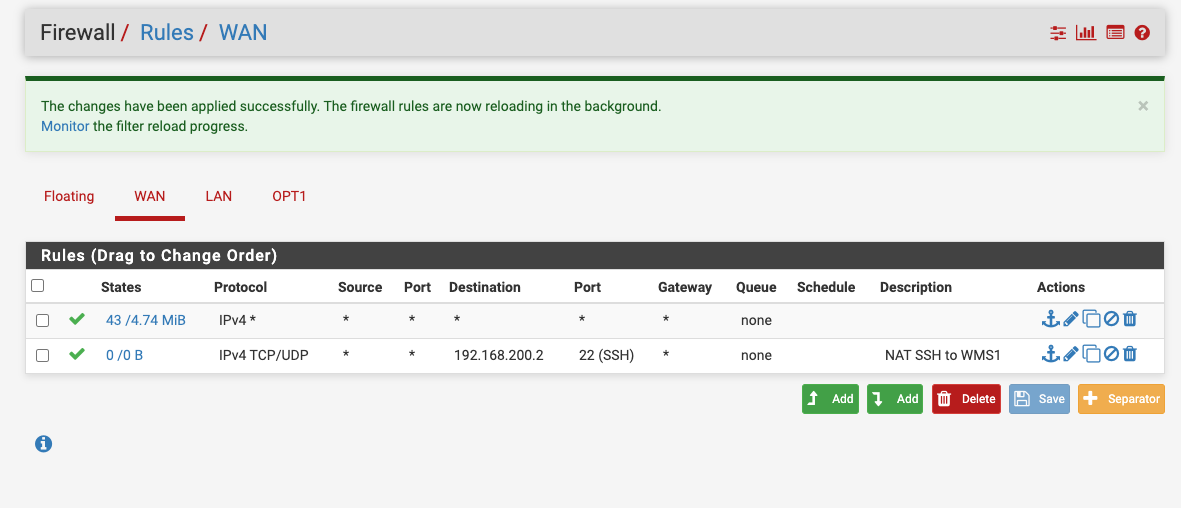
non ho altro configurato sul firewall
Cosa mi sta sfuggendo ?
Chiedo scusa ma sono novizio con Psfense :)Grazie In anticipo
-
OK RISOLTO , nel template delle macchine Cloud non viene configurato Il gateway della Wan e di conseguenza Pfsense non riesce a costruire la NAT automatica , ricordate di impostare In ROUTING il gateway corretto poi selezionatelo dalla scheda della WAN. Se no la NAT non va su in automatico ( se impostata in Auto )
Spero possa essere utile
Saluto
-
bene che hai risolto, ma scusa se mi permetto, attenzione che con quelle regole WAN hai tutto aperto, anche l'accesso a pfsense stesso lato pubblico e nessuna protezione. per l'accesso ssh da remoto è inoltre consiglito usare una vpn piuttosto che fare port forward, sopratutto se usi la porta standard 22

Hello! It looks like you're interested in this conversation, but you don't have an account yet.
Getting fed up of having to scroll through the same posts each visit? When you register for an account, you'll always come back to exactly where you were before, and choose to be notified of new replies (either via email, or push notification). You'll also be able to save bookmarks and upvote posts to show your appreciation to other community members.
With your input, this post could be even better 💗
Register LoginPrivacy Policy · Cookie Policy