SG2100 and internal switch
-
Hi guys,
I hope you could help me with the setup of my relatively new SG-2100.
I want to setup five VLAN's at home network, it could be something like this:
VLAN5 - Management (also this will be native VLAN)
VLAN10 - Home Users
VLAN20 - IoT
VLAN30 - Guests
VLAN40 - ServersSo I've been playing with the internal switch and I've been able to configure two kinds of ports on the SG-2100:
- Trunk ports, so I have all the VLAN's on this port and also the VLAN5 as "untagged".
- Access ports, but I need always these ports to be attached to the "native" VLAN.
What I want to achieve is, for example, to assign port 2 of the switch to VLAN 20, leave port 1 as a trunk port, and leave ports 3 and 4 on the native VLAN.
My problem is that the SG-2100 has an "especial" or internal port that is port 5. I have to "pass" the traffic through this port to get everything working, and if I change the configuration of this port I lose management of the box.
My problem comes in here, I have left my VLAN 5 as vlan 1 on the box to not touch a lot the native vlan and also LAN interface.

I configured VLAN's from 10 to 40 correctly, but I have to set the port 5 as "tagged" for these VLANs.
So if I want to "untag" a VLAN o a port, for example let's say VLAN 20, what do I have to do with port 5? Because this port is already untagged on VLAN 1, and also tagged for the rest of VLAN's for trunks to work.
I assume that what I want to achieve here is not possible. Or maybe I have to move "all the ports" to this new VLAN and convert this VLAN as my untagged one. Am I right? Anyone able to have "access-ports" on different VLANs in this box?
BR!
ISO
-
Ok, I'm a bit stupid :) I did this and it worked!
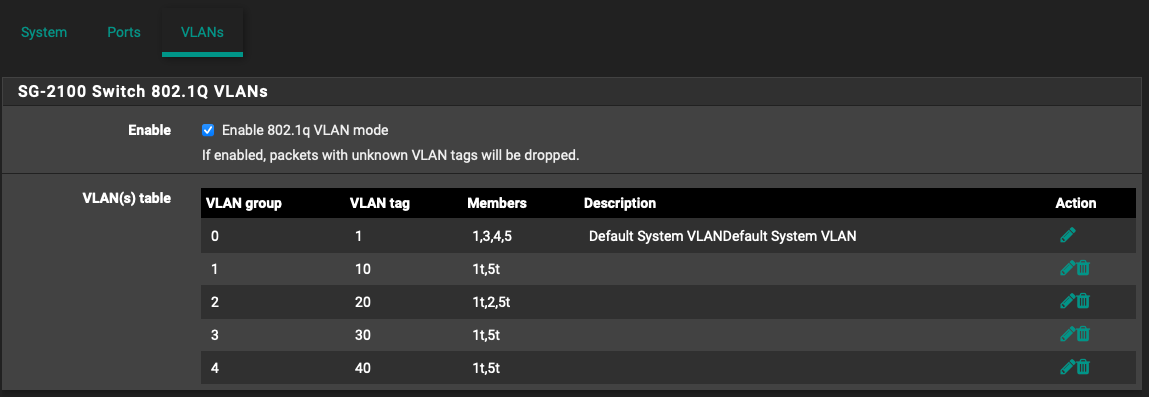
I though I had to "remove" the port number 5 also from the untagged VLAN or configured it as untagged on VLAN 20. But with this small change everything started to work.
Thanks!
I can delete the post if you prefer that or leave it here for further reference.
BR!
ISO
-
No, it is not working :(
Sorry for the confusion! I have several devices that have a LAN interface and also a WLAN interface, and the device I connected to the SG-2100 was connecting and obtaining its address through WLAN.
Do you know if it is possible to configure SG-2100 as normal "switch" ports ??
Thanks!
ISO
-
The way you have that configured is correct in the switch on the VLANs tab.
You would also have to set the PVID on port 2 to 20 on the ports tab. That tags untagged packets arriving on port 2 to VLAN 20.
As long as VLAN 20 is defined, assigned as an interface and has DHCP running a client connected to port 2 should get an IP there.
Steve
-
Hey Stephen thank you very much for your answer!!!
I feel like a stupid :D I was looking at this page wondering where to change this...
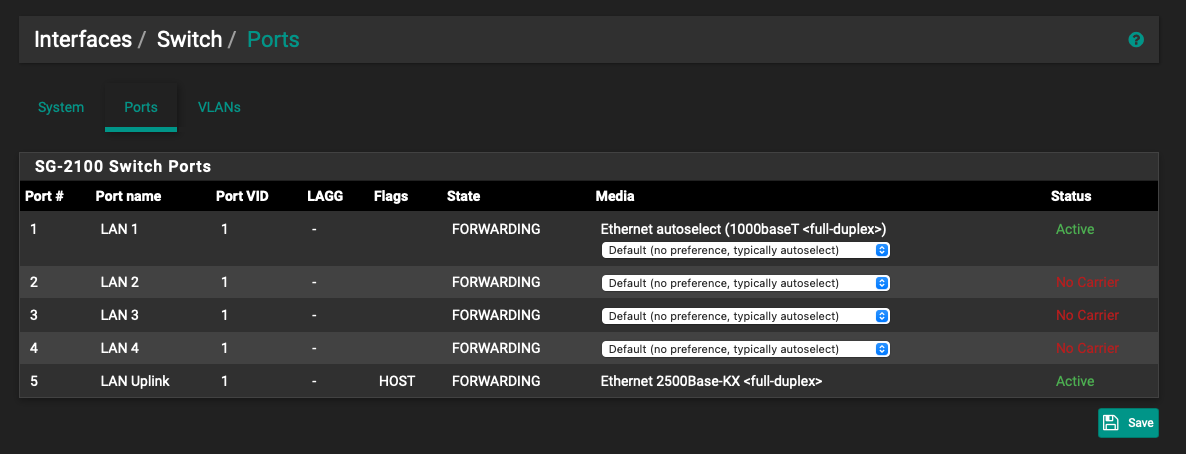
Then I realized that if I click on the Port VID field, it is "editable" :D
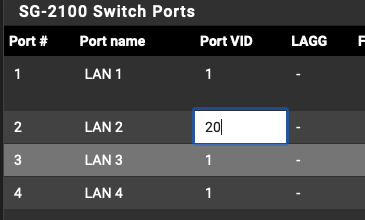
My bad!! I hope it works perfectly now this way :)
BR!
ISO
-
Yup, that should do it. Let us know.
-
-
@iso667 , I am looking at setting up my network in a similar fashion as you have described here. Do you have steps you used to setup this configuration?
-
Beyond the switch config detailed here you only need to create the VLAN interfaces on mvneta1 and apply firewall rules as required.
Are you seeing any particular problem?Steve

Hello! It looks like you're interested in this conversation, but you don't have an account yet.
Getting fed up of having to scroll through the same posts each visit? When you register for an account, you'll always come back to exactly where you were before, and choose to be notified of new replies (either via email, or push notification). You'll also be able to save bookmarks and upvote posts to show your appreciation to other community members.
With your input, this post could be even better 💗
Register LoginPrivacy Policy · Cookie Policy