Netgate Discussion Forum
    • Categories
    • Recent
    • Tags
    • Popular
    • Users
    • Search
    • Register
    • Login
    Introducing Netgate Nexus: Multi-Instance Management at Your Fingertips.

    bypass vpn not working

    Scheduled Pinned Locked Moved OpenVPN
    1 Posts 1 Posters 406 Views 1 Watching
    Loading More Posts
    • Oldest to Newest
    • Newest to Oldest
    • Most Votes
    Reply
    • Reply as topic
    Log in to reply
    This topic has been deleted. Only users with topic management privileges can see it.
    • B Offline
      boomramada
      last edited by

      I have setup the network wide open vpn and configure the outbound NAT as Manual Outbound NAT rule generation, then configure the OPENVPN within that.
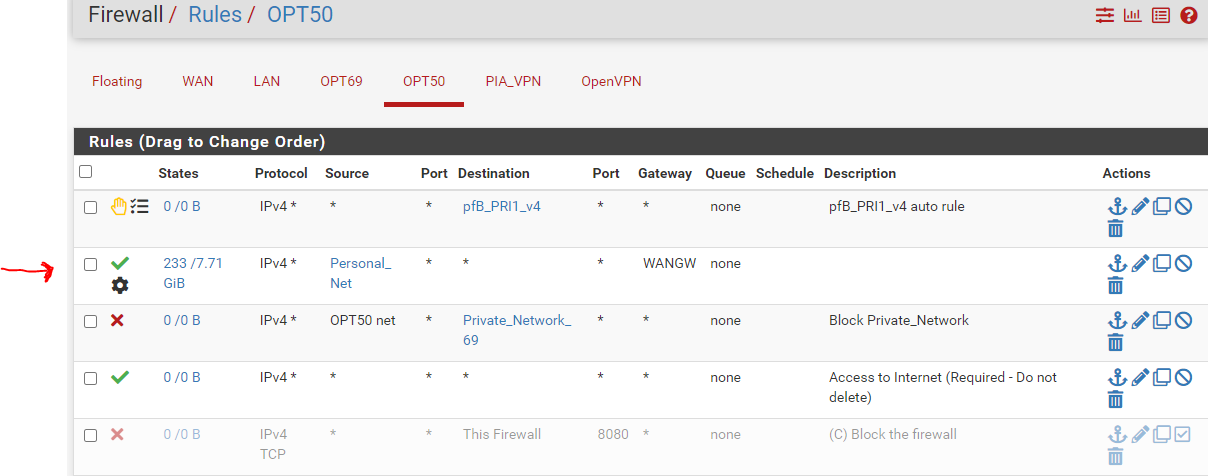
      rules.PNG
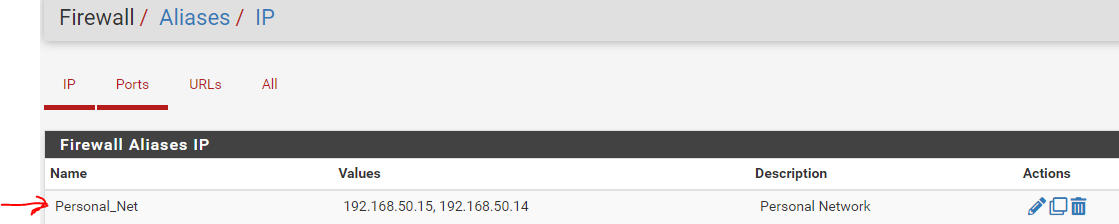
      alias.PNG
      Then created VPN bypass for one PC via firewall by adding a rule for 192.168.50.15 and other PC 192.168.50.5 goes through the VPN. I have tested the connection with ipchicken.

      Where 192.168.50.15 shows isp assigned IP address and 192.168.50.5 use the one from the VPN, which seems working.

      However, when I ping google from 192.168.50.15 or try to trace, it seems traffic still goes through VPN as I'm getting same ping as through VPN. was wondering what causing it?

      1 Reply Last reply Reply Quote 0
      • First post
        Last post
      Copyright 2026 Rubicon Communications LLC (Netgate). All rights reserved.