clear text packets dropped
-
Hello guys !
I'm in the process of migrating an old Netgera VPN router to pfsense. The network is pretty simple with a site to site IPsec tunnel. The tunnel is used for file transfer in both directions. At my end a FTP Client / Server receives and sends files to the remote end. The same goes for the remote end, i.e. receiving and sending files.
I have a Netgate 2100 with pfsense up and running. When trying to connect a FTP session from my side to the remote side, the tunnel is activated and status in pfsense shows a couple of outgoing packets. Using Wireshark I can see that an initial FTP setup package is sent, but nothing is coming back causing the setup request being resent a couple of times.
I don't have control of the remote firewall, but managed to get some log results showing packets where dropped with note "cleat text packets should be encrypted". I'm stuck and do not know how to proceed - any troubleshooting tips are welcome.
Please see network diagram below.
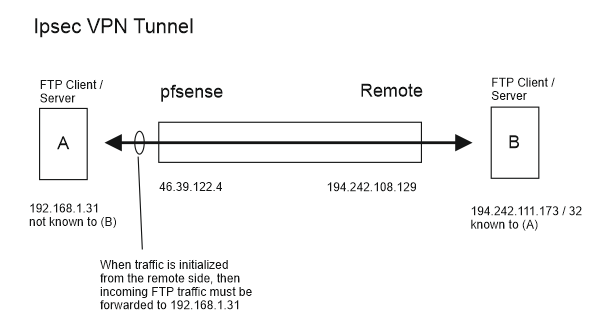
-
@rookie001 said in clear text packets dropped:
cleat text packets should be encrypted
Throw this text in a web search engine, and you discover that this message didn't come from pfSense.
My advise : Go visit the remote firewall. -
@gertjan Sure, that message did not come from pfSense, but the packet resulting in that log message on the remote firewall did, right !?
please develop your thoughts
-
@rookie001 said in clear text packets dropped:
but the packet resulting in that log message on the remote firewall did, right !?
If the remote firewall uses packages, or not, isn't important.
I presume it isn't pfSense, so that's one down, hundreds of other choices are still possible.
I have to say : it's a smart firewall as it warns you - and it even blocks - non encrypted FTP traffic. Not that smart, as the traffic comes in over a VPN, so the traffic doesn't really voyage over the 'open' Internet.
FTP shouldn't be used anyway, as the list "don't use FTP" has been ratified by nearly every country on the planet, somewhere in the last century.
One of the reasons was : it's to hard (learning to use FTP on the server and or client side is rather "special", see the thousand of Youtube videos just alone for this subject). -
Right, FTP or not isn't my call.
Please also note that I have a working setup IPsec site-to.site with FTP sessions back and forth using an old Netgear roter. Has been working for 10 years. Now the tunnel encryption needs to be updated to latest standard, DH group 14 and above supported by Netgate 2100 and pfSense.
So, bottom line is to get more information from the remote firewall/router, right ?
-
Exact.
Most probably it's blocking or filtering "TCP port 21".
Ask the admin of that remote firewall "why".
If the FTP server is also behind the same remote firewall, this have a strange situation. -
Much obliged !

Hello! It looks like you're interested in this conversation, but you don't have an account yet.
Getting fed up of having to scroll through the same posts each visit? When you register for an account, you'll always come back to exactly where you were before, and choose to be notified of new replies (either via email, or push notification). You'll also be able to save bookmarks and upvote posts to show your appreciation to other community members.
With your input, this post could be even better 💗
Register LoginPrivacy Policy · Cookie Policy