Netgate Discussion Forum
    • Categories
    • Recent
    • Tags
    • Popular
    • Users
    • Search
    • Register
    • Login
    Introducing Netgate Nexus: Multi-Instance Management at Your Fingertips.

    2.6.0-RELEASE - DHCP OMAPI still not working?

    Scheduled Pinned Locked Moved DHCP and DNS
    10 Posts 3 Posters 2.6k Views 3 Watching
    Loading More Posts
    • Oldest to Newest
    • Newest to Oldest
    • Most Votes
    Reply
    • Reply as topic
    Log in to reply
    This topic has been deleted. Only users with topic management privileges can see it.
    • C Offline
      CapitanBlack
      last edited by

      Hello,

      Does anyone made it working?
      I don't even see OMAPI settings added into /var/dhcpd/etc/dhcpd.conf :(

      Any help appreciated
      Thank you!

      C 1 Reply Last reply Reply Quote 0
      • C Offline
        CapitanBlack @CapitanBlack
        last edited by

        @capitanblack

        I've switched to pfSense Plus 22.01-RELEASE (amd64) and OMAP is still not working.
        Can someone help me please? It really prevents using pfSense DHCP with TheForeman and Satellite for hosts provisioning and it's very pity.

        1 Reply Last reply Reply Quote 0
        • C Offline
          CapitanBlack
          last edited by

          Anyone? Please help to solve this very old issue.
          Thank you!

          1 Reply Last reply Reply Quote 0
          • A Offline
            aduzsardi
            last edited by

            Hi, i would like this functionality as well

            We are using
            Netgate 7100
            22.05-RELEASE (amd64)
            built on Wed Jun 22 18:56:13 UTC 2022
            FreeBSD 12.3-STABLE

            GertjanG 1 Reply Last reply Reply Quote 0
            • GertjanG Offline
              Gertjan @aduzsardi
              last edited by

              @aduzsardi

              I had to look up what OMAPI actually is - and I know for sure that I'm not suing it.
              But I have this
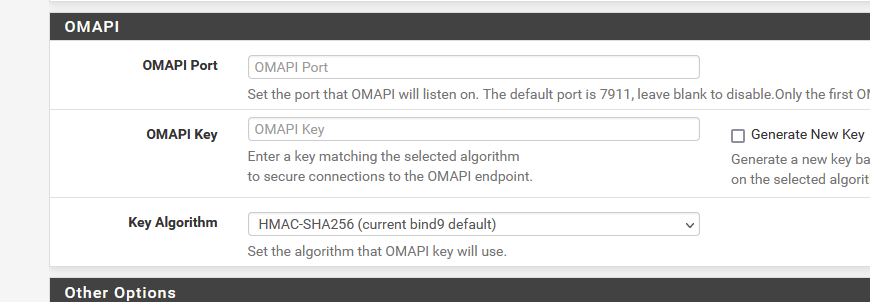
              7e34af3e-9fde-4b7b-8f97-aba94a583536-image.png

              on the DHCP server page.

              Btw : using 22.05.

              No "help me" PM's please. Use the forum, the community will thank you.

              A 1 Reply Last reply Reply Quote 0
              • A Offline
                aduzsardi @Gertjan
                last edited by

                @gertjan i know that but it's not saved in the actual configuration so the port is never listening for connections
                basically those settings don't do anything beside showing up in the UI

                GertjanG 1 Reply Last reply Reply Quote 0
                • GertjanG Offline
                  Gertjan @aduzsardi
                  last edited by

                  @aduzsardi said in 2.6.0-RELEASE - DHCP OMAPI still not working?:

                  i know that but it's not saved in the actual configuration

                  I've
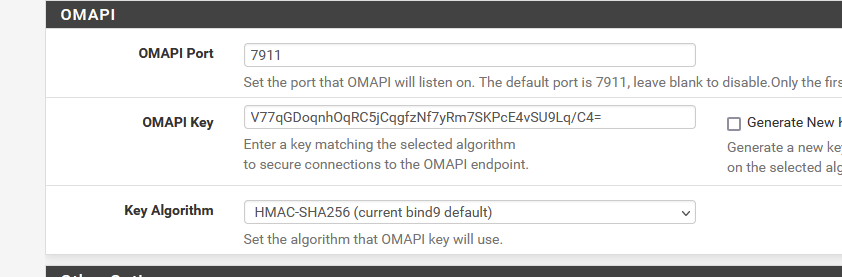
                  69671a73-d384-4c64-9436-e2929370a609-image.png

                  and in my config.xml, under the dhcpd, I have :

                  			<omapi_port>7911</omapi_port>
                  			<omapi_key>V77qGDoqnhOqRC5jCqgfzNf7yRm7SKPcE4vSU9Lq/C4=</omapi_key>
                  			<omapi_key_algorithm>hmac-sha256</omapi_key_algorithm>
                  

                  and I see in the dhcpd.conf file ( here /var/dhcpd/etc/ )

                  key omapi_key {
                    algorithm hmac-sha256;
                    secret "axxwk2Pt5yfwKKXuFs3vTwBx/g3Kq89QsZpaRa07Hzg=";
                  };
                  omapi-port 7911;
                  omapi-key omapi_key;
                  

                  And even better: when I ask who listens on (any interface) on port 7911 my pfSense tells me:

                  [22.05-RELEASE][root@pfSense.hi-there.net]/root: sockstat -4l | grep '7911'
                  dhcpd    dhcpd      51829 14 tcp4   *:7911                *:*
                  

                  So, what is the issue ?
                  You don't know how to talk to this TCP port 7911 ? Bad news, me neither ^^

                  But the dhcpd process now listens on port 7911, that can not be a coincidence ....
                  When I ditch the config in the GUI, it stops listening.

                  I'm not using 2.6.0 - I use 22.05, also called pfSense Plus.
                  Dono what OMAPI is (well, I did read about it, and I start to understand what it is) and I don't use it.

                  @aduzsardi said in 2.6.0-RELEASE - DHCP OMAPI still not working?:

                  actual configuration so the port is never listening for connections
                  basically those settings don't do anything beside showing up in the UI

                  But it could be so that 2.6.0 doesn't work. Check redmine for know issues.
                  Worse case scenario : use 22.05 ;)

                  No "help me" PM's please. Use the forum, the community will thank you.

                  A 1 Reply Last reply Reply Quote 0
                  • A Offline
                    aduzsardi @Gertjan
                    last edited by

                    @gertjan i have the same settings applied in the webui and these are present in config.xml but are not saved in dhcpd.conf

                    Anybody from Netgate can help me out why is that ?
                    Do i need to apply a patch or something ?
                    Thank you!

                    1 Reply Last reply Reply Quote 0
                    • A Offline
                      aduzsardi
                      last edited by

                      ok , this is weird
                      it only gets written to dhcpd.conf if i add the settings in the webconfigurator on the first LAN interface/network that has dhcp enabled

                      GertjanG 1 Reply Last reply Reply Quote 0
                      • GertjanG Offline
                        Gertjan @aduzsardi
                        last edited by

                        @aduzsardi

                        These omapi settings are more like global, DHCP server wide settings.
                        The DHCP server has not a global settings page - not yet, I guess.
                        Anyway, things start to work now ?

                        No "help me" PM's please. Use the forum, the community will thank you.

                        1 Reply Last reply Reply Quote 0
                        • First post
                          Last post
                        Copyright 2026 Rubicon Communications LLC (Netgate). All rights reserved.