Clients not using configured DNS server
-
We have a client we inherited whose Windows domain name was set up as their "example.org" web site. Not ideal, and we can rename the domain...we just haven't bothered yet and I don't think it would solve our immediate problem anyway.
We set up IPSec for several remote workers and those PCs are not using the IPSec configured DNS server. Config:
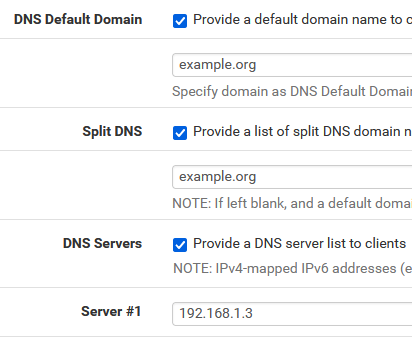
We started with just the DNS server list (IP of the Windows DC). nslookup directly using 192.168.1.3 from a VPN client PC works fine. But resolving the name without specifying a DNS server uses their own/public DNS so that lookup finds the IP of their web server. (and as noted above, renaming the domain to example.lan would probably just result in example.lan not resolving)How can we get the remote clients (Windows 10, 11, MacOS) to use 192.168.1.3 for DNS for at least the example.org domain?
Incidentally the docs say for Split DNS that "If the option is checked and the text box is empty, and a DNS Default Domain is set, then only requests for that domain name will go to the provided DNS Server(s)." I found if I check the Split box and leave the field blank, and save the page, the checkmark is removed. If someone can please verify, I'll open a Redmine entry.
To upgrade, select your branch in System/Update/Update Settings. When upgrading, allow 10-15 minutes to reboot, or more depending on packages, CPU, and/or disk speed.
Only install packages for your version of pfSense.
Upvote 👍 helpful posts! -
To perhaps clarify, the Windows remote/VPN client shows 192.168.1.3 in the ipconfig /all output under the VPN connection. It just isn't being used.
-
I searched a while and found some references that the behavior changed in Windows 10, where Windows uses the interface metric to send DNS queries. Traffic still goes out the default interface. Lower metric = higher priority.
list via PowerShell:
Get-NetIPInterface | Select-Object -Property InterfaceAlias, InterfaceMetric | Sort-Object -Property InterfaceMetricchange via PowerShell:
Set-NetIPInterface -InterfaceAlias "VPN Connection" -AddressFamily IPv4 -InterfaceMetric 20(and IPv6 if necessary)

Hello! It looks like you're interested in this conversation, but you don't have an account yet.
Getting fed up of having to scroll through the same posts each visit? When you register for an account, you'll always come back to exactly where you were before, and choose to be notified of new replies (either via email, or push notification). You'll also be able to save bookmarks and upvote posts to show your appreciation to other community members.
With your input, this post could be even better 💗
Register LoginPrivacy Policy · Cookie Policy