PFBNG Errors I Think
-
I am seeing the following show up in the Notices on the dashboard. I have a general understanding of what they mean but I can not access the directory with the *.txt files using ssh, I get a security issue which I think is related to keys. This is a new build so am still working out the kinks but just wanted to get some feedback on the errors just in case. These are but a few of them, there are about 37 at the moment.
There were error(s) loading the rules: /tmp/rules.debug:39: cannot define table pfB_Europe_v6: Cannot allocate memory - The line in question reads [39]: table <pfB_Europe_v6> persist file "/var/db/aliastables/pfB_Europe_v6.txt"
@ 2022-08-07 08:47:57There were error(s) loading the rules: /tmp/rules.debug:21: cannot define table pfB_Top_v4: Cannot allocate memory - The line in question reads [21]: table <pfB_Top_v4> persist file "/var/db/aliastables/pfB_Top_v4.txt"
@ 2022-08-07 12:54:26There were error(s) loading the rules: /tmp/rules.debug:21: cannot define table pfB_Top_v4: Cannot allocate memory - The line in question reads [21]: table <pfB_Top_v4> persist file "/var/db/aliastables/pfB_Top_v4.txt"
@ 2022-08-07 16:51:04There were error(s) loading the rules: /tmp/rules.debug:21: cannot define table pfB_Top_v4: Cannot allocate memory - The line in question reads [21]: table <pfB_Top_v4> persist file "/var/db/aliastables/pfB_Top_v4.txt"
@ 2022-08-07 16:56:02Intelligence is not a substitute for common sense.
Intel i5-3427 * 1.80GHz * 8GB Memory * 100GB HDD
Putting legacy equipment into service and out of landfills. -
@lpd7 said in PFBNG Errors I Think:
Cannot allocate memory
That's your answer for you to increase your RAM.
-
This post is deleted! -
@nollipfsense How is that possible? I am running 4gb and a tech from Netgate said that 4gb is more than enough to do just about anything I could possibly want.
I am only using 18% memory now with Squid proxy service running so there is ample memory available. Also PFB is not a resource hound and cant see how these tables can cause a memory issue with over 80% percent of 4gb available.
Also since it is calling out a specific line how can that be related to memory when the rest seems to run fine?
Do you know what are the steps to troubleshoot this? I cant seem to resolve this to being a memory issue without actually digging into it and seeing it first hand.
Thanks for your input.
Intelligence is not a substitute for common sense.
Intel i5-3427 * 1.80GHz * 8GB Memory * 100GB HDD
Putting legacy equipment into service and out of landfills. -
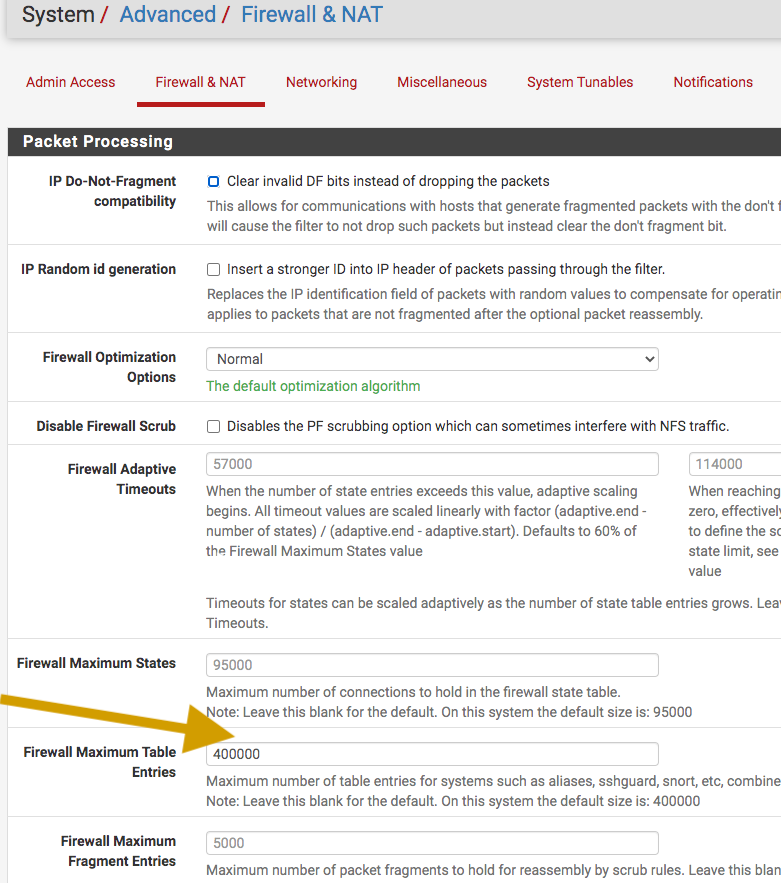
@lpd7 increase the Firewall Maximum Table Entries size, it’s under the advanced tab.
-
@lpd7 Apologized for only giving you half of the story. As Nogbadthebad says just increase the firewall maximum table start by doubling it (default 40,000)...see below
-
@nollipfsense Default looks more like 400,000 to me......
-
@negan Try doubling if.
-
@negan
@NogBadTheBad
@NollipfSenseThank you all for your input. I have doubled it to 800000 and will keep an eye on it to see what happens. I did notice that mem utilization went from 18 to 21/22% which I assume is the additional space needed for the increased table entries. Thanks again.
-
Its been 2 days and no error messages..looks like we are in the clear. (fingers crossed). Thank you.




Hello! It looks like you're interested in this conversation, but you don't have an account yet.
Getting fed up of having to scroll through the same posts each visit? When you register for an account, you'll always come back to exactly where you were before, and choose to be notified of new replies (either via email, or push notification). You'll also be able to save bookmarks and upvote posts to show your appreciation to other community members.
With your input, this post could be even better 💗
Register LoginPrivacy Policy · Cookie Policy