pfBlocker with GEO IP not block IPSEC
-
I have configured firewall with GEO block for IPSEC.
After all, in the IPSEC logs I see attempts to connect to addresses outside of geolocation, e.g.:Jan 4 07:18:18 charon 98918 03[NET] received unsupported IKE version 6.15 from 45.33.46.249, sending INVALID_MAJOR_VERSION
Geolocation works properly, because I do not see blocked addresses on the list. The VPN alias ports are 500 and 4500. Where do these entries come from? Shouldn't the firewall cut them out?
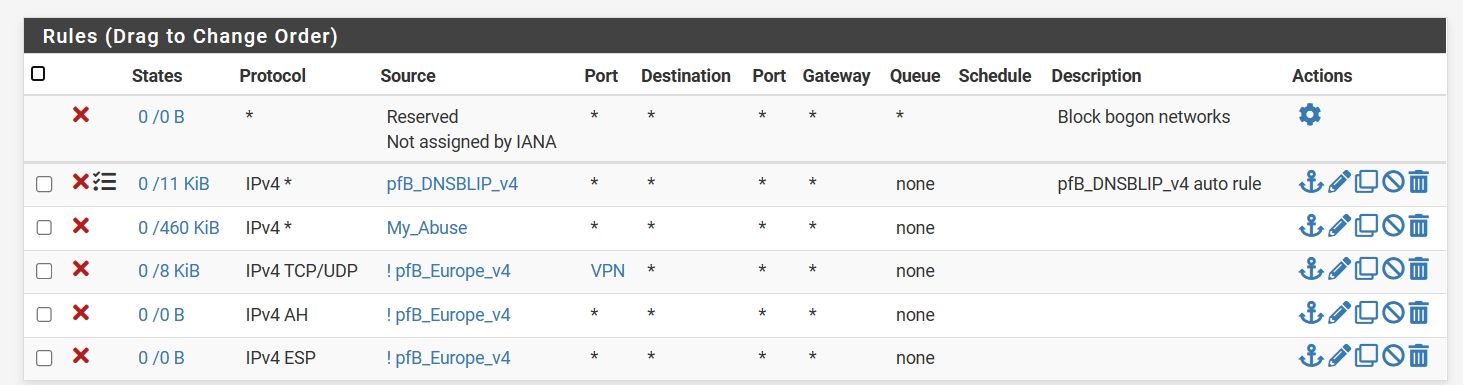
IPSEC Firewall rules:

WAN Firewall rules:
-
@piter-0 That depends on you having disabled the “built-in” rules that allows VPN Server access.
By default pfSense has built-in rules to allow access to UDP 500, 4500 and ESP - these rules have a higher ppreference than user created rules.
So if you want to GEO block access to your VPN service, you need to disable the built-in rules, and then create som “allow VPN rules” after your block rules.You can disable the built-in rules in SYSTEM->ADVANCED->FIREWALL&NAT
-
@keyser Thanks, sounds reasonable. I'll test it when I have time :)
-
@keyser Works fine, thx :)

Hello! It looks like you're interested in this conversation, but you don't have an account yet.
Getting fed up of having to scroll through the same posts each visit? When you register for an account, you'll always come back to exactly where you were before, and choose to be notified of new replies (either via email, or push notification). You'll also be able to save bookmarks and upvote posts to show your appreciation to other community members.
With your input, this post could be even better 💗
Register LoginPrivacy Policy · Cookie Policy