DHCP PXE configuration on multiple LANs - wrong filename (Bug?)
-
Hello,
something strange is happening over here.
I have an PXE Server running on subnet 10.91.0.0/24 (IP 10.91.0.1) which i use to serve PXE on multiple LANs.
For testing is use different boot filenames on each LAN.
LAN 10.91.0.0/24
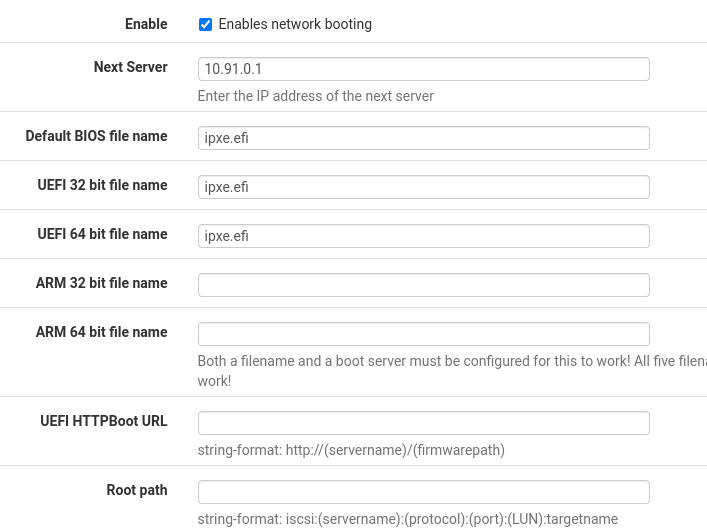
LAN 10.94.0.0/24
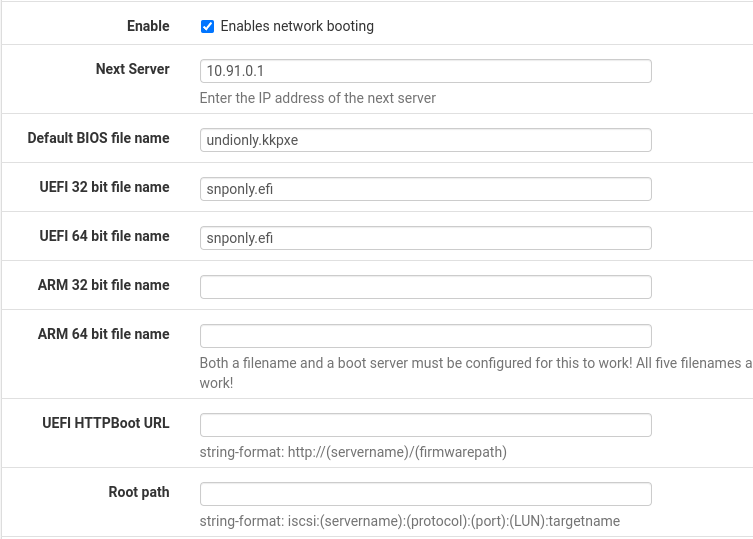
"Additional BOOTP/DHCP Options" is empty on both LANs.
After booting up a Client on 10.91.0.0/24 i wondered why he received "undionly.kkpxe" instead of "ipxe.efi". I did a packet capture and indeed, the DHCP Server sends the wrong file.
0.0.0.0.68 > 255.255.255.255.67: [udp sum ok] BOOTP/DHCP, Request from ea:75:25:77:f1:7e, length 359, xid 0x81068654, Flags [Broadcast] (0x8000)
  Client-Ethernet-Address ea:75:25:77:f1:7e
  Vendor-rfc1048 Extensions
    Magic Cookie 0x63825363
    DHCP-Message Option 53, length 1: Request
    Server-ID Option 54, length 4: 10.91.0.253
    Requested-IP Option 50, length 4: 10.91.0.169
    MSZ Option 57, length 2: 65280
    Parameter-Request Option 55, length 35:
      Subnet-Mask, Time-Zone, Default-Gateway, Time-Server
      IEN-Name-Server, Domain-Name-Server, Hostname, BS
      Domain-Name, RP, EP, RSZ
      TTL, BR, YD, YS
      NTP, Vendor-Option, Requested-IP, Lease-Time
      Server-ID, RN, RB, Vendor-Class
      TFTP, BF, GUID, Option 128
      Option 129, Option 130, Option 131, Option 132
      Option 133, Option 134, Option 135
    GUID Option 97, length 17: 0.206.73.168.108.53.9.185.72.128.118.176.75.127.225.187.247
    NDI Option 94, length 3: 1.3.1
    ARCH Option 93, length 2: 7
    Vendor-Class Option 60, length 32: "PXEClient:Arch:00007:UNDI:003001"

10.91.0.252.67 > 255.255.255.255.68: [udp sum ok] BOOTP/DHCP, Reply, length 306, xid 0x81068654, Flags [Broadcast] (0x8000)
  Your-IP 10.91.0.169
  Server-IP 10.91.0.1
  Client-Ethernet-Address ea:75:25:77:f1:7e
  file "undionly.kkpxe"
  Vendor-rfc1048 Extensions
    Magic Cookie 0x63825363
    DHCP-Message Option 53, length 1: ACK
    Server-ID Option 54, length 4: 10.91.0.252
    Lease-Time Option 51, length 4: 6155
    Subnet-Mask Option 1, length 4: 255.255.255.0
    Default-Gateway Option 3, length 4: 10.91.0.254
    Domain-Name-Server Option 6, length 8: 10.0.1.1,10.0.1.2
    Domain-Name Option 15, length 9: "net.intra"
    NTP Option 42, length 4: 10.91.0.254
    TFTP Option 66, length 9: "10.91.0.1"
In the DHCP configuration file i found this:
subnet 10.94.0.0 netmask 255.255.255.0 {
    pool {
            option domain-name-servers 10.0.1.1,10.0.1.2;
            deny dynamic bootp clients;
            failover peer "dhcp_opt77";

            range 10.94.0.1 10.94.0.200;
    }

    option routers 10.94.0.254;
    option domain-name "net.intra";
    option domain-name-servers 10.0.1.1,10.0.1.2;
    ping-check true;
    option ntp-servers 10.94.0.254;
    option tftp-server-name "10.91.0.1";

    next-server 10.91.0.1;
    if option arch = 00:06 {
            filename "snponly.efi";
    } else if option arch = 00:07 {
            filename "snponly.efi";
    } else if option arch = 00:09 {
            filename "snponly.efi";
    } else {
            filename "undionly.kkpxe";
    }

}

subnet 10.91.0.0 netmask 255.255.255.0 {
    pool {
            option domain-name-servers 10.0.1.1,10.0.1.2;
            deny dynamic bootp clients;
            failover peer "dhcp_opt19";

            filename "undionly.kkpxe";
            range 10.91.0.100 10.91.0.200;
    }

    option routers 10.91.0.254;
    option domain-name "net.intra";
    option domain-name-servers 10.0.1.1,10.0.1.2;
    ping-check true;
    option ntp-servers 10.91.0.254;
    option tftp-server-name "10.91.0.1";

    next-server 10.91.0.1;
    if option arch = 00:06 {
            filename "ipxe.efi";
    } else if option arch = 00:07 {
            filename "ipxe.efi";
    } else if option arch = 00:09 {
            filename "ipxe.efi";
    } else {
            filename "ipxe.efi";
    }

}
"subnet 10.91.0.0" wrongly contains filename "undionly.kkpxe";, which belongs to "subnet 10.94.0.0"
Looks like a bug to me.
Hello! It looks like you're interested in this conversation, but you don't have an account yet.
Getting fed up of having to scroll through the same posts each visit? When you register for an account, you'll always come back to exactly where you were before, and choose to be notified of new replies (either via email, or push notification). You'll also be able to save bookmarks and upvote posts to show your appreciation to other community members.
With your input, this post could be even better 💗
Register LoginPrivacy Policy · Cookie Policy