Netgate Discussion Forum
    • Categories
    • Recent
    • Tags
    • Popular
    • Users
    • Search
    • Register
    • Login
    Introducing Netgate Nexus: Multi-Instance Management at Your Fingertips.

    script schedule backup pfsense to ext drive

    Scheduled Pinned Locked Moved General pfSense Questions
    4 Posts 2 Posters 818 Views 2 Watching
    Loading More Posts
    • Oldest to Newest
    • Newest to Oldest
    • Most Votes
    Reply
    • Reply as topic
    Log in to reply
    This topic has been deleted. Only users with topic management privileges can see it.
    • T Offline
      troubleshooting74
      last edited by

      i've some problem to generate an unique file .ovpn .
      I've a 2.6.0-RELEASE (amd64) and the latest version of export file such as openvpn-client-export security 1.6_9.

      Please give a me feedback , about us .

      GertjanG 1 Reply Last reply Reply Quote 0
      • GertjanG Offline
        Gertjan @troubleshooting74
        last edited by

        @troubleshooting74

        Can you give more details ?

        No "help me" PM's please. Use the forum, the community will thank you.

        T 1 Reply Last reply Reply Quote 0
        • T Offline
          troubleshooting74 @Gertjan
          last edited by

          @gertjan

          cfde4b4f-46e6-4656-8200-adeb3147cd0d-image.png

          i have 3 icons to download certificate , key and p12 and not opvn file, i've just update export-version of openvpn , but the problem is the same .

          GertjanG 1 Reply Last reply Reply Quote 0
          • GertjanG Offline
            Gertjan @troubleshooting74
            last edited by

            @troubleshooting74

            You need none of those.

            To download an openvpn client config file, go here :
            OpenVPN > Client Export Utility

            and over a created user ( System > User Manager > Users ) you can select :
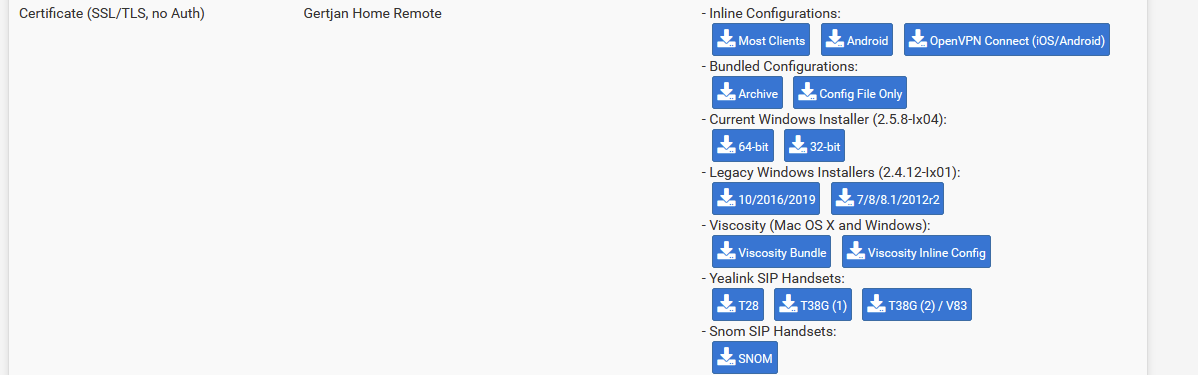
            c7d3f740-db42-4477-937a-bbe672d4d5f1-image.png

            For most of the options, the needed certs will be in the opvn file.

            See here https://www.youtube.com/@NetgateOfficial/video and have a look at :
            How to use pfSense Plus OpenVPN Client Import Package
            Configuring OpenVPN Remote Access in pfSense Software
            etc.

            No "help me" PM's please. Use the forum, the community will thank you.

            1 Reply Last reply Reply Quote 0
            • First post
              Last post
            Copyright 2026 Rubicon Communications LLC (Netgate). All rights reserved.