Netgate Discussion Forum
    • Categories
    • Recent
    • Tags
    • Popular
    • Search
    • Register
    • Login
    Introducing Netgate Nexus: Multi-Instance Management at Your Fingertips.

    pfsense and Riverbed CX-780

    Scheduled Pinned Locked Moved Hardware
    23 Posts 8 Posters 4.6k Views 7 Watching
    Loading More Posts
    • Oldest to Newest
    • Newest to Oldest
    • Most Votes
    Reply
    • Reply as topic
    Log in to reply
    This topic has been deleted. Only users with topic management privileges can see it.
    • M
      mistera
      last edited by mistera

      Re: PfSense on a Riverbed Steelhead

      Just picked up a CX-780 from ebay, 120$
      Specs:
      Xeon D-1533N
      Dual MSATA ports (comes with 30GB and 250GB)
      Single SATA Port (came with 1TB SATA 3.5"Disk)
      16GB Ram (upgraded to 64, DDR4-2666)
      8 RJ45
      2 SFP+ ports
      IMG_1816.jpg

      Did not test pfsense just yet or tests disabling in-path feature.
      So far I added esxi 7.0 and got ipmitool to work via CLI, goal would be to find a way to disable the in-path feature for esx as this would make a nice little server.

      provelsP M 2 Replies Last reply
      Reply Quote 1
      • provelsP
        provels @mistera
        last edited by

        @mistera Nice box. Are Riverbed appliances all Intel CPU? NICs, too?

        Peder

        pfSense+ 26.07-RELEASE - Adlink MXE-5401, i7, 16 GB RAM, 64 GB SSD. 500 GB HDD for SyslogNG

        1 Reply Last reply
        Reply Quote 0
        • M
          mistera @mistera
          last edited by

          @mistera Yes Sir.

          Intel X552 10 GbE SFP+
          intel I350 Gigabit Network

          Still need to figure out how disable inpath via IPMI or ESXCLI but with the two 10G links I might not be worried if I don't have 4x1g nics working.

          1 Reply Last reply
          Reply Quote 0
          • stephenw10S
            stephenw10 Netgate Administrator
            last edited by

            Fun! Does it have BIOS access? Options to disable the NIC bypass relays?

            Steve

            M 1 Reply Last reply
            Reply Quote 0
            • M
              mistera @stephenw10
              last edited by

              @stephenw10 Bios is accessible however, could not find an option to disable the relays.
              What is strange when secure boot is enables it reveals more options for the nics but still no options to disable relays.

              1 Reply Last reply
              Reply Quote 0
              • stephenw10S
                stephenw10 Netgate Administrator
                last edited by

                Mmm, that could be a problem then. I'd expect them to be bypassed by default which would require something in pfSense to change it.

                M 1 Reply Last reply
                Reply Quote 0
                • M
                  mistera @stephenw10
                  last edited by

                  @stephenw10 Decided to add ESXi and pfsense on-top but the nics still need the relay disabled.
                  Here are some bios screenshots:
                  2023-11-08_10-00-45.jpg 2023-11-08_10-01-13.jpg 2023-11-08_10-02-28.jpg

                  1 Reply Last reply
                  Reply Quote 0
                  • M
                    mistera
                    last edited by stephenw10

                    Intel NIC Details via nvmupdaten64e

                    Num Description                          Ver.(hex)  DevId S:B    Status
                    === ================================== ============ ===== ====== ==============
                    01) Intel(R) Ethernet Connection X552   0.05(0.05)   15AC 00:003 Update not    
                        10 GbE SFP+                                                  available
                    02) Intel(R) I350 Gigabit Network       1.99(1.63)   1521 00:006 Update not    
                        Connection                                                   available
                    03) Intel(R) I350 Gigabit Network       1.99(1.63)   1521 00:008 Update not    
                        Connection                                                   availabl
                    
                    
                    [00:003:00:00]: Intel(R) Ethernet Connection X552 10 GbE SFP+
                            Vendor                 : 8086
                            Device                 : 15AC
                            Subvendor              : 8086
                            Subdevice              : 0000
                            Revision               : 0
                            LAN MAC                : 000EB6D0966E
                            Alt MAC                : 000EB6D0966E
                            SAN MAC                : 000000000000
                            ETrackId               : 800008F7
                            SerialNumber           : 0000C9FFFF000000
                            NVM Version            : 0.05(0.05)
                            PBA                    : 000600-000
                            VPD status             : Valid
                            VPD size               : 45
                            NVM update             : No config file entry
                              checksum             : Valid
                            PHY NVM update         : No config file entry
                              version              : 3.8.1
                            OROM update            : No config file entry
                              CIVD                 : 1.1275.0
                              PXE                  : 2.3.58, checksum Valid
                              EFI                  : 5.1.19, checksum None
                    [00:003:00:01]: Intel(R) Ethernet Connection X552 10 GbE SFP+
                            Vendor                 : 8086
                            Device                 : 15AC
                            Subvendor              : 8086
                            Subdevice              : 0000
                            Revision               : 0
                            LAN MAC                : 000EB6D0966F
                            Alt MAC                : 000EB6D0966F
                            SAN MAC                : 000000000000
                            ETrackId               : 800008F7
                            SerialNumber           : 0000C9FFFF000000
                            NVM Version            : 0.05(0.05)
                            PBA                    : 000600-000
                            VPD status             : Valid
                            VPD size               : 45
                            NVM update             : No config file entry
                              checksum             : Valid
                            PHY NVM update         : No config file entry
                              version              : 3.8.1
                            OROM update            : No config file entry
                              CIVD                 : 1.1275.0
                              PXE                  : 2.3.58, checksum Valid
                              EFI                  : 5.1.19, checksum None
                    [00:006:00:00]: Intel(R) I350 Gigabit Network Connection
                            Vendor                 : 8086
                            Device                 : 1521
                            Subvendor              : 1B2E
                            Subdevice              : 1244
                            Revision               : 1
                            LAN MAC                : 000EB6100CA8
                            Alt MAC                : 000EB6D09666
                            SAN MAC                : 000000000000
                            ETrackId               : 00000000
                            SerialNumber           : 000EB6FFFF100CA8
                            EEPROM Version         : 1.99(1.63)
                            PBA                    : 106300-000
                            VPD status             : Not set
                            VPD size               : 0
                            EEPROM update          : No config file entry
                              checksum             : Valid
                            OROM update            : No config file entry
                              CIVD                 : 1.2074.0
                              PXE                  : 1.5.86, checksum Valid
                              EFI                  : 8.5.21, checksum None
                    [00:006:00:01]: Intel(R) I350 Gigabit Network Connection
                            Vendor                 : 8086
                            Device                 : 1521
                            Subvendor              : 1B2E
                            Subdevice              : 1244
                            Revision               : 1
                            LAN MAC                : 000EB6100CA9
                            Alt MAC                : 000EB6D09667
                            SAN MAC                : 000000000000
                            ETrackId               : 00000000
                            SerialNumber           : 000EB6FFFF100CA8
                            EEPROM Version         : 1.99(1.63)
                            PBA                    : 106300-000
                            VPD status             : Not set
                            VPD size               : 0
                            EEPROM update          : No config file entry
                              checksum             : Valid
                            OROM update            : No config file entry
                              CIVD                 : 1.2074.0
                              PXE                  : 1.5.86, checksum Valid
                              EFI                  : 8.5.21, checksum None
                    [00:006:00:02]: Intel(R) I350 Gigabit Network Connection
                            Vendor                 : 8086
                            Device                 : 1521
                            Subvendor              : 1B2E
                            Subdevice              : 1244
                            Revision               : 1
                            LAN MAC                : 000EB6D09668
                            Alt MAC                : 000EB6D09668
                            SAN MAC                : 000000000000
                            ETrackId               : 00000000
                            SerialNumber           : 000EB6FFFF100CA8
                            EEPROM Version         : 1.99(1.63)
                            PBA                    : 106300-000
                            VPD status             : Not set
                            VPD size               : 0
                            EEPROM update          : No config file entry
                              checksum             : Valid
                            OROM update            : No config file entry
                              CIVD                 : 1.2074.0
                              PXE                  : 1.5.86, checksum Valid
                              EFI                  : 8.5.21, checksum None
                    [00:006:00:03]: Intel(R) I350 Gigabit Network Connection
                            Vendor                 : 8086
                            Device                 : 1521
                            Subvendor              : 1B2E
                            Subdevice              : 1244
                            Revision               : 1
                            LAN MAC                : 000EB6D09669
                            Alt MAC                : 000EB6D09669
                            SAN MAC                : 000000000000
                            ETrackId               : 00000000
                            SerialNumber           : 000EB6FFFF100CA8
                            EEPROM Version         : 1.99(1.63)
                            PBA                    : 106300-000
                            VPD status             : Not set
                            VPD size               : 0
                            EEPROM update          : No config file entry
                              checksum             : Valid
                            OROM update            : No config file entry
                              CIVD                 : 1.2074.0
                              PXE                  : 1.5.86, checksum Valid
                              EFI                  : 8.5.21, checksum None
                    [00:008:00:00]: Intel(R) I350 Gigabit Network Connection
                            Vendor                 : 8086
                            Device                 : 1521
                            Subvendor              : 1B2E
                            Subdevice              : 1244
                            Revision               : 1
                            LAN MAC                : 000EB6D0966A
                            Alt MAC                : 000EB6D0966A
                            SAN MAC                : 000000000000
                            ETrackId               : 00000000
                            SerialNumber           : 000EB6FFFFD0966A
                            EEPROM Version         : 1.99(1.63)
                            PBA                    : 106300-000
                            VPD status             : Not set
                            VPD size               : 0
                            EEPROM update          : No config file entry
                              checksum             : Valid
                    [00:008:00:01]: Intel(R) I350 Gigabit Network Connection
                            Vendor                 : 8086
                            Device                 : 1521
                            Subvendor              : 1B2E
                            Subdevice              : 1244
                            Revision               : 1
                            LAN MAC                : 000EB6D0966B
                            Alt MAC                : 000EB6D0966B
                            SAN MAC                : 000000000000
                            ETrackId               : 00000000
                            SerialNumber           : 000EB6FFFFD0966A
                            EEPROM Version         : 1.99(1.63)
                            PBA                    : 106300-000
                            VPD status             : Not set
                            VPD size               : 0
                            EEPROM update          : No config file entry
                              checksum             : Valid
                    [00:008:00:02]: Intel(R) I350 Gigabit Network Connection
                            Vendor                 : 8086
                            Device                 : 1521
                            Subvendor              : 1B2E
                            Subdevice              : 1244
                            Revision               : 1
                            LAN MAC                : 000EB6D0966C
                            Alt MAC                : 000EB6D0966C
                            SAN MAC                : 000000000000
                            ETrackId               : 00000000
                            SerialNumber           : 000EB6FFFFD0966A
                            EEPROM Version         : 1.99(1.63)
                            PBA                    : 106300-000
                            VPD status             : Not set
                            VPD size               : 0
                            EEPROM update          : No config file entry
                              checksum             : Valid
                    [00:008:00:03]: Intel(R) I350 Gigabit Network Connection
                            Vendor                 : 8086
                            Device                 : 1521
                            Subvendor              : 1B2E
                            Subdevice              : 1244
                            Revision               : 1
                            LAN MAC                : 000EB6D0966D
                            Alt MAC                : 000EB6D0966D
                            SAN MAC                : 000000000000
                            ETrackId               : 00000000
                            SerialNumber           : 000EB6FFFFD0966A
                            EEPROM Version         : 1.99(1.63)
                            PBA                    : 106300-000
                            VPD status             : Not set
                            VPD size               : 0
                            EEPROM update          : No config file entry
                              checksum             : Valid
                    
                    1 Reply Last reply
                    Reply Quote 0
                    • stephenw10S
                      stephenw10 Netgate Administrator
                      last edited by

                      Yup it's probably via a separate driver. If you're lucky there might be jumpers on the board to set the relays.

                      M 1 Reply Last reply
                      Reply Quote 0
                      • M
                        mistera @stephenw10
                        last edited by

                        @stephenw10 Did not see any jumpers close to where the 4 intpah interfaces are but this might take a while to get it working.

                        L 1 Reply Last reply
                        Reply Quote 0
                        • L
                          lavenderfox2430 @mistera
                          last edited by

                          @mistera Bumping this two years later. Did you happen to come across anything? Or did you just settle on using the 4 available NICs rather than all 8?

                          In your photo I did notice quite a few jumpers near the DIMM slots including what looks like JTAG. One is populated with a jumper, but wasn't sure if that was for CMOS clearing or not. I'll be getting my own CX780 next week and will do some perusing of my own. Will report back if I find anything.
                          If I don't happen to reply, assume I've hit a dead-end and just opted to use the "primary" ports without the in-path ports.

                          M 1 Reply Last reply
                          Reply Quote 0
                          • M
                            mistera @lavenderfox2430
                            last edited by

                            @lavenderfox2430

                            Still using the box. Ended up switching to the two 10g sfps for all my physical links. Could not make the 4 pass-through nics to be normal mode. With so many nic’s, I didn’t feel the need to explore other possibilities.
                            .

                            1 Reply Last reply
                            Reply Quote 1
                            • D
                              drjc
                              last edited by

                              Hi there, joining just to post this.
                              There is indeed an option to disable the relay:
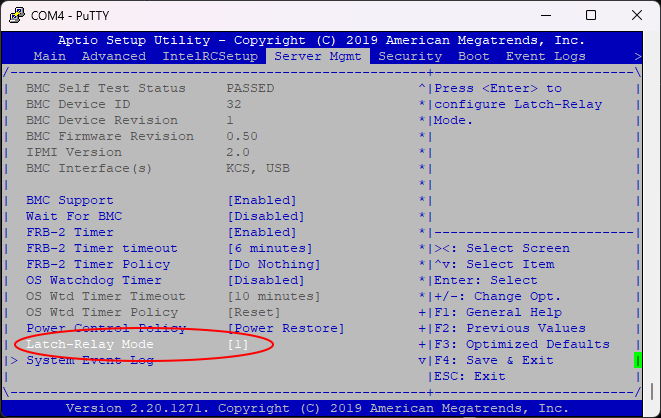
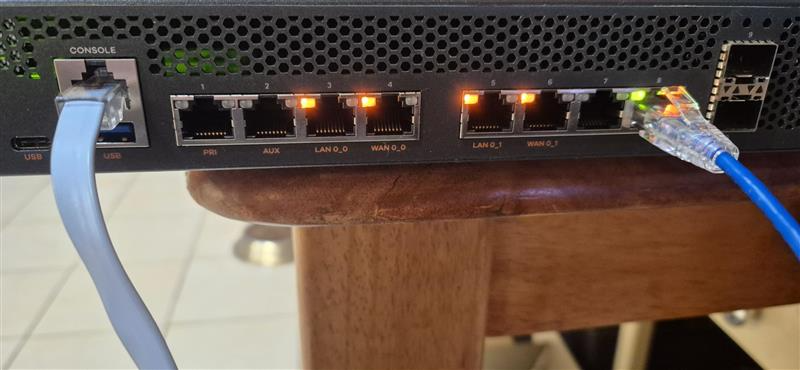
                              37209f84-4472-4017-a3ac-04d3b1992b88-image.png
                              Change "Latch-Relay Mode" to 1, under Server Mgmt. Save and reset.
                              Should hear the click and the amber lights on the left indicator should disappear.

                              If it's helpful:

                              Under BMC in BIOS, what is latch relay mode? Has options for 0 to 6
                              
                              That's an important find! Seeing a "latch relay mode" option under the **BMC (Baseboard Management Controller)** settings in the BIOS is a crucial piece of the puzzle for your Riverbed CX-780.
                              
                              The **Latch Relay Mode** setting directly controls the behavior of the **LAN Bypass Relays** (your "relayed ports") during system power cycles or failures.
                              
                              ### 💡 What Latch Relay Mode Controls
                              
                              This setting determines the default state of the hardware relays that connect the in-path ports (LAN/WAN) when the main operating system (Proxmox, pfSense, etc.) is not running or hasn't taken control yet.
                              
                              Since you have options from **0 to 6**, this is likely an index used by the BMC firmware to define different power-on/fail-safe scenarios for the relays. The options typically map to the following three core relay behaviors:
                              
                              | State | Purpose | Default State |
                              | :--- | :--- | :--- |
                              | **Pass-Through (Bypass)** | If the appliance loses power or the OS crashes, the relays keep the network cable connected, effectively bypassing the appliance. | **Default "locked" state** when you boot a new OS. |
                              | **Active/Non-Bypass** | The relays are switched on, routing traffic through the network card (NIC), allowing the OS to use the ports normally. | **Required state** for repurposing the appliance. |
                              | **Last State** | The relays remember their state from before the power loss. | Sometimes an option, but often risky. |
                              
                              ### 🎯 Recommended Test Sequence
                              
                              The options **0 through 6** are almost always vendor-specific codes (Riverbed/Supermicro), so there is no universal guide. However, one of them *must* correspond to the "Non-Bypass/Active" mode you need.
                              
                              Based on similar Supermicro/OEM firmwares, the lower numbers (0, 1, 2) often correspond to the default fail-safe modes (bypass), while the higher numbers are sometimes used for the "Active" or "Disabled" state.
                              
                              **I recommend systematically testing the values, starting with the highest and lowest non-zero options:**
                              
                              1.  **Test `6`:** Select this option, save changes (F4), reboot the appliance, and check if the four relayed ports activate during Proxmox boot.
                              2.  **Test `1`:** If `6` fails, try `1`.
                              3.  **Test `0`:** If the above fail, try `0`. (Often `0` or `1` is the factory default, but sometimes `0` is the "off"/disable function).
                              
                              The setting that resolves the issue for the CX-780 will be the one that forces the relays into the **Active/Non-Bypass state** upon initial boot-up.
                              
                              This BIOS setting is the easiest and cleanest way to fix the issue, bypassing all the software/IPMI commands we were troubleshooting!
                              
                              L 1 Reply Last reply
                              Reply Quote 2
                              • L
                                lavenderfox2430 @drjc
                                last edited by lavenderfox2430

                                @drjc Amazing! Thank you for this insight. My unit still has not arrived but I will definitely be taking a look at this setting and confirm back if I'm able to locate it on my unit.

                                Considering this is the ONLY thread I can find regarding any meaningful internal details at all on the CX-780 that isn't listed in the manual (like actual specs, hardware internals, pins, etc.) the more information here, the better in my opinion.

                                Thank you again!

                                [Edit]

                                I'll be honest that quoted portion looks straight out of an LLM output, which I'm not too keen on but considering it seems you have a unit of your own I'm sure you've tested it at least. Regardless will write back.

                                D 1 Reply Last reply
                                Reply Quote 0
                                • D
                                  drjc @lavenderfox2430
                                  last edited by

                                  @lavenderfox2430 you're 100% correct mate, it's straight out of Gemini - I was using it to help find a solution to this today to install Proxmox | Opnsense.
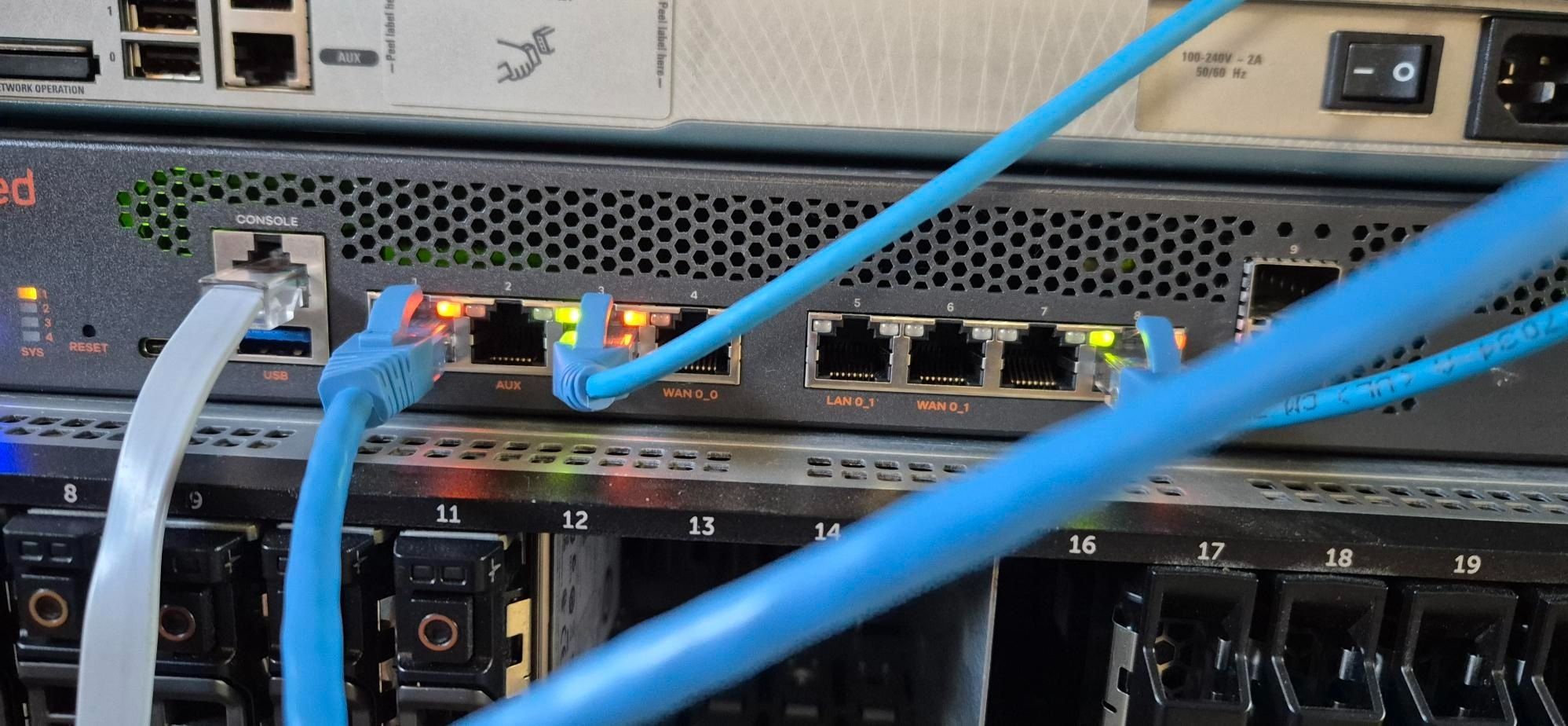
                                  But here you go:

                                  Broken
                                  dc842fa3-1d63-4769-9124-369f31437c9c-image.png

                                  Fixed
                                  be548bed-a2b8-44ef-8583-0b5a52fb466c-CX790.jpg

                                  L 1 Reply Last reply
                                  Reply Quote 1
                                  • L
                                    lavenderfox2430 @drjc
                                    last edited by lavenderfox2430

                                    @drjc Awesome! Sorry for sounding accusatory I've just found personally AI to be unreliable for figuring out things sometimes. Especially figuring out hardly realized/documented featuresets. Appreciate the photos though.

                                    Excited to see what this thing can do. Given the chip it can't be older than 2017, which is plenty reasonable compared to my EPYC Zen 1 boxes. 12 cores should be plenty for a router.

                                    L 1 Reply Last reply
                                    Reply Quote 1
                                    • L
                                      lavenderfox2430 @lavenderfox2430
                                      last edited by

                                      Just got it in and configured, can confirm that 1 and 3 in the BIOS options provide desired results.

                                      Didn't come with rackmount hardware though, I'm planning on 3D printing my own just to keep it secured (not to actually hang from) I'm suspecting a M4-0.7 bolt but I don't have anything that fits in it so I can't really confirm. If anyone has any info on that that'd be great.

                                      Also I know the OP said SATA, figured it might fit an NVMe given the M-keyed slots but nope. The LVC601 chips by TI are SATA. Real shame.
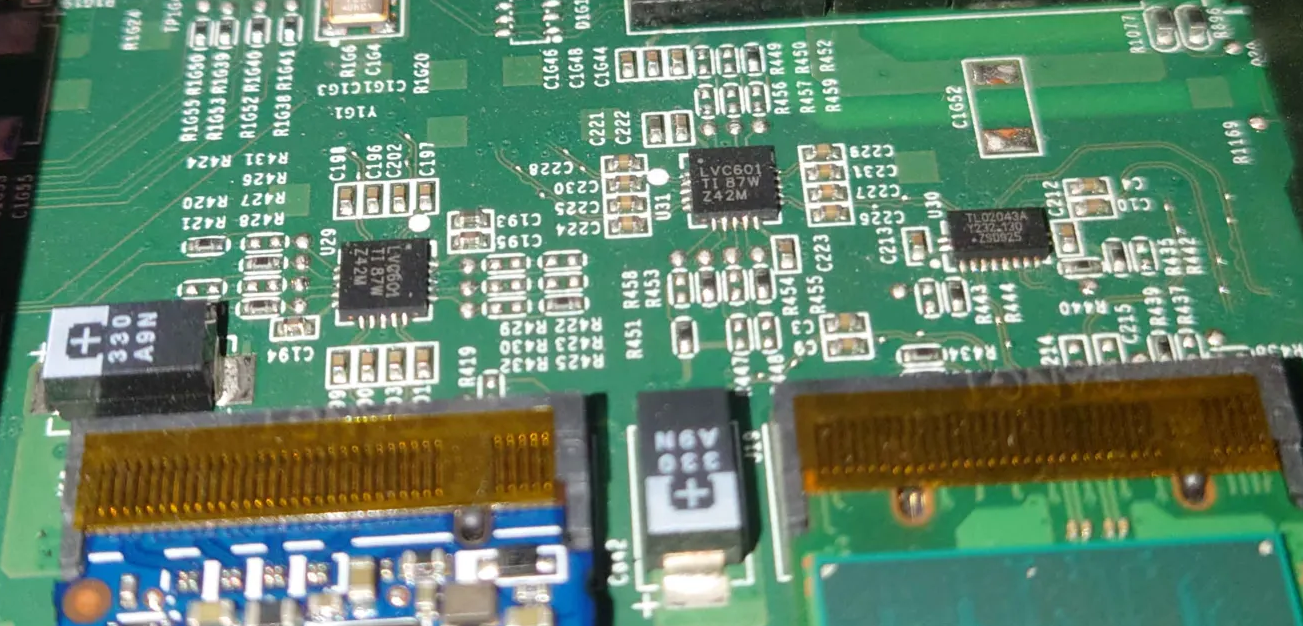
                                      63254b62-4a68-47cc-8832-cdc78a6e3062-image.png

                                      C 1 Reply Last reply
                                      Reply Quote 0
                                      • stephenw10S
                                        stephenw10 Netgate Administrator
                                        last edited by

                                        For pfSense NVMe isn't going to make much difference; drive speed isn't that important. I guess it might give you access to more drive choice.

                                        1 Reply Last reply
                                        Reply Quote 0
                                        • C
                                          Canuckfire @lavenderfox2430
                                          last edited by Canuckfire

                                          @lavenderfox2430 There are some conflicting options on the pcb that make me think the pcb might be technically capable of nvme... But it was just never fully implemented or it was an OEM build option not used by Riverbed. :(

                                          The chip beside (TL02043A) is a mux chip for usb, sata, and pcie, which you would typically see on nvme slots to support both pcie and sata drives.

                                          There are also some more differential traces to the m-type connector than are used for sata; without pulling out the motherboard there appear to be enough for pcie x2.

                                          There is even a section for nvme options in the bios so i was really hoping that it would support other drive types, but so far ive tried a couple different models and pcie generations and havent had any luck with any of them being detected by the motherboard or an OS.
                                          (Intel, optane, samsung, and teamgroup)

                                          I didnt get rack hardware with mine either, so on a shelf it goes for now.

                                          L 1 Reply Last reply
                                          Reply Quote 0
                                          • L
                                            lavenderfox2430 @Canuckfire
                                            last edited by

                                            @Canuckfire If it's any consolation, if you don't intend to hang it from the rack ears and instead mount it to a sliding shelf or another piece of rack hardware, I made a rack ear for it if you've got a 3D printer.

                                            https://www.printables.com/model/1509441-riverbed-cx780-rack-ears

                                            1 Reply Last reply
                                            Reply Quote 1

                                            Hello! It looks like you're interested in this conversation, but you don't have an account yet.

                                            Getting fed up of having to scroll through the same posts each visit? When you register for an account, you'll always come back to exactly where you were before, and choose to be notified of new replies (either via email, or push notification). You'll also be able to save bookmarks and upvote posts to show your appreciation to other community members.

                                            With your input, this post could be even better 💗

                                            Register Login
                                            • First post
                                              Last post
                                            Copyright 2026 Rubicon Communications LLC (Netgate). All rights reserved.
                                            Privacy Policy · Cookie Policy