Netgate Discussion Forum
    • Categories
    • Recent
    • Tags
    • Popular
    • Users
    • Search
    • Register
    • Login
    Introducing Netgate Nexus: Multi-Instance Management at Your Fingertips.

    Netgate 4100 - Current WAN reconfigure to a 2.5Gbps

    Scheduled Pinned Locked Moved General pfSense Questions
    8 Posts 3 Posters 1.5k Views 3 Watching
    Loading More Posts
    • Oldest to Newest
    • Newest to Oldest
    • Most Votes
    Reply
    • Reply as topic
    Log in to reply
    This topic has been deleted. Only users with topic management privileges can see it.
    • B Offline
      BennySoh
      last edited by

      Dear Community,
      My current Netgate 4100 WAN port is on 1Gbps and I will be receiving an ISP ONT that supports 2.5Gbps.
      Will I be able to make use of 1 of the unused 2.5Gbps physical port to be assigned to this WAN ?

      Would such a change be possible and will my current backend network be intact and be able to access the Internet with such a change.

      Many thanks for your insight on this.

      SteveITSS 1 Reply Last reply Reply Quote 0
      • SteveITSS Offline
        SteveITS Rebel Alliance @BennySoh
        last edited by

        @BennySoh You can use any port for any function including WAN.

        You can reassign WAN to the new port in Interface Assignments.

        To upgrade, select your branch in System/Update/Update Settings. When upgrading, allow 10-15 minutes to reboot, or more depending on packages, CPU, and/or disk speed.
        Only install packages for your version of pfSense.
        Upvote 👍 helpful posts!

        1 Reply Last reply Reply Quote 0
        • B Offline
          BennySoh
          last edited by

          @SteveITS , Thanks Steve, my worry is, would this change from a current working WAN to a 2.5Gbps port disrupt all my current backend network setting, rendering it inoperable ?
          Thanks for your patience on this.

          SteveITSS 1 Reply Last reply Reply Quote 0
          • SteveITSS Offline
            SteveITS Rebel Alliance @BennySoh
            last edited by

            @BennySoh If you don't change anything on LAN or other interfaces I don't see there would be any problems. At the point of the interface reassignment I'd expect open connections to drop.

            To upgrade, select your branch in System/Update/Update Settings. When upgrading, allow 10-15 minutes to reboot, or more depending on packages, CPU, and/or disk speed.
            Only install packages for your version of pfSense.
            Upvote 👍 helpful posts!

            1 Reply Last reply Reply Quote 1
            • B Offline
              BennySoh
              last edited by

              @SteveITS, Thank you very much for the pointer, I appreciate the pertinent tip and look forward to better speed on the reassigned WAN to 2.5Gbps. Have a good one.

              M 1 Reply Last reply Reply Quote 0
              • M Offline
                Marty 1 @BennySoh
                last edited by

                @BennySoh Hi, did you go ahead with change?
                If so, was it easy to do?

                I may be doing the same in a few months time.

                B 1 Reply Last reply Reply Quote 0
                • B Offline
                  BennySoh @Marty 1
                  last edited by

                  Screenshot 2025-06-24 at 3.48.24 PM.png
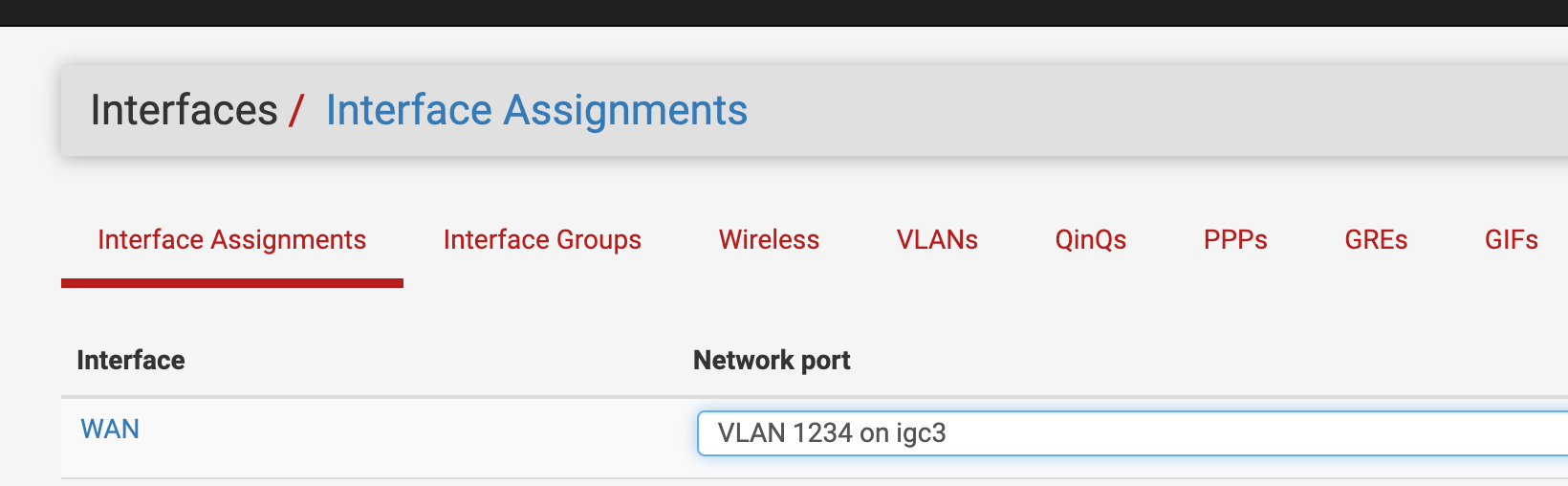
                  Hello, Yes, Ive gone on to reassign WAN to igc3 which is 2.5Gbs. It was a seamless Interface reassignment as mentioned by SteveITS.

                  M 1 Reply Last reply Reply Quote 1
                  • M Offline
                    Marty 1 @BennySoh
                    last edited by

                    @BennySoh Terrific, thanks

                    1 Reply Last reply Reply Quote 0
                    • First post
                      Last post
                    Copyright 2026 Rubicon Communications LLC (Netgate). All rights reserved.
                    Privacy Policy · Cookie Policy