Netgate Discussion Forum
    • Categories
    • Recent
    • Tags
    • Popular
    • Users
    • Search
    • Register
    • Login

    pfsense UI hangs up and internet stops working until device is restarted.
    Scheduled Pinned Locked Moved Routing and Multi WAN
    11 Posts 6 Posters 695 Views 6 Watching
    Loading More Posts
    • Oldest to Newest
    • Newest to Oldest
    • Most Votes
    Reply
    • Reply as topic
    Log in to reply
    This topic has been deleted. Only users with topic management privileges can see it.
    • K Offline
      kan84
      last edited by

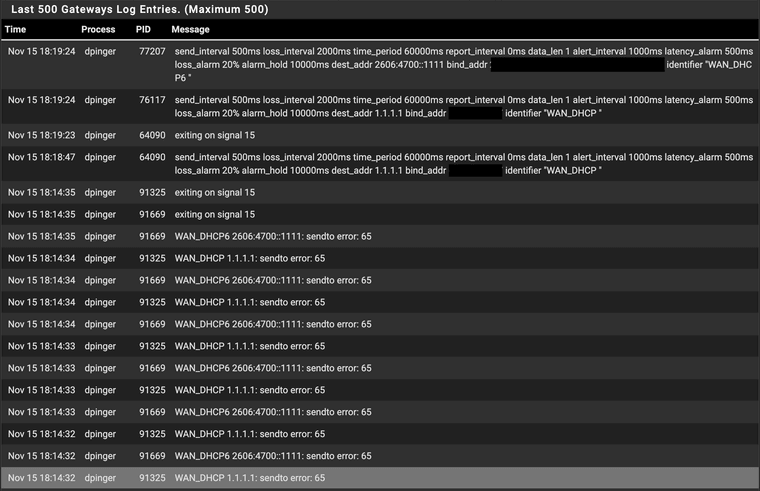
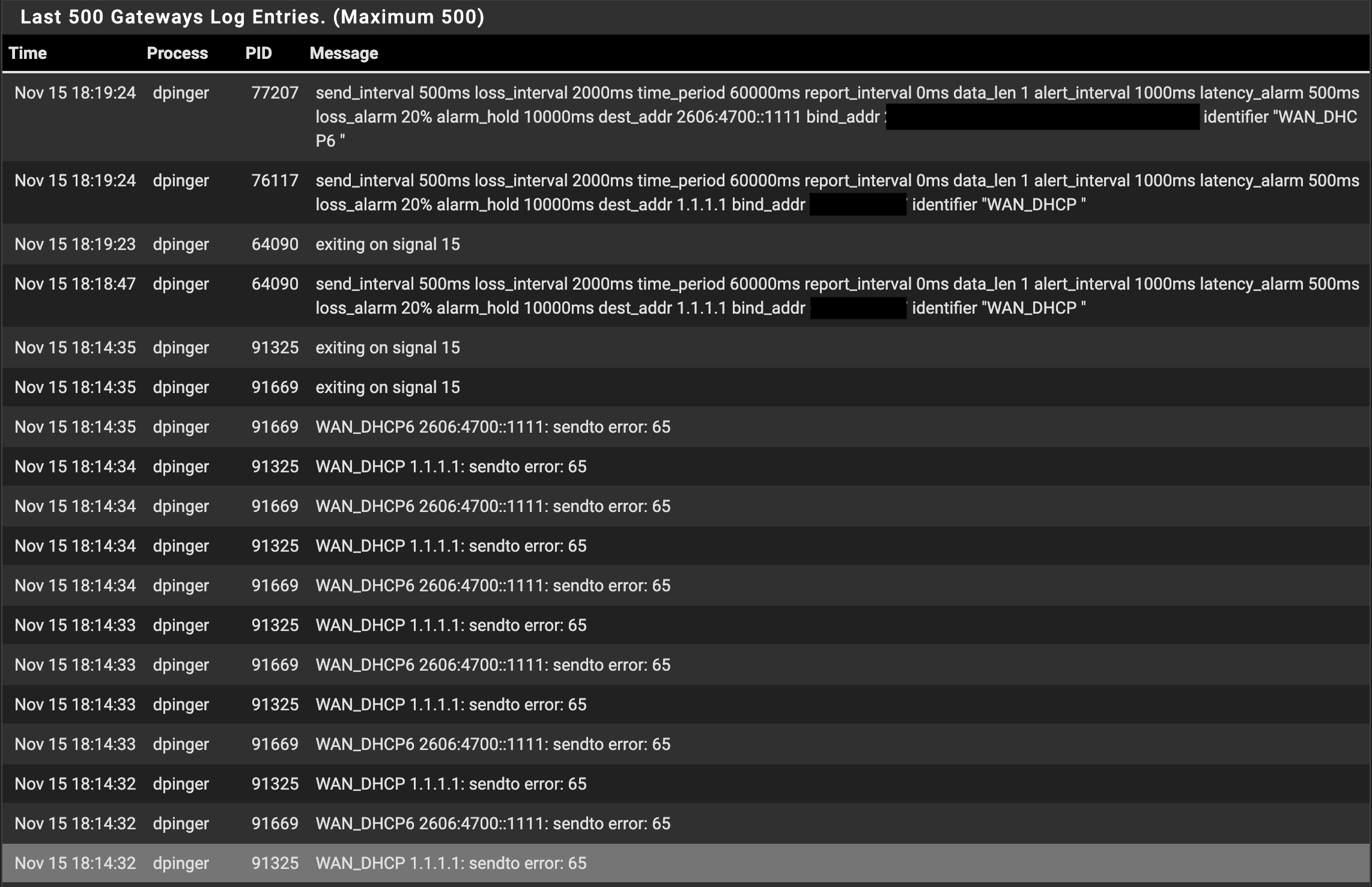
      As the title says, after upgrading to 2.8.0 & 2.8.1 I have seen that internet will stop working even though no issue on modem/provider and I am not able to access UI though i was able to connect using shell. Screenshot attached for the logs.

      Its a mini pc running v2.8.1, previous errors had exiting on signal 15, i see 65 as well this time. I could see that modem did not loose any connection based on the lights of the modem. Any advice will be very helpful, I checked other logs didnt see anything else. I have monitoring enabled but have disabled monitoring action and there is only one WAN and multiple vlanSystem Logs System Gateways.png

      patient0P S 2 Replies Last reply Reply Quote 0
      • patient0P Online
        patient0 @kan84
        last edited by patient0

        @kan84 according to an older thread send error 65 means no route to host. That would indicate an issue with the WAN connection.

        https://forum.netgate.com/topic/98656/gateway-send-to-error-65

        pfSense troubleshooting guide:

        https://docs.netgate.com/pfsense/en/latest/troubleshooting/gateway-errors.html#sendto-error-65

        • Are you accessing the UI from LAN and this doesn't work at that time? Accessing it by IP or name?
        • Access by shell: Are you referring to accessing it by SSH or the console directly on the min pc?

        K 1 Reply Last reply Reply Quote 0
        • K Offline
          kan84 @patient0
          last edited by

          @patient0 Thanks for the quick response. Yes I am accessing from LAN and using ip but it does not work. Correct, remotely logging from lan to ssh which was working.

          This does not happen very often but seems that i read somewhere that sometimes the Spectrum modem will issue an ip from local range which causes the issue and this only happens sporadically. I have added in wan interface to reject lease from local interface, will see how it goes.

          The main issue is that it happens once in 3-4 months so not very easy to troubleshoot and i have not been able to recreate it by plugging modem cable etc.

          1 Reply Last reply Reply Quote 0
          • A Offline
            alexwill
            last edited by alexwill

            @io games That definitely sounds like one of those intermittent WAN/DHCP edge cases that’s hard to reproduce, especially if it only hits every few months.

            K 1 Reply Last reply Reply Quote 0
            • K Offline
              kan84 @alexwill
              last edited by kan84

              @alexwill It did happen again, i see error 13 as well. UI stopped working.
              Screenshot 2025-11-22 at 13-17-06 pfSense.home.arpa - Status System Logs System Gateways.png

              GertjanG 1 Reply Last reply Reply Quote 0
              • GertjanG Offline
                Gertjan @kan84
                last edited by

                @kan84 said in pfsense UI hangs up and internet stops working until device is restarted.:

                UI stopped working.

                It doesn't really stop, it's just really busy resolving domain names, and it waits for the inevitable fail with a DNS time out as it can't do its work : the WAN is down for everybody and everyone.
                This last for a small eternity, like 120 seconds or so.

                There's only one real solution : make your WAN uplink work ...

                No "help me" PM's please. Use the forum, the community will thank you.

                K 1 Reply Last reply Reply Quote 0
                • K Offline
                  kan84 @Gertjan
                  last edited by

                  @Gertjan I generally wait way over 120 secs to try if UI is not working. I did confirm that cable modem connectivity was restored but pfsense didnt come out of the loop. Any recommendation for making wan uplink work?

                  GertjanG 1 Reply Last reply Reply Quote 0
                  • GertjanG Offline
                    Gertjan @kan84
                    last edited by

                    @kan84

                    Use also pfSense best interface : not the GUI, the console access !
                    You can see the state of your interfaces, and by inspecting the log file you can see what's going on.

                    No "help me" PM's please. Use the forum, the community will thank you.

                    1 Reply Last reply Reply Quote 0
                    • S Offline
                      SenseiNYC @kan84
                      last edited by

                      @kan84 I am getting the same thing.
                      Dec 18 14:25:47 dpinger 10438 GW_1_Fiber MY-GATEWAY-IP-ADDRESS: sendto error: 64
                      New Qotom device with v2.8.1. Previous device was also Qotom running v2.6.0. Everything on the old device and 2.6.0 was fine. The new device was briefly set up with 2.6.0 but boss said "put the new one on there" so I did. Fresh install (net install) of 2.8.1 and a full manual config (old device was 1Gbps ports, new one is 2.5Gbps ports) and interface names are mismatched so I only imported the aliases, rules, NAT, users, certs. Double and triple checked consistency and everything worked just fine. 2nd WAN is an LTE link. When the primary (GW_1_Fiber) failed, the LTE kicked over. However we went to check the primary (fiber), plugged a laptop in with the static IP preconfigured and it worked fine. So I rebooted the pfSense and it magically came back online.

                      It's making me wonder if there is a problem with "dpinger 10438 GW_1_Fiber MY-GATEWAY-IP-ADDRESS: sendto error: 64" (sorry I really don't know how else to explain it).

                      By the way it's STILL having that issue right at this moment. Let's keep in mind that MY-GATEWAY-IP-ADDRESS is the fiber modem sitting on the rack next to the firewall connected via 1 Cat6 cable.

                      S GertjanG 2 Replies Last reply Reply Quote 0
                      • S Offline
                        SteveITS Rebel Alliance @SenseiNYC
                        last edited by

                        @SenseiNYC 64 is a different error:
                        https://docs.netgate.com/pfsense/en/latest/troubleshooting/gateway-errors.html#sendto-error-64

                        Just guesses... try changing patch cables, or put a switch between your router and the fiber modem.

                        Only install packages for your version, or risk breaking it. Select your branch in System/Update/Update Settings.
                        When upgrading, allow 10-15 minutes to reboot, or more depending on packages, CPU, and/or disk speed.
                        Upvote 👍 helpful posts!

                        1 Reply Last reply Reply Quote 0
                        • GertjanG Offline
                          Gertjan @SenseiNYC
                          last edited by

                          @SenseiNYC

                          That's probably the core of your issue :

                          @SenseiNYC said in pfsense UI hangs up and internet stops working until device is restarted.:

                          it magically came back online

                          We all presume that a "2.5 Gbit NIC" works like a 10,100 1000 NIC, but faster.
                          When you run the numbers on a "2.5 Gbit NIC" (how it works, what it does, whats needed to make it works) you'll find situation where the electric pulses must be going faster as what we know is "the speed of light".
                          So, special care is needed. Above 1 Gbit, the quality of NIC plugs (both sides), the cables used, and even the position of the moon right now become important factors. Ok, maybe not the moon.

                          Btw : Yes, I saw 10 Gbit electric NICs working in front of me. I could use it in the kitchen and boil eggs on it. For me, it can't work, but it some how does ^^

                          error 64 : the interface used was 'not available', 'not ready' or 'out of sync' or more commonly said : it is 'down'. Check the NIC leds, get the doc of the NIC, check what the colors mean. Are the (very fast) flashing ? If so : sync errors => NIC is going up down very fast => it's having a hard time syncing.

                          Keep in mind : I'm just thinking out loud here, except for the '64 error'.

                          No "help me" PM's please. Use the forum, the community will thank you.

                          1 Reply Last reply Reply Quote 0
                          • First post
                            Last post
                          Copyright 2026 Rubicon Communications LLC (Netgate). All rights reserved.